-
Firmly depress the brake pedal and start the Kia Carnival engine.
-
Press the Auto Hold button located on the center console. The white "AUTO HOLD" indicator will illuminate on
the instrument cluster, confirming the system is in standby mode.
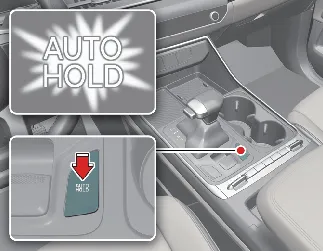
Please note: For the system to engage, all doors, the liftgate, and the engine hood must be fully closed.
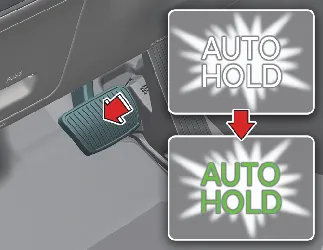
When you bring the Kia Carnival to a complete stop by pressing the brake pedal, the "AUTO HOLD"
indicator will change from white to green, signifying that the system is actively engaged. The vehicle will remain
held in place automatically, even if you lift your foot off the brake pedal.
If the engine is turned off and restarted while the Auto Hold button is pressed, the system will remain in its
standby state.
Note: If the Electronic Parking Brake (EPB) is applied manually, the Auto Hold function will release.
To resume driving, simply press the accelerator pedal while the transmission is in D (Drive), R (Reverse), or Manual
mode. The system will automatically release the hold, and the indicator will change from green back to white. Always
ensure the path around your Kia Carnival is clear before pressing the accelerator for a smooth,
controlled launch.
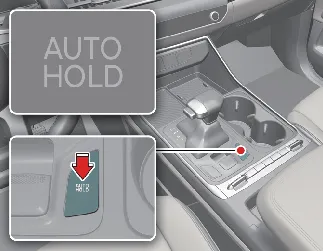
- To deactivate the system entirely, press the Auto Hold switch again; the indicator light will turn off.
- If the vehicle is currently at a standstill and held by the system, you must press the brake pedal while
simultaneously pressing the Auto Hold switch to cancel it.
 NOTICE
- System Standby: Auto Hold will not engage (indicator will not turn green) if the driver's door,
hood, or liftgate is open, if the gear is in P (Park), or if the EPB is already engaged.
- Safety Transition to EPB: For your protection, the Kia Carnival will
automatically switch from Auto Hold to the Electronic Parking Brake (EPB) under certain conditions, such as if the
driver's door, hood, or liftgate is opened, if the vehicle remains stationary for more than 10 minutes, or if the
vehicle is on a steep slope. In these instances, a warning chime will sound and a message will appear on the
dashboard. To resume driving, press the brake pedal and manually release the EPB using the console switch.
- System Fault: If the AUTO HOLD indicator illuminates yellow, it indicates a system malfunction.
Please have the Kia Carnival inspected by an authorized Kia dealer.
 WARNING
To ensure maximum safety, do not activate the Auto Hold function while driving downhill, backing up, or during
precision parking maneuvers. Additionally, ensure the detection sensors for your doors and hood are functioning
correctly, as malfunctions here may cause the system to behave unexpectedly.
 NOTICE
You may hear a subtle "click" or an electric motor whine during system operation. These sounds are a normal part of
the Kia Carnival electronic brake system and confirm that the components are working properly.
The Auto Hold system in your Kia Carnival is equipped with integrated diagnostic features that
provide both audible alerts and visual warnings on the instrument cluster to ensure safe and predictable operation.
When the system automatically transitions from Auto Hold to the Electronic Parking Brake (EPB), you will hear a
warning chime, and the following message will appear:

A: Parking brake automatically engaged
If the Kia Carnival detects an issue during the transition from Auto Hold to EPB, a warning sound
will alert you, and the following message will be displayed:
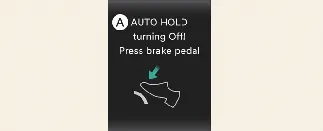
A: AUTO HOLD turning Off! Press brake pedal
 NOTICE
If the message above appears, the Auto Hold and EPB systems may be temporarily unable to engage or maintain the
vehicle's position. Immediately depress the brake pedal to maintain vehicle stability.
If you attempt to deactivate the Auto Hold function by pressing the [AUTO HOLD] switch without first pressing the
brake pedal while the vehicle is at a standstill, the system will alert you to ensure safety:
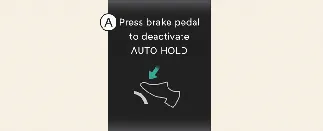
A: Press brake pedal to deactivate AUTO HOLD
For the Auto Hold system to activate in your Kia Carnival, all primary access points must be secure.
If you attempt to activate the system while the driver's door, liftgate, or engine hood is open, a warning chime will
sound and the following message will appear on the LCD display:

A: AUTO HOLD conditions not met. Close door and hood.
Once you have ensured that the driver's door, engine hood, and liftgate are fully closed, you may press the [AUTO
HOLD] button again to engage the system and resume normal operation.
