-
Driver Assistance
-
Driving Safety
-
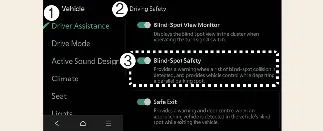
Blind-Spot Safety
With the vehicle powered on, you can configure your preferences by navigating to Setup → Vehicle → Driver
Assistance → Blind-Spot Safety on the Kia Carnival infotainment system.
-
Blind-Spot Safety: Once enabled, the Kia Carnival Blind-Spot Collision-Avoidance Assist (BCA)
system will actively monitor surrounding traffic, providing warnings and applying braking assistance based on
the severity of the collision risk.
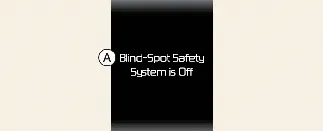
A: Blind-Spot Safety System is Off
Upon activating the BCA system or restarting your Kia Carnival with the function enabled, the warning indicator on
your side mirrors will illuminate for approximately 3 seconds as a self-check. Conversely, if you restart the vehicle
while the BCA system is inactive, a reminder message will appear on the instrument cluster for your awareness.
 WARNING
Regardless of whether the Blind-Spot Safety function is selected or deselected, you must always remain alert,
maintain full awareness of your surroundings, and practice safe driving habits while operating your Kia Carnival.
 CAUTION
When a trailer is electrically connected to your Kia Carnival (if equipped with genuine parts), the Blind-Spot
Collision-Avoidance Assist will automatically disable itself to prevent interference. In this state, the system
cannot provide collision avoidance assistance; please drive with extra caution while towing.
 NOTICE
The Blind-Spot Collision-Avoidance Assist system is designed to remember your last preferred setting and will
maintain it even after the vehicle is turned off and restarted.
-
Driver Assistance
-
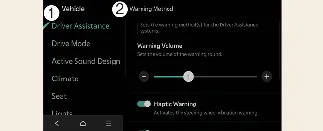
Warning Methods
You can customize the feedback provided by your Kia Carnival safety systems by selecting Setup → Vehicle →
Driver Assistance → Warning Methods while the vehicle is on:
-
Warning Volume: Adjusts the loudness of the audible warning chimes.
-
Haptic Warning: Enables or disables the steering wheel vibration feedback feature.
-
Driving Safety Priority: Automatically lowers the volume of current media or navigation audio
when a safety system issues a warning.
 NOTICE
-
Please note that your chosen Warning Methods may apply to multiple driver assistance systems across your Kia
Carnival.
-
These settings are persistent and will be saved automatically upon each restart.
-
The availability of specific menu items may vary based on your specific Kia Carnival trim level and equipment
package.
-
To ensure safety, the Warning Volume and Haptic Warning cannot be disabled simultaneously; at least one must
remain active at all times.
