Turning Lane Following Assist On/Off
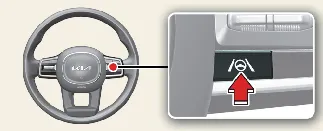
With your Kia Carnival powered on, you can easily activate the Lane Following Assist (LFA) system by briefly pressing
the Lane Driving Assist button located on the steering wheel. Once activated, a gray or green indicator light ( ) will appear on the instrument cluster to confirm
the system is active. To turn off the Lane Following Assist feature, simply press the same button on the steering
wheel again.
) will appear on the instrument cluster to confirm
the system is active. To turn off the Lane Following Assist feature, simply press the same button on the steering
wheel again.
 CAUTION
If your Kia Carnival is equipped with a trailer-towing package and a trailer is electrically connected, certain
Driver Assistance functions may not operate as expected. Please remain fully attentive and drive with increased
caution whenever a trailer is attached.
Warning and control
 NOTICE
Lane Following Assist

The Kia Carnival Lane Following Assist function becomes operational when both lane markings and/or a vehicle ahead
are successfully detected, provided your driving speed is below 110 mph (180 km/h).
 CAUTION
When the Kia Carnival system is unable to provide steering assistance, the white indicator light ( ) will
blink and then transition to gray, indicating that you must take full control of the steering.
) will
blink and then transition to gray, indicating that you must take full control of the steering.
Hands-off warning
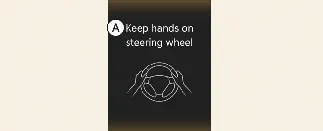
A: Keep hands on steering wheel
If you remove your hands from the steering wheel while the Kia Carnival Lane Following Assist is active, the system
will initiate a multi-stage warning process to ensure safety:
-
First stage: A visual warning message is displayed on the instrument cluster.
-
Second stage: An audible alarm sounds, accompanied by a visual warning featuring a red
steering wheel icon.
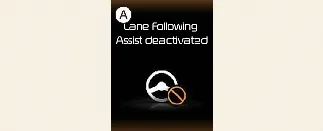
A: Lane Following Assist deactivated
If the driver fails to place their hands back on the steering wheel after the multi-stage warnings, the Kia Carnival
will automatically cancel the Lane Following Assist function for safety.
 WARNING
-
Steering assistance may be suspended if the steering wheel is held with excessive force or if you apply
significant steering input beyond a certain threshold.
-
Lane Following Assist is a driver assistance feature, not a self-driving system. You are always responsible for
keeping the Kia Carnival centered in its lane and navigating safely.
-
Road conditions may delay the appearance of the hands-off warning; always keep your hands on the steering wheel
while driving your Kia Carnival.
-
Attaching aftermarket objects to the steering wheel can interfere with the torque-sensing mechanism, preventing
the hands-off warning from working correctly.
-
Wearing thick gloves or holding the wheel too lightly may prevent the sensors from detecting your grip,
triggering unnecessary hands-off warnings.
 NOTICE
-
When the Kia Carnival successfully detects both lane markings, the lane lines on the instrument cluster will
transition from gray to white.
Lane undetected: 
Lane detected: 
-
Visual elements and colors on your Kia Carnival cluster may vary based on your selected theme or display
settings.
-
If lane markings are unclear or missing, the ability of the Kia Carnival to provide steering assistance may be
restricted by the lead vehicle's behavior or specific road conditions.
-
You may override the Lane Following Assist system at any time by applying manual steering input.
-
You might notice a slight difference in steering weight when the Kia Carnival LFA is actively assisting
compared to when it is inactive.
