-
Driver Assistance
-
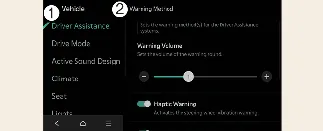
Warning Methods
You can customize the alerts provided by your Kia Carnival while the vehicle is on. To adjust these, navigate through
your infotainment system to Setup → Vehicle → Driver Assistance → Warning Methods. Here, you can
change the following settings:
-
Warning Volume: Allows you to adjust the loudness of the warning chimes. For your safety, if
you choose to mute or turn the volume to its lowest setting, the system may still emit a low-volume alert
during critical situations.
-
Driving Safety Priority: When enabled, this feature automatically lowers the volume of all
other audio sources (such as music or navigation prompts) whenever a Driving Safety system warning is
triggered.
 CAUTION
If you have a trailer connected electrically to your Kia Carnival, the Lane Following Assist system will
automatically deactivate to ensure safe towing dynamics. During this time, the LFA system will not provide steering
assistance; please drive with increased caution.
 NOTICE
-
Please note that the "Warning Methods" configuration may apply globally to other driver assistance systems in
your Kia Carnival.
-
Your chosen settings for Warning Methods are saved automatically and will be maintained even after the vehicle
is turned off and restarted.
-
Depending on your specific Kia Carnival trim level and regional specifications, some menu options may not be
available.
