Turning Lane Keeping Assist On/Off
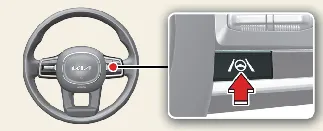
To enable or disable the Lane Keeping Assist (LKA) function in your Kia Carnival, ensure the vehicle is powered on,
then press and hold the Lane Driving Assist button ( ) located on the steering wheel.
Once activated, a gray or green indicator light ( ) will illuminate on the instrument cluster to
confirm the system status.
) will illuminate on the instrument cluster to
confirm the system status.
 NOTICE
-
When the Kia Carnival meets all operational conditions for LKA, the cluster displays a green indicator ( ).
).
-
If operating conditions are not currently met, a gray indicator ( ) is illuminated to show the system is in standby mode.
Warning and control
The Kia Carnival Lane Keeping Assist system enhances driving security by operating through the following dual
functions:
-
Lane Departure Warning
-
Lane Keeping Assist


Lane Departure Warning
Should the vehicle begin to drift, the Kia Carnival will issue a Lane Departure Warning. This includes a green
indicator light on the instrument cluster, a flashing warning indicator corresponding to the side of the departure, a
distinct audible alert, and noticeable vibrations through the steering wheel.
The Lane Departure Warning system in your Kia Carnival is active under the following conditions:
Lane Keeping Assist
When the system is actively guiding your vehicle, the green indicator light ( ) will blink on the instrument
cluster, and the Kia Carnival steering system will make subtle adjustments to ensure your vehicle remains centered
within its travel lane.
) will blink on the instrument
cluster, and the Kia Carnival steering system will make subtle adjustments to ensure your vehicle remains centered
within its travel lane.
The Lane Keeping Assist (LKA) function is designed to activate under the following speed conditions:
Hands-off warning
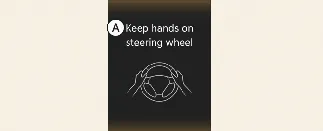
A: Keep hands on steering wheel
For your safety, the Kia Carnival system monitors driver engagement. If the system detects that you have removed your
hands from the steering wheel for several seconds, a warning message will appear on the instrument cluster,
accompanied by audible warnings that escalate in intensity.
 WARNING
-
Steering assistance may be suspended if the wheel is held with excessive force (too tight) or if the driver
performs a sharp steering maneuver that exceeds a specific degree of input.
-
Lane Keeping Assist is a driver-aid, not an autonomous system. It does not operate at all times; the driver
bears full responsibility for steering the Kia Carnival and maintaining lane discipline.
-
The hands-off warning timing may vary based on road conditions. Always remain focused and keep your hands on
the steering wheel while driving.
-
If you hold the steering wheel too lightly, the Kia Carnival sensors may fail to detect your presence,
triggering an unnecessary hands-off warning.
-
Modifying the steering wheel with aftermarket covers or attached objects may interfere with the detection
sensors and prevent the warning system from functioning correctly.
 NOTICE
-
The driver can override the Lane Keeping Assist system at any time by applying manual steering input.
-
You may notice the steering feel changes (becoming slightly heavier or lighter) when the system is actively
providing assistance compared to when it is inactive.
-
When the system successfully recognizes lane markings, the lane lines on your cluster display will change from
gray to white.


-
If your Kia Carnival is equipped with Highway Lane Change Assist, a green lane indicator will appear when the
system is active.
-
Visual themes and colors on the instrument cluster may vary based on the selected settings and theme
configurations of your Kia Carnival.
-
For additional details regarding cluster customization, please consult the "More Details" section of your
manual.
