The Kia Carnival provides a convenient wireless charging pad located in the center console area,
allowing you to charge your mobile devices without the clutter of cables.
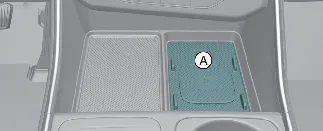
A: Charging pad
To use the system, ensure all vehicle doors are firmly closed and the ENGINE START/STOP button is in the ON position.
Simply place your Qi-compatible smartphone in the center of the charging pad. For optimal charging efficiency in your
Kia Carnival, ensure the device is aligned with the center of the pad, as improper placement may
slow the charging speed.
Note: The system is designed to support one Qi-standard smartphone at a time. Consult your device's manufacturer
documentation to verify Qi compatibility.
 WARNING
Never place metallic objects, such as coins, keys, or credit cards, between the charging pad and your smartphone.
These items can become extremely hot, damage the charging surface of your Kia Carnival, or disrupt
the charging process entirely.
Wireless smartphone charging
The Kia Carnival is equipped with a sophisticated wireless charging system designed to keep your
mobile devices powered throughout your journey. To ensure optimal performance and safety, please follow these
guidelines.
- Always clear the charging pad of any foreign objects, including your smart key, coins, or metallic items, before
placing your device down. The presence of non-compatible items may prevent the Kia Carnival
wireless charging function from initiating.
- Place your Qi-compatible smartphone directly in the center of the charging pad.
- You can customize your user experience by navigating to Setup → Vehicle → Convenience → Mobile Phone Wireless
Charging Indicator on your infotainment screen, where you can select between 'Type 1' or 'Type 2' indicator
displays.
The status of your device's charging progress is reflected by the indicator light:
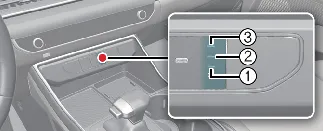
|
Operation Status
|
Type 1 Indicator
|
Type 2 Indicator
|
|
Charging
|
Orange (1, 2, 3)
|
Green (1 → 2 → 3 sequence)
|
|
Complete
|
Green (1, 2, 3)
|
Green (Static)
|
|
Failure
|
Orange blinking (1, 2, 3)
|
Orange blinking
|
To enable or disable the wireless charging system entirely, navigate to Setup → Vehicle → Convenience → Wireless
Charging System for Mobile Devices within your infotainment settings.
If the system fails to initiate, adjust the phone's position on the pad until the indicator glows. Note that some
device manufacturers use unique charging protocols, meaning the indicator may not turn green even after a full charge
is achieved—this is normal behavior for your Kia Carnival.
 WARNING: Distracted driving
Your primary responsibility is the safe operation of your Kia Carnival. Never attempt to adjust
devices or interact with infotainment systems while the vehicle is in motion. Eyes on the road are essential for your
safety and the safety of others.
 NOTICE
- Using power-intensive applications (like Android Auto or Apple CarPlay) while charging may cause your phone to
overheat. If charging pauses, please remove the device to allow it to cool down.
- You may hear the subtle sound of an internal cooling fan; this is a normal component of the Kia
Carnival charging system designed to protect your device battery.
 CAUTION: Liquid damage
Keep beverages and liquids away from the wireless charging pad. Spillage can cause short circuits and permanent
damage to the Kia Carnival electronic systems.
 CAUTION: Metallic objects
Never leave metallic objects like coins or keys on the pad. They will heat up rapidly and may damage both your device
and the Kia Carnival charging unit.
 CAUTION
- The system will automatically pause if the internal temperature exceeds safe limits and resume once it has
cooled.
- Charging efficiency may be significantly reduced by thick smartphone cases or non-standard battery covers.
- Safety features in your Kia Carnival, such as the smart key search or opening vehicle doors,
will automatically interrupt wireless charging to prevent radio wave interference.
- Magnetic components (credit cards, transport tickets, or bankbooks) should never be placed on the pad, as the
magnetic field can corrupt or destroy them.
- For best results, always position your phone in the exact center of the pad.
- The wireless charging system in your Kia Carnival is compatible with Qi-certified devices (
 ).
).
FCC Compliance Statement
This electronic device complies with Part 15 of the FCC Rules. Its operation is subject to the following two
conditions to ensure reliable performance within the Kia Carnival:
- This device must not cause harmful radio frequency interference.
- This device must accept any interference received, including interference that may cause undesired operational
behavior.
