Sliding door
Opening the sliding door
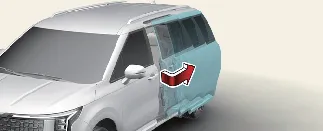
Once the doors are unlocked, you can open the sliding door by pulling the door handle firmly and sliding the door
smoothly towards the rear of the Kia Carnival until it engages in the fully open position.
Closing the sliding door
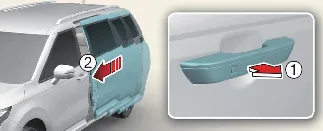
When the door is fully extended, it will lock securely into place. To close, pull out the exterior door handle (1)
and slide the door panel (2) forward towards the front of the Kia Carnival until it latches
completely.
Sliding door spot lamp (if equipped)
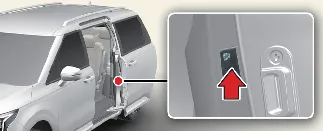
The integrated spot lamp located on the underside of each sliding door illuminates the ground area, ensuring safe
entry and exit from the Kia Carnival during nighttime or in low-light conditions.
 WARNING
Partially opened sliding door: Always ensure the sliding doors are fully opened and locked into
their detent position. Partially opened doors may move unexpectedly due to vehicle incline or vibration, which can
lead to serious injuries.
 CAUTION
Sliding door hinge protection:
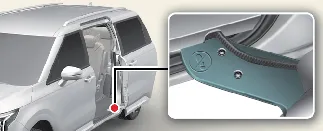
When entering or exiting the Kia Carnival, take care not to step on the sliding door hinge
mechanism. Do not drop or place heavy items on this area; damage to the hinge or internal wiring may result in the
door failing to open or close correctly.
 CAUTION
For safety, the left-side sliding door is designed not to open while the fuel filler door is open. If you open the
fuel door while the sliding door is already slightly ajar, the sliding door may still move backward. Always ensure
the left sliding door is fully closed before accessing the fuel filler to prevent potential collision damage to
either component.
LCD display messages
Door, hood, liftgate, sunroof open

- This visual warning provides an immediate alert if any door, the hood, the power liftgate, or the sunroof is not
completely closed and latched.
Low tire pressure warning display
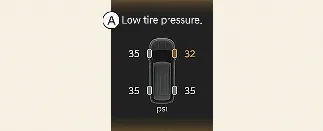
A: Low tire pressure
If the Tire Pressure Monitoring System (TPMS) identifies low pressure, a graphic of your Kia
Carnival will display the specific tire affected, allowing for quick inspection.
Lights mode

A: Lights
This indicator provides real-time confirmation of which exterior lights are currently active based on your lighting
control settings. You can toggle this display function on or off via the "User Settings" menu in the cluster LCD.
Wiper mode
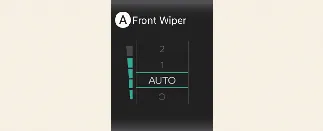
A: Front Wiper
Displays the currently selected wiper speed. Like the lights mode, this can be customized in the Kia
Carnival cluster settings.
Low washer fluid (if equipped)
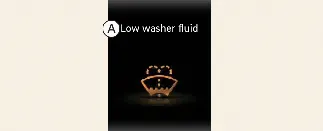
A: Low washer fluid
Displays when the washer fluid reservoir is nearly empty. Please refill the reservoir to ensure clear visibility.
Icy road warning
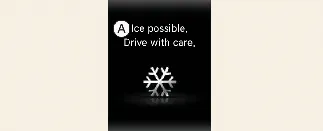
A: Ice possible. Drive with care.
To enhance safety in winter conditions, your Kia Carnival monitors the outside temperature. When the
gauge drops below approximately 40 °F (4 °C), the temperature display will blink 5 times, accompanied by an audible
warning chime, to alert you that roads may be icy.
 NOTICE
When this warning appears, adjust your driving style: increase your following distance, avoid aggressive
acceleration, and brake gently to maintain vehicle control.
Low engine oil
- This warning message is triggered when the Kia Carnival onboard sensors detect that the engine
oil level has dropped below the minimum safe requirement.
- Immediate action is required: check your oil level and replenish it using the manufacturer-recommended grade of
oil.
 WARNING
- When this light activates, verify if your oil is due for a full replacement. If the oil is degraded, perform an
oil change. If the oil is still within its service life, add the necessary amount to reach the "F" (Full) mark on
the dipstick.
Engine oil change due soon. Reset oil life after oil change
- This advisory message appears when your remaining engine oil life in the Kia Carnival reaches 5%
or less.
- Please schedule an appointment with an authorized Kia dealer for an oil change. Once completed, navigate to:
Setup → Vehicle → Convenience → Oil Change Reminder on your infotainment screen to manually
reset the system timer.
Engine oil change due now. Reset oil life after oil change
- This urgent notification appears when your Kia Carnival oil life reaches 1% or less.
- You must have your engine oil changed immediately by an authorized Kia dealer to avoid internal engine wear.
Follow the same reset procedure in the infotainment settings once the service is finished.
Engine Overheated
- This critical alert warns that the engine coolant temperature has exceeded 248°F (120°C). Continuing to drive the
Kia Carnival in this condition will cause severe, irreversible damage to the engine block and
head gasket.
- Safely pull over, turn off the engine, and allow it to cool down before investigating the cause.
Low key battery (for smart key system)
- This message indicates that the CR2032 (or equivalent) battery inside your smart key is depleted. Replace the
battery as soon as possible to ensure reliable Kia Carnival keyless entry and ignition
functionality.
Press START button while turning wheel (for smart key system)
- This message appears if the steering column lock mechanism is under tension, preventing it from releasing.
- Gently rock the steering wheel left and right while simultaneously pressing the ENGINE START/STOP button to
disengage the lock.
Key not in vehicle (for smart key system)
- This message triggers if you attempt to start your Kia Carnival, but the system cannot locate
the smart key within the cabin. Ensure the smart key is inside the vehicle and not left outside or in a shielded
location.
Key not detected (for smart key system)
- The system is unable to establish a secure radio link with the smart key. Try moving the smart key closer to the
start button or ensure no electronic interference is present.
Shift to P or N to start engine (for smart key system)
- Safety logic requires the transmission to be in either Park (P) or Neutral (N) before the engine can be cranked.
Shift the Kia Carnival transmission accordingly and attempt to start the engine again.
Press brake pedal to start engine (for smart key system)
- This message appears if you press the ENGINE START/STOP button repeatedly without depressing the brake pedal,
causing the system to transition into Accessory (ACC) mode instead of starting the engine.
- To safely start your Kia Carnival, firmly depress the brake pedal and press the ENGINE
START/STOP button once more.
Battery discharging due to external electrical devices
The Kia Carnival is equipped with smart sensors capable of detecting abnormal battery discharge.
This often occurs when unauthorized aftermarket devices—such as dashboard cameras or GPS trackers—continue to draw
excessive current while the vehicle is parked.
If this warning persists even after you have disconnected all external electrical accessories, we recommend having
your vehicle's electrical system inspected by an authorized Kia dealer to prevent potential battery failure.
Press START button again (for smart key system)
- This alert signifies a temporary communication error or a logic fault within the ENGINE START/STOP button system.
- Simply press the button once more; this typically resolves the handshake error.
- Should this warning occur consistently every time you attempt to start your Kia Carnival, please
contact an authorized Kia dealer for a diagnostic evaluation of the ignition circuit.
Press START button with key (for smart key system)
- This message appears if you press the ENGINE START/STOP button while the "Key not detected" warning is active.
- To bypass this, press the ENGINE START/STOP button directly with the physical body of the smart key fob. This
action triggers the immobilizer’s near-field communication, allowing you to start the engine even if the fob
battery is critically low.
Driver Assistance settings (infotainment system)
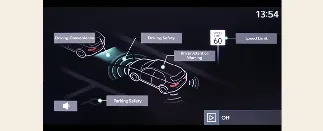
You can customize the safety and convenience features of your Kia Carnival by navigating to Setup
→ Vehicle → Driver Assistance on your infotainment screen. From this menu, you can fine-tune the
following systems:
- Driving Convenience: Adjust settings for cruise control and highway driving aids.
- Speed Limit: Configure how the vehicle alerts you to speed limit changes.
- Driver Attention Warning: Manage sensitivity for fatigue detection.
- Warning Methods: Customize the volume and type of audible or haptic alerts.
- Driving Safety: Configure collision avoidance and lane-keeping parameters.
- Parking Safety: Adjust camera and sensor sensitivity for parking maneuvers.
 NOTICE
- The interface and specific options within your Kia Carnival infotainment system may evolve
following official software updates. For the most current instructions, always refer to the digital manual
embedded within the infotainment system or the provided Quick Reference Guide.
Welcome system (if equipped)
The Kia Carnival Welcome System enhances convenience and safety by illuminating the interior and
exterior of your vehicle as you approach or prepare to exit, providing better visibility in low-light environments.
Door handle lamp (if equipped)
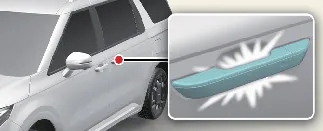
When the Kia Carnival is locked and all doors/liftgate are fully closed, the exterior door handle
lamps will illuminate for approximately 15 seconds upon performing any of the following:
- Unlocking the vehicle via the smart key fob button.
- Pressing the button on the exterior door handle.
- Approaching the vehicle while carrying the authorized smart key.
Headlamp (headlamp) escort function
This "Escort" feature ensures you are not left in the dark after parking your Kia Carnival. When the
ENGINE START/STOP button is turned to OFF, the headlights and taillights remain active for 5 minutes. If you open and
close the driver’s door, this duration is automatically reduced to 15 seconds to save power.
You can manually cancel this function by pressing the lock button on your smart key twice, or by turning the lighting
control switch to the OFF or AUTO position.
Interior light
With the interior light switch set to the DOOR position, the cabin lamps will illuminate for 30 seconds to welcome
you when:
- You unlock the Kia Carnival using the smart key remote.
- You press the exterior door handle button while in possession of the smart key.
If you decide to lock the doors during this 30-second window, the interior lights will extinguish immediately to
secure the cabin.
A/C Automatic Drying
The Kia Carnival is equipped with an intelligent A/C Automatic Drying feature designed to eliminate
residual moisture within the air conditioning system. By drying the evaporator after the vehicle is powered down,
this system effectively minimizes the growth of mold and reduces unpleasant odors, ensuring fresh air every time you
drive.
The system is programmed to initiate the blower motor automatically 30 minutes after the engine has been turned off
to complete the drying process.
Turning A/C Automatic Drying on or off
You can customize or deactivate this feature via the infotainment system interface. Navigate to: Setup → Vehicle →
Climate → Climate Features → A/C Automatic Drying.
When this feature is enabled, the Kia Carnival will automatically set the fan to the third speed
level, activate the 'Fresh Air' intake, and direct airflow toward the floor to maximize evaporation efficiency.
 NOTICE
Software updates may occasionally change the layout or labeling of the infotainment menus. Always refer to your
vehicle's integrated digital owner's manual or the Quick Reference Guide for the most accurate information regarding
your specific Kia Carnival software version.
Operating conditions
For safety and battery longevity, the A/C Automatic Drying feature will only engage when the following conditions are
met:
- The air conditioning system has been in use for a sufficient duration prior to engine shutdown.
- The 12-volt vehicle battery maintains a healthy charge level.
- The external ambient temperature is within an appropriate operational range.
Non-operating conditions
The drying process will be interrupted or will fail to start if:
- The feature has completed its designated 3-minute drying cycle.
- The ENGINE START/STOP button is pressed or the vehicle is shifted to the 'ON' position.
- The climate control system is activated via a remote start function.
 NOTICE
- While this feature significantly reduces AC-related odors, it may not eliminate pre-existing environmental or
cabin-based odors.
- To protect the vehicle's electrical health, the A/C Automatic Drying feature is automatically inhibited if the
battery power is insufficient, preventing potential drainage issues in your Kia Carnival.
FCC
The electronic systems within your Kia Carnival have been rigorously tested and are certified to
comply with the limits for a Class B digital device, as specified in Part 15 of the FCC Rules. These standards are
established to provide reliable protection against harmful interference in residential settings.
This equipment generates and utilizes radio frequency energy. If not installed and operated in strict accordance with
the provided guidelines, it may cause interference with radio communications. While every effort is made to minimize
this, there is no absolute guarantee against interference in every installation. If you detect interference with
radio or television reception—which can be confirmed by toggling the equipment power—we encourage you to resolve the
issue using the following methods:
- Reorient or relocate the receiving antenna.
- Increase the physical separation between the Kia Carnival electronic system and the affected
receiver.
- Connect the equipment to an outlet on a different circuit than the one powering the receiver.
- Consult your local Kia dealer or an experienced radio/TV technician for specialized assistance.
 CAUTION
Unauthorized changes or modifications to any electronic device within your Kia Carnival that are not
explicitly approved by the manufacturer may void your legal authority to operate the equipment.
This device complies with Part 15 of the FCC Rules, subject to two primary conditions: (1) this device must not cause
harmful interference, and (2) this device must accept any interference received, including interference that might
cause undesired operation.
This equipment is compliant with FCC radiation exposure limits for uncontrolled environments. For your safety, the
system should be installed and operated with a minimum distance of 8 inches (20 cm) between the transmitter radiator
and your body. This transmitter must not be co-located or operated in conjunction with other antennas or transmitters
without prior FCC authorization.
