The Kia Carnival features a high-resolution LCD display that can be fully customized using the
control switches on the steering wheel.
LCD Display Control
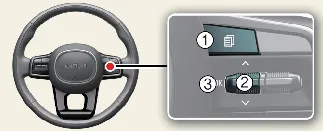
| Switch |
Control |
Action |
Mode (1) ( ) ) |
Short Press |
Switch between primary cluster view modes |
Up/Down (2) ( , ,  ) ) |
Short Press |
Scroll through Utility and vehicle information |
| OK (3) |
Short Press |
Select or operate additional system functions |
| OK (3) |
Long Press |
Reset selected menu information or trip data |
LCD display modes
| View |
Description |
| Driving Assist view |
Central hub for Kia Carnival driver assistance status |
| Navigation view |
Turn-by-turn navigation guidance and map integration |
| Utility information view |
Real-time driving statistics and vehicle warning alerts |
Fuel economy
Fuel efficiency data is permanently displayed at the bottom center of the Kia Carnival full LCD
cluster.
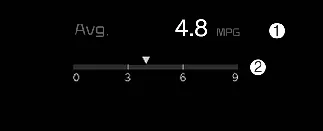
- Average fuel economy
- Instant fuel economy
Average Fuel Economy (1)
- Calculated based on distance and fuel usage since the last manual reset. Range: 0-99.9 MPG or equivalent metric
units.
 NOTICE
For statistical accuracy, average fuel economy may not update if the Kia Carnival has not traveled
more than 50 meters (0.03 mi) or driven for at least 10 seconds since startup.
Instant Fuel Economy (2)
- Displays real-time fuel efficiency when the vehicle speed exceeds 6.2 mph (10 km/h).
Driving Assist mode

This mode provides a graphical interface for:
- Lane Keeping Assist & Lane Following Assist
- Smart Cruise Control & Navigation-based Smart Cruise Control
- Highway Driving Assist (if equipped)
Navigation view

Provides streamlined turn-by-turn directions to keep your eyes on the road.
Utility information view
Low tire pressure warning display
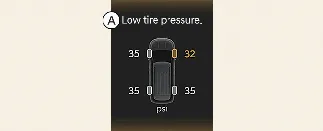
A: Low tire pressure indicator
If the Tire Pressure Monitoring System (TPMS) detects a pressure drop, a visual graphic of the Kia
Carnival will highlight the specific tire that requires attention.
Drive Info display
The Drive Info display in your Kia Carnival provides a comprehensive summary of your current trip,
including distance traveled, average fuel efficiency, and total driving time for the current ignition cycle.
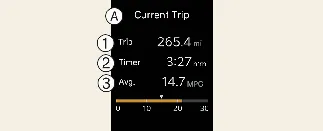
A: Current Trip Statistics
- Trip Distance
- Driving Timer
- Average Fuel Economy
- Fuel efficiency calculations begin once the Kia Carnival has traveled more than 0.2 miles (300
meters).
- Data resets automatically when the driver's door is opened after ignition is turned off, or after a 3-minute
period of inactivity following engine shutdown.
- Note that engine idle time is included in these calculations, meaning metrics continue to accumulate even when
the vehicle is stationary.
 NOTICE
To ensure data accuracy, the Kia Carnival requires a minimum distance of 0.2 miles (300 meters) to
be driven per ignition cycle before recalculating the average accumulated driving metrics.
Information since refueling
This mode tracks your vehicle's performance metrics specifically since the last time you refueled your Kia
Carnival.
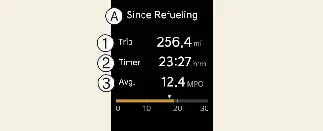
A: Since Refueling Data
- Trip Distance
- Driving Timer
- Average Fuel Economy
- Statistics begin accumulating after driving at least 0.19 miles (300 meters).
- You can manually reset these values at any time by pressing and holding the "OK" button for more than 1 second
while this screen is active.
- Like the Drive Info display, this mode accounts for idling time.
Accumulated driving information mode
This screen provides a long-term overview of your Kia Carnival usage, displaying total accumulated
distance, long-term average efficiency, and overall engine operating time.
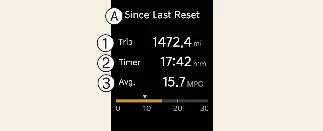
A: Lifetime Statistics
- Total Trip Distance
- Total Driving Timer
- Lifetime Average Economy
- Values are stored until manually reset. To clear the cumulative data, hold the "OK" button for over 1 second.
- This view is ideal for tracking total vehicle usage over longer intervals, such as monthly maintenance cycles.
Other view modes
Master warning mode

The Master Warning system is the primary notification hub for your Kia Carnival, consolidating
critical alerts into one easy-to-read interface. It activates for:
- Driver assistance system malfunctions, sensor limitations, or radar/camera obstructions.
- LED headlamp or exterior lighting assembly faults.
- Tire Pressure Monitoring System (TPMS) errors or low-pressure alerts.
When an issue is detected, the Master Warning icon ( ) will appear. Once the specific fault is corrected or the
warning condition is resolved, the icon will automatically extinguish.
) will appear. Once the specific fault is corrected or the
warning condition is resolved, the icon will automatically extinguish.
Service mode
The Service mode in your Kia Carnival acts as a proactive digital maintenance assistant, keeping you
informed about upcoming scheduled service requirements based on mileage or time intervals.
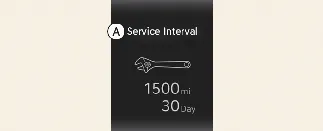
Service Interval
This system automatically calculates and displays the time remaining until your next required maintenance. If you
reach the 900-mile (1,500 km) or 30-day threshold, a "Service interval" message will appear for several seconds each
time you start your Kia Carnival to ensure you stay on schedule.
Service required
If the pre-programmed maintenance interval is exceeded, a "Service required" alert will be displayed upon engine
start. To reset the service interval after your maintenance is completed, simply press and hold the "OK" button for
more than 1 second.
 NOTICE
Please note that the accuracy of these calculations depends on a stable power supply. If the battery cable is
disconnected or the battery becomes fully discharged, the stored mileage and date information may be reset or display
incorrectly.
