The Head-Up Display (HUD) in your Kia Carnival is an advanced driver-assistance feature that
projects key information—such as vehicle speed, navigation guidance, and safety alerts—directly onto the windshield.
This allows you to monitor critical data without taking your eyes off the road.
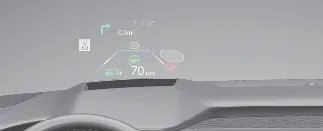
- Optimal Visibility Factors: The HUD image may become difficult to view under certain conditions:
- Incorrect seating posture or eye level.
- Wearing polarized sunglasses, which can interfere with the reflected light.
- Obstructions or objects placed on the HUD housing cover.
- Driving on wet or highly reflective road surfaces.
- Inadequate interior lighting or excessive external sunlight/glare.
- Wearing prescription eyewear that is not suited for the projected focal distance.
- Customization: If the image quality or position is not ideal, you can easily adjust the height, rotation,
and illumination levels through the vehicle's LCD cluster settings menu.
- Maintenance: Should the HUD system malfunction or exhibit distorted projection, please have your
Kia Carnival inspected by an authorized Kia dealer.
 WARNING
- Avoid applying aftermarket window tint or metallic coatings to the windshield, as these can obscure the HUD
projection.
- Do not place accessories or stickers on the instrument panel or windshield, as they may obstruct the HUD
projection unit.
- Note: Blind-Spot Collision Warning information displayed via the HUD is a supplemental tool. Always
perform manual head checks before changing lanes; do not rely solely on the electronic warning system.
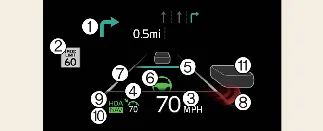
- Turn-by-turn navigation (if equipped)
- Traffic sign recognition
- Speedometer reading
- Smart Cruise Control (SCC) set speed (if equipped)
- Smart Cruise Control (SCC) distance/lead vehicle information
- Lane Following Assist (LFA) status
- Lane Safety (Lane Keeping/Departure) alerts
- Blind-Spot Safety alerts
- Highway Driving Assist (HDA) status
- Highway Auto Speed Change alerts
- Surrounding vehicle detection visualization
 NOTICE
Specific features like traffic sign recognition and turn-by-turn navigation on the Kia Carnival HUD
may vary based on regional map data availability.
Head-Up Display Setting
You can fine-tune the HUD performance in your Kia Carnival via the cluster LCD menu:
- Display Height: Adjust vertical position to match your eye line.
- Rotation: Align the image for horizontal leveling.
- Brightness: Set automatic or manual intensity levels.
- Content Selection: Choose which safety and driving metrics appear in your view.
