The Kia Carnival features advanced power-adjustable driver and passenger seats. You can fine-tune your seating
position using the intuitive control switches located on the exterior side of the seat cushion. We recommend
adjusting your seat, steering wheel, and pedals to a comfortable, ergonomic position before operating the vehicle to
ensure full control over the instrument panel and drive systems.
 WARNING: Unattended children
Never leave children unattended inside the vehicle. Children may inadvertently activate power seat controls or other
electronic features, creating a risk of personal injury or trapping.
 CAUTION: Power seating adjustments
-
The power adjustment system relies on high-torque electric motors. Operating these controls excessively can
lead to premature wear or overheating of the electrical components.
-
Avoid activating two or more power seat control switches simultaneously. This practice can strain the
electrical circuit and potentially damage the internal seat motors or control modules in your Kia Carnival.
Moving forward and backward
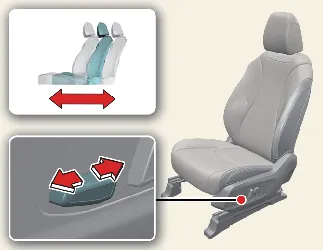
To adjust the seat position forward or backward:
-
Slide the control switch horizontally in the desired direction to move the seat.
-
Release the switch immediately once you achieve your optimal driving position.
Reclining seatback
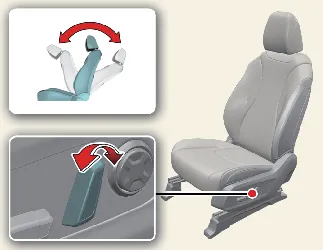
To adjust the seatback angle:
-
Push the upper portion of the control switch forward or backward to recline or straighten the seatback.
-
Release the switch when the seatback reaches the preferred angle for maximum comfort.
Changing seat cushion tilt and height
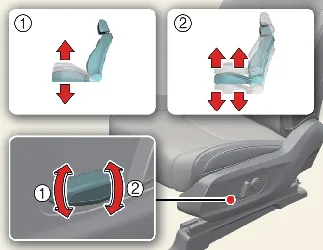
To change the height and angle of your seat cushion:
-
Pull the front portion (1) of the switch upward to raise or press it downward to lower the front edge of the
cushion, allowing for customized leg support.
Pull the rear portion (2) of the switch upward to raise or press it downward to adjust the overall vertical
height of the seat cushion.
-
Release the switch once the seat cushion is positioned to your specific comfort preference.
Adjusting lumbar support (if equipped)
Type A
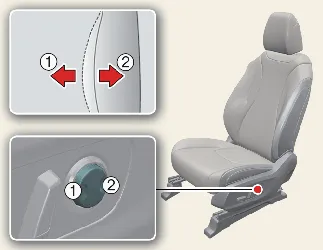
Type B
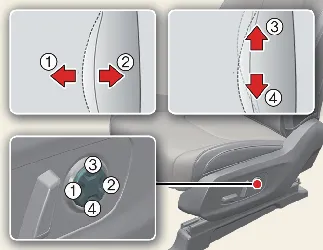
Lumbar support provides essential ergonomic relief for long drives in your Kia Carnival. Use the switch on the side
of the seat to adjust:
-
Press the front portion (1) of the switch to increase firmness or the rear portion (2) to decrease the
intensity of the lumbar support.
-
If equipped, press the upper portion (3) to shift the support upward or the lower portion (4) to lower the
lumbar support point.
-
Release the switch once the support feels perfectly tailored to your lower back curvature.
Passenger walk-in switch (if equipped)
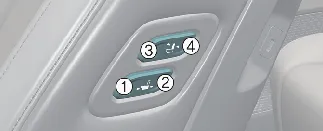
To enhance cabin flexibility, the Kia Carnival is equipped with a convenient "Walk-in" switch system. This feature
allows rear-seat passengers to adjust the position and recline angle of the front passenger seat for easier entry or
additional legroom.
Sliding forward or rearward:
Angle adjustment:
