The Integrated Memory System (IMS) in your Kia Carnival is designed to offer maximum comfort by
storing and recalling specific driver configurations at the touch of a button.
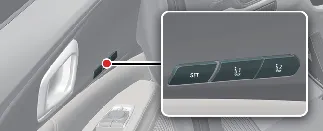
-
Driver's seat position (including lumbar support and seat cushion settings).
-
Outside rearview mirror angles.
-
Head-Up Display (HUD) projection height and brightness.
 WARNING
Never attempt to operate the Integrated Memory System while your Kia Carnival is in motion.
Unexpected movement of the seat or mirrors can lead to a loss of vehicle control, potentially resulting in a serious
accident, injury, or property damage.
 NOTICE
-
Please note that if the vehicle battery is disconnected for any reason, all stored memory settings will be
erased and must be re-programmed.
-
If the Integrated Memory System fails to operate according to your saved preferences, please contact an
authorized Kia dealer for diagnostic inspection.
Storing memory positions
The Integrated Memory System (IMS) in your Kia Carnival allows you to save your preferred ergonomic
settings for effortless recall. Follow these steps to store your configuration:
-
Ensure that the ignition switch or the ENGINE START/STOP button is in the ON position.
-
Adjust the driver's seat, outside rearview mirrors, and the head-up display (HUD) height to your desired
ergonomic positions.
-
Press the SET button. You will hear a single beep, and the Kia Carnival LCD display will
notify you to "Press button to save settings."
-
Within 4 seconds, press one of the memory buttons (1 or 2). The system will provide two audible beeps,
confirming that your memory settings have been successfully stored.
-
The message "Settings 1 (or 2) saved" will appear on the LCD display as confirmation.
Recalling memory positions
To restore your previously saved configuration in your Kia Carnival, simply perform the following:
-
Ensure the vehicle is in the ON position.
-
Press the desired memory button (1 or 2). A single beep will sound, and the driver's seat, mirrors, and HUD
will automatically adjust to the stored positions.
-
The LCD display will show "Settings 1 (or 2) applied."
-
If you are currently recalling position "1," you can temporarily interrupt the adjustment by pressing the SET
or "1" button. To switch to the second preset, simply press the "2" button.
-
Similarly, if recalling position "2," pressing the SET or "2" button will pause movement, while pressing the
"1" button will trigger the recall for preset "1."
-
During the automatic adjustment process, pressing any manual control switch for the seat, mirrors, or HUD will
immediately stop the automated movement, allowing you to fine-tune the component manually.
Integrated memory system reset
If the memory system in your Kia Carnival does not respond correctly or operates intermittently, you
may need to initialize the system to its factory default state:
-
Park the Kia Carnival, ensure the transmission is in P (Park), keep the ENGINE START/STOP
button in the ON position, and open the driver's door.
-
Using the manual adjustment switches, move the driver's seat as far forward as possible and position the
seatback to its most upright (vertical) angle.
-
Simultaneously push and hold the SET button and the seat forward movement switch for 2 seconds.
Initialization process details:
-
An alarm will sound to indicate that the initialization sequence has started.
-
The seat and seatback will automatically move backwards. You will hear a continuous alarm sound while this
movement is in progress.
-
Once the seat and seatback reach the center position, the initialization is complete, and the alarm will cease.
The process will be immediately interrupted if any of the following occur:
-
You press one of the driving position memory system buttons.
-
You activate the driver's seat height adjustment switch.
-
The transmission is shifted from P (Park) to any other gear.
-
The Kia Carnival driving speed exceeds 3 km/h.
-
The driver's door is closed.
Easy access function
To enhance driver comfort, the Kia Carnival is equipped with an Easy Access Function that
automatically adjusts the driver's seat position for easier entry and exit.
Operation with Smart Key system:
-
Exit Mode: When the ENGINE START/STOP button is turned to the OFF position and you open the
driver's door, the seat automatically slides rearward to provide additional legroom.
-
Entry Mode: When you enter the Kia Carnival, the seat will automatically
return to its pre-set driving position as soon as the vehicle is turned ON or the driver's door is closed while
the smart key is detected inside.
You can easily toggle this feature ON or OFF through the Settings menu on your Kia Carnival
infotainment system. For further customization options, please refer to the dedicated infotainment manual provided
with your vehicle.
 NOTICE
Infotainment software updates may alter menu layouts. For the most current instructions, always check the digital
user's manual integrated into the Kia Carnival display or consult the quick reference guide.
