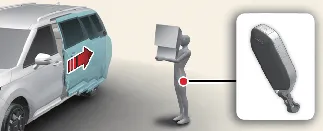
The hands-free Smart Sliding Door system in your Kia Carnival offers seamless entry. The sliding
door will activate automatically via no-touch detection only when all the following conditions are simultaneously
met:
 NOTICE
The Smart Sliding Door with Auto Open feature will be temporarily disabled if any of the following occur:
-
The smart key is detected in the vicinity within 15 seconds after the doors are locked, and it remains
continuously detected.
-
The smart key is detected within 60 inches (1.5 m) of the front door handles within 15 seconds of closing the
doors (applicable to Kia Carnival models equipped with Welcome Light features).
-
Any door, including the liftgate, is left unlocked or partially ajar.
-
The registered smart key is still located inside the cabin of the Kia Carnival.
-
Configuration Settings: To activate or customize the Smart Sliding Door with Auto Open
feature, navigate to Setup → Vehicle → Door → Smart Sliding Door within your Kia
Carnival infotainment system.
-
Detection and Alert Sequence:
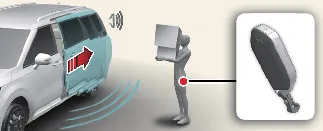
When you stand within the detection zone (approximately 12 ~ 24 inches or 30 ~ 60 cm from the sliding door)
while carrying your smart key, the Kia Carnival will recognize your presence. The hazard
warning lights will flash and an audible chime will sound to notify you that the key has been detected,
followed by the automatic opening of the sliding door.
-
1st Alert (Welcome and Alert): Once you enter the detection area, the hazard lights
flash and the chime sounds once to signal initial recognition.
-
2nd Alert (Detect and Open): The hazard lights continue to flash and the chime sounds
once per second for approximately 3 seconds, after which the door begins its opening motion.
 NOTICE
Always maintain awareness of your surroundings when the Kia Carnival Smart Sliding Door is
activating. If you wish to cancel the automatic opening, simply move away from the detection area before the
3-second countdown concludes.
To avoid accidental activation, please refrain from approaching the vehicle's side detection area unless you intend
to open the sliding door. If you inadvertently enter the detection zone and the Kia Carnival hazard
warning lights and chime sequence begins, simply step away from the area while carrying your smart key. The sliding
door will remain safely closed and locked.
 NOTICE
Please note that infotainment interface designs may evolve following periodic software updates. For the most accurate
and up-to-date guidance, always refer to the digital user's manual pre-installed in your Kia
Carnival infotainment system or consult the printed quick reference guide provided with your vehicle.
Automatic opening sequence:
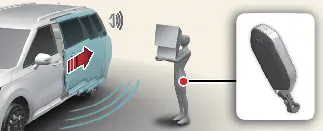
Once the detection phase is complete, the hazard warning lights will blink and the chime will sound twice in quick
succession to confirm the command, immediately followed by the smooth, automatic opening of the sliding door.
 WARNING
To maintain maximum safety and prevent damage to your Kia Carnival, please adhere to these
critical guidelines:
-
Always ensure the sliding door is completely closed and securely latched before operating the vehicle.
-
Before initiating the opening or closing sequence, perform a quick visual check to ensure no people, pets,
or loose objects are obstructing the path of the sliding door.
-
When parked on an incline, be mindful that cargo inside the Kia Carnival may shift and fall
out unexpectedly as the door opens, which could result in serious injury or damage.
-
Always deactivate the Smart Sliding Door with Auto Open feature before entering an automatic car wash to
prevent the door from opening inadvertently due to sensor activation.
-
Keep your smart key stored securely and out of reach of children. If left unattended, children may
accidentally trigger the auto-open feature while playing near the rear section of the Kia
Carnival, leading to potentially dangerous situations.
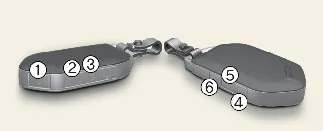
If you need to bypass the auto-open feature while the system is in the "Detect and Alert" stage, you can quickly
deactivate it using your Kia Carnival smart key. Simply press any of the following buttons:
-
Lock button 
-
Unlock button 
-
Liftgate unlock/open button 
-
Remote start button 
-
Left power sliding door button 
-
Right power sliding door button 
Understanding how to manually deactivate this function is a key aspect of operating your Kia
Carnival safely in emergency or crowded situations.
 NOTICE
-
Pressing the unlock button (2) provides a temporary deactivation. If no doors are opened within 30 seconds, the
Kia Carnival system will automatically re-activate the smart sliding door function.
-
Pressing the sliding door buttons (5 or 6) for more than 1 second will command the door to open immediately,
overriding the standby deactivation.
-
Deactivation commands are only recognized while the system is in the "Detect and Alert" stage; pressing lock or
liftgate buttons outside of this phase will not affect the standby status.
-
Once you have manually deactivated the function and opened a door, the system resets to "active" status once
all doors are closed and locked again.
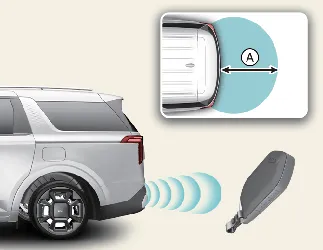
The Kia Carnival utilizes precise sensors to monitor the area around the sliding doors:
-
Detection Zone (A & B): 12 ~ 24 inches (30 ~ 60 cm) from the sliding door surface.
-
When the smart key enters this range, the vehicle initiates the welcome alert sequence.
-
If the key is moved out of this zone during the alert phase, the process stops immediately to prevent
unintended operation.
 NOTICE
-
Signal Interference: The function may be restricted if the Kia Carnival smart key is near
high-power radio transmitters, airport radar, mobile two-way radios, or cellular phones.
-
Multi-Vehicle Environments: Performance may be impacted if another vehicle's smart key is being actively used
in close proximity to yours.
-
Range Variations: Sensor detection ranges can fluctuate if the Kia Carnival is lifted on one
side (e.g., for tire changes) or parked on a steep incline/uneven surface.