 NOTICE
Please note that the installation of aftermarket High-Intensity Discharge (HID) headlamps may introduce
electromagnetic interference, which can cause malfunctions in the Kia Carnival audio system and
other sensitive electronic devices. If your Kia Carnival is equipped with a factory infotainment
system, please refer to the dedicated, separately supplied manual for comprehensive operational instructions.
Shark-fin Antenna
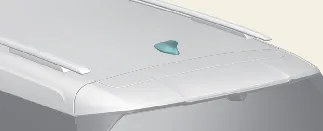
The sleek shark-fin antenna is designed to transmit and receive essential signals for AM/FM radio, GPS navigation,
and other connected vehicle services depending on your specific Kia Carnival configuration.
 NOTICE
- Always verify vertical clearance before entering low-ceiling areas, such as underground parking structures or
automatic car washes, to prevent accidental damage to the antenna.
- When utilizing the roof rack, ensure that no cargo makes physical contact with the antenna, as this can degrade
signal transmission and reception quality.
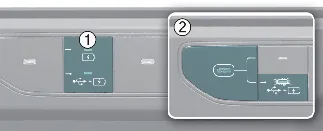
USB port
To access the USB functionality, press button (1). Once the USB port and charger light (2) illuminates, the port is
active and ready for your USB device.
 CAUTION
Be mindful of the dimensions of your USB memory stick. If a device is too large, long, or irregularly shaped, do not
force the tray cover closed; doing so can deform the USB device, damage the port, or cause the cover to become
permanently stuck. If a device does not fit comfortably, please use a more compact USB stick instead of risking
damage to your Kia Carnival interior hardware.
How vehicle radio works
FM reception
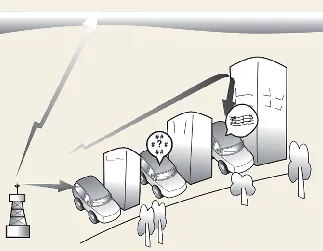
FM radio signals are broadcast from local transmitter towers and intercepted by the specialized antenna on your
Kia Carnival. The system then processes these high-frequency signals to deliver clear audio through
the vehicle speakers. Please be aware that signal clarity may fluctuate based on your distance from the transmitter,
the presence of physical obstructions like skyscrapers or bridges, or interference from other high-powered radio
sources.
AM reception
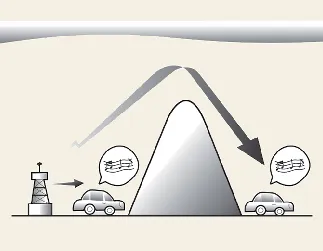
AM broadcasts are capable of reaching significantly greater distances than FM signals. This is attributed to their
lower frequency, which allows the radio waves to follow the Earth's curvature and wrap around physical obstacles.
Consequently, the Kia Carnival audio system provides reliable AM reception even in remote areas
where line-of-sight signals may be obstructed.
FM radio station
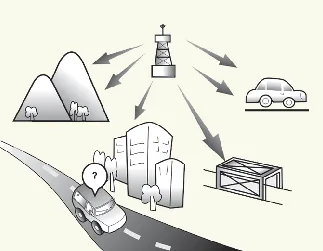
FM radio broadcasts are transmitted at high frequencies and, unlike AM signals, do not follow the curvature of the
Earth's surface. Consequently, FM signal reception typically begins to degrade as your Kia Carnival
moves further away from the broadcasting tower. Additionally, FM signals are highly susceptible to interference from
physical obstructions such as buildings, mountains, and large bridges. These signal fluctuations are expected in
certain environments and do not indicate a fault with your Kia Carnival audio system.
The following reception phenomena are normal and are not signs of equipment malfunction:
-
Fading: As your vehicle increases its distance from the transmitter, the signal strength
diminishes, resulting in a gradual loss of audio clarity. We recommend switching to a different station with a
stronger signal in such instances.
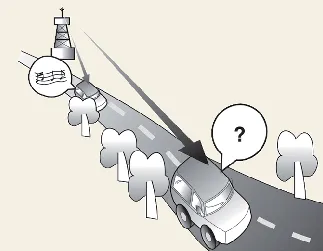
-
Flutter/Static: Weak signals or large obstacles between the tower and your vehicle may cause
audible static or fluttering. Reducing the treble level on your Kia Carnival audio equalizer
can sometimes mitigate this interference until you move back into a stronger signal area.
-
Station Swapping: To maintain the best audio quality, your radio is programmed to lock onto
the strongest signal. As an FM signal fades, your system may automatically capture a more powerful broadcast on
a nearby frequency. If this happens, simply select your preferred station again.
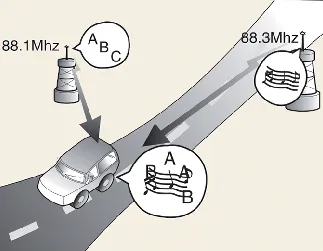
-
Multi-Path Cancellation: This occurs when signals from the same station arrive at your antenna
from multiple directions—one direct and one reflected—causing distortion. Selecting an alternative frequency
until the condition passes is the recommended solution.
Using a cellular phone or a two-way radio
If you notice intermittent noise through the speakers while using a mobile phone, this is a common result of
electromagnetic interference and does not imply a mechanical failure of your Kia Carnival audio
equipment. For the best experience, keep mobile devices and transmitting equipment as far away from the vehicle's
infotainment unit as possible.
When operating two-way communication systems inside your Kia Carnival, it is mandatory to use a
dedicated external antenna. Operating such devices solely with an internal antenna can cause interference with the
vehicle's sensitive electrical systems, potentially compromising safe operation.
 WARNING: Cell phone use
Never operate a cellular phone while the vehicle is in motion. Always stop at a safe location before initiating or
answering calls.
 WARNING: Distracted driving
Distracted driving poses a severe threat to road safety and can lead to a loss of control, resulting in accidents,
serious bodily injury, or death. The driver's primary responsibility is the safe and legal operation of the
Kia Carnival. Using handheld devices or any infotainment systems that divert your eyes, attention,
and focus from the road is never permissible while driving.
