Your Kia Carnival supports Over-The-Air (OTA) software updates, enabling the vehicle to wirelessly
download and install the latest system enhancements and features. This ensures your vehicle's software remains
current without needing to visit a service center.
Downloading software
The system automatically downloads the latest software updates while the vehicle is in motion. Once a download is
successfully completed, you will receive a notification on the vehicle screen or via your linked smartphone,
indicating that an update is ready for installation.
Approving software update
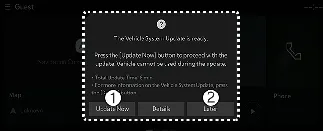
- Update Now
- Later
Once you turn off the ignition, the Kia Carnival system will provide the option to finalize the
update process.
- To initiate the update immediately, press Update Now (1).
- To schedule the update for a more convenient time, press Later (2).
Preparing software update
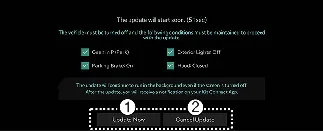
- Update Now
- Cancel Update
To initiate the installation process on your Kia Carnival, select the 'Update Now' button on the
display. The system will automatically verify that the vehicle meets the following mandatory safety conditions before
proceeding:
- The vehicle ignition must be OFF.
- The transmission must be in P (Park).
- The Electronic Parking Brake (EPB) must be firmly engaged.
- All exterior lights must be switched off.
- The hood must be completely closed.
- The 12V battery must have sufficient charge to support the update.
- The specific systems scheduled for update must be inactive.
 NOTICE
Your Kia Carnival performs a diagnostic check of the battery and system status automatically before
authorizing the software update.
Updating software
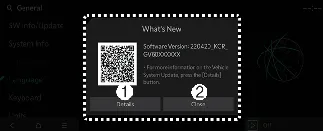
- Details
- Close
You can monitor the installation progress directly on the infotainment screen. Once the process is finished, a
confirmation notification will be sent to your phone and displayed on the Kia Carnival screen.
 NOTICE
- To conserve battery power, the screen may turn off automatically after 3 minutes. If this happens, you can
briefly press the ENGINE START/STOP button to wake the display and view the update status.
- Once the update is confirmed as started, you are free to exit the Kia Carnival.
- The Over-The-Air (OTA) feature is exclusive to active Kia Connect service subscribers.
- If an update error occurs, the system will automatically attempt a recovery. Should you wish to restart the
process following a successful recovery, please contact an authorized Kia call center.
- Following a successful update, your Kia Carnival may feature new functionality or performance
enhancements. Detailed release notes are available on the official Kia website or by scanning the QR code provided
on your infotainment screen.
 NOTICE: Operational Restrictions
- Vehicle Use: The Kia Carnival cannot be driven during the update process.
Please ensure you have sufficient time and that the vehicle is parked safely before starting.
- Remote Features: Remote start and other remote-access features are disabled while the update is
in progress.
- Charging: Do not attempt to charge the vehicle during the update; wait until the process is
complete.
- Safety Systems: The Rear Occupant Alert may be temporarily unavailable; please manually check
the rear cabin before leaving the vehicle.
- Modifications: The OTA feature will not function if the vehicle’s original software has been
unauthorizedly modified or replaced.
- OBD Tools: Ensure no diagnostic devices are connected to the OBD terminal; disconnect any such
tools and restart the vehicle if an update fails to initiate.
- Connectivity: A stable and strong network signal (above -82 dBm) is required to ensure the
software installs safely and correctly.
