The Kia Carnival features a suite of premium interior enhancements designed for maximum occupant
convenience.
Ambient light (if equipped)
Sophisticated ambient lighting is integrated into the crash pad, front doors, and sliding doors, creating a refined
atmosphere within your Kia Carnival.
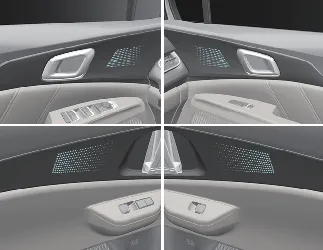
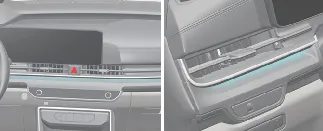
You can synchronize the ambient light intensity and color with your headlamp activation via the infotainment system
settings. For detailed customization instructions, please consult your Kia Carnival infotainment
user manual.
Cup holder
The Kia Carnival is equipped with strategically placed cup holders for all rows, ensuring
convenience for both driver and passengers. These holders are designed to securely accommodate standard beverage cups
and small cans.
Front seats: 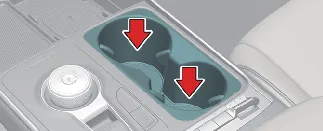
2nd row seats: 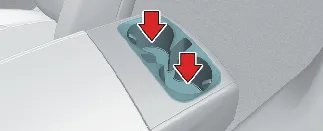
3rd row seats: 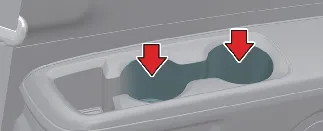
 WARNING: Hot liquids
- Avoid placing uncovered containers filled with hot liquids in the cup holders while the Kia
Carnival is in motion. Spills can cause severe burns, and a sudden reaction by the driver may lead to
a loss of vehicle control.
- To mitigate injury risks during sudden stops or collisions, always use sealed containers for your beverages.
 WARNING
Never leave canned beverages or pressurized bottles in your Kia Carnival when parked in direct
sunlight or heated environments. Internal pressure buildup can cause these containers to burst, potentially damaging
the interior or causing injury.
 NOTICE
- Always keep drinks sealed. Liquid spills can penetrate the center console, potentially damaging the delicate
electrical and electronic systems located beneath the trim.
- When cleaning the cup holder area, avoid using heat guns or high-temperature dryers, as this can permanently warp
or damage the plastic components.
Air ventilation seat (if equipped)
The air ventilation system in your Kia Carnival enhances occupant comfort by circulating air through
the seat cushions, keeping them cool and dry during hot weather or long drives.
Front seat: 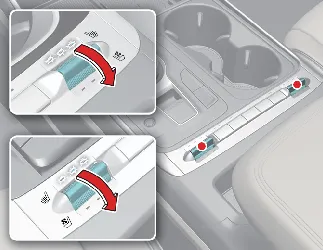
Rear seat: 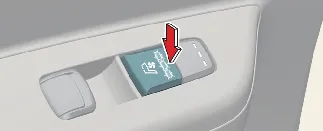
The intensity of the airflow can be adjusted using the seat control levers or buttons. To activate, simply pull the
lever or press the corresponding button. The system cycles through various intensity levels to provide tailored
cooling.
- Front seat adjustment: When the system is "OFF", pull the lever down to immediately set the ventilation to
"HIGH". You can then toggle the lever up or down to cycle through the available speed levels to reach your ideal
comfort setting.
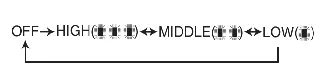
- Rear seat adjustment: Rear passengers can control their comfort independently using the dedicated buttons
provided in the rear cabin area.
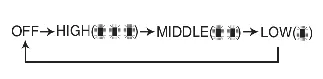
For safety and to conserve energy, the system (including seat heating/ventilation combinations) defaults to the "OFF"
position every time the ENGINE START/STOP button is engaged.
 NOTICE
To ensure consistent comfort, the Kia Carnival seat ventilation system features an intelligent logic
that automatically adjusts airflow intensity (e.g., from High to Low) once the cabin temperature reaches a
comfortable state.
 CAUTION: Seat damage prevention
- Never use organic solvents (benzene, paint thinner, alcohol, or gasoline) to clean your seats, as these will
permanently damage the delicate ventilation mesh and surface materials.
- Avoid placing sharp or heavy items on the seats, as these can puncture the internal air distribution layers.
- In the event of a liquid spill, immediately blot the area with a dry, absorbent towel. Allow the seat to air-dry
completely before attempting to use the ventilation system again.
Sun visor
The sun visor is designed to provide effective glare protection through the front or side windows of your Kia
Carnival.
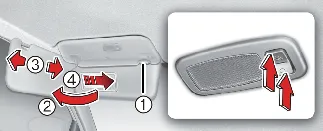
- To block direct sunlight from the front, pull the visor downward.
- For side window glare, pull the visor down, unsnap it from the bracket (1), and pivot it toward the side window
(2). If additional coverage is needed, you may slide the visor extension along the rail (3).
- To use the illuminated vanity mirror, pull the visor down and slide the mirror cover (4) to reveal the glass. Use
the integrated 'ON' button (
 ) to activate the light, and ensure you press the 'OFF' button
(
) to activate the light, and ensure you press the 'OFF' button
( ) before retracting
the visor to preserve battery life.
) before retracting
the visor to preserve battery life.
 WARNING
Always ensure the sun visor is positioned so that it does not obstruct your line of sight while driving. Maintaining
clear, panoramic visibility is critical for the safe operation of your Kia Carnival.
 NOTICE
Do not overload the integrated ticket holder with multiple cards or tickets; overstretching the material can cause
the clip to lose its tension or break over time.
USB charger
The integrated USB charging system in your Kia Carnival is designed to keep your digital devices,
such as smartphones, tablets, and portable media players, powered up during your travels.
Front ports: 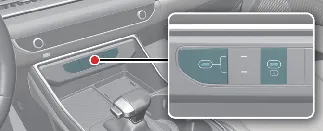
Front seat row: 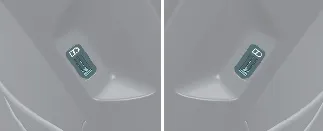
3rd row (if equipped): 
To begin charging, simply plug your device's cable into the appropriate USB port. The system is functional whenever
the vehicle is in ACC or IGNITION ON mode; however, for maximum charging efficiency, we recommend using these ports
while the engine is running.
Please note that smartphones or tablets may become warm to the touch during the charging process—this is a normal
operation and does not affect the device's longevity. If a device exceeds a certain internal temperature threshold,
charging may pause automatically as a safety precaution. While the Kia Carnival USB charger supports
a wide range of devices, please be aware that some products may require specific proprietary adapters if their
charging protocols differ from standard USB specifications. For devices supporting Fast Charging (Quick Charge 2.0 or
Power Delivery 3.0), the charging speed will be automatically optimized based on the connected device's capabilities.
 NOTICE
- Power Delivery (PD) 3.0: This advanced feature is available for compatible devices using USB
C-type cables. The Kia Carnival will negotiate the optimal charging speed (Rated output: 9.0V/Max
3.0A) based on the device's technical specifications.
 CAUTION
- Battery Preservation: We strongly recommend using the USB charger while the engine is running to
prevent excessive drain on your vehicle's 12-volt battery.
- Cable Integrity: For the best results and device protection, always use the original, certified
USB cable provided by the device manufacturer.
- Contamination Prevention: Ensure that no liquids or foreign objects (such as metallic debris)
enter the USB ports, as this can cause short circuits and permanent damage to the Kia Carnival
electronic system.
- Electromagnetic Interference: Avoid connecting devices that produce significant electromagnetic
noise, as this can cause audio interference or disruptions to the vehicle's AV system.
- Warranty Information: Improper connection or forcing cables into the ports can lead to severe
damage to your device. Please be aware that any damage resulting from incorrect usage is not covered under the
vehicle warranty.
Power outlet
Your Kia Carnival is equipped with convenient 12V power outlets located strategically throughout the
cabin. These outlets are designed to provide electrical power for mobile phones, portable navigation systems, and
other accessories compatible with automotive electrical standards.
Front console location: 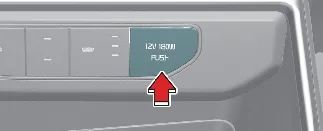
2nd row access: 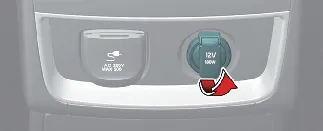
3rd row access: 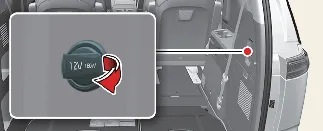
To ensure system stability, all connected devices must draw less than 15 amps of current while the Kia
Carnival engine is running.
 CAUTION
- Battery Management: Always use the power outlet while the vehicle is powered on. Remove
accessory plugs immediately after use; leaving high-draw devices connected while the engine is off will rapidly
deplete the Kia Carnival battery.
- Compatibility: Use only 12V accessories with an electrical capacity of less than 15A.
- System Load: For optimal performance, especially when using high-power accessories, set the
air-conditioner or heater to a moderate level to avoid excessive load on the electrical circuit.
- Maintenance: Always close the protective cover when the outlet is not in use to prevent debris
from entering the port.
- Electronic Interference: Note that certain aftermarket electronic devices may introduce
electromagnetic noise, leading to audio static or interference with other integrated Kia Carnival
electronic systems.
- Physical Connection: Ensure the accessory plug is fully inserted into the outlet. A loose
connection can create high resistance, leading to overheating of the plug or causing the circuit fuse to blow.
- Reverse Current Protection: When connecting electronic devices that feature their own internal
battery, ensure the device is equipped with reverse current protection to prevent power from flowing back into the
vehicle's electrical system, which could lead to severe malfunctions.
 WARNING: Electric shock
For your safety, never insert fingers or foreign objects (such as pens or metallic tools) into the power outlet.
Never touch the interior of the outlet with wet hands, as this poses a significant risk of electric shock.
 CAUTION
Do not connect a Tire Mobility Kit (TMK) or any high-amperage equipment designed for another vehicle to the power
outlets in your Kia Carnival. The mismatched power requirements can lead to circuit failure, damaged
wiring, or even a fire hazard.
AC Inverter (if equipped)
The Kia Carnival is equipped with a high-utility AC inverter system, providing 115V/100W of
electrical power to operate small electronic devices and accessories while on the move.
2nd row outlet: 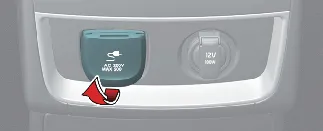
3rd row outlet: 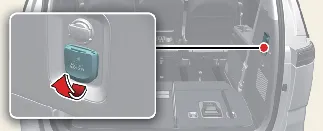
- Rated Voltage: AC 115V
- Maximum Power Capacity: 100W
- To ensure the longevity of your Kia Carnival electrical system and prevent the risk of electric
shock, always review the owner's manual instructions before connecting any high-demand devices.
- Always ensure the protective cover is snapped shut when the outlet is not in active use.
 WARNING: To reduce the risk of serious or fatal injury:
- Do not attempt to power high-heat appliances such as coffee pots, toasters, space heaters, or irons, as these far
exceed the 100W capacity.
- Do not insert metallic objects into the outlet or touch the contact points; doing so may result in a severe
electric shock.
- Keep children away from the AC inverter outlet at all times.
 NOTICE
- Battery Preservation: Only use the AC inverter while the engine is running to prevent draining
the Kia Carnival 12V battery.
- Disconnection: Always unplug accessories immediately after use to prevent slow battery drain.
- Power Limits: Do not use devices with a power consumption exceeding 100W. Using multiple devices
simultaneously is strictly prohibited and can cause permanent damage to your Kia Carnival
electrical circuit.
- Interference: Certain devices may cause electromagnetic noise, resulting in audio static or
system malfunctions. If this occurs, disconnect the device immediately.
- Safety Logic: If the vehicle's input voltage drops, the outlet's LED will blink, and the system
will automatically power down. It will resume once the voltage returns to normal levels.
Coat hook
For your convenience, a dedicated coat hook is positioned next to the rear passenger grab handle, providing an
organized way to hang clothing during transit.
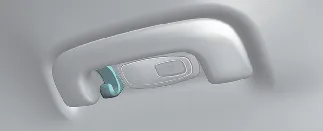
* Note: The actual appearance or placement of this feature may vary slightly depending on your specific Kia
Carnival trim level.
 CAUTION: Hanging clothing
To avoid damaging the hook assembly, do not hang excessively heavy garments or heavy outerwear.
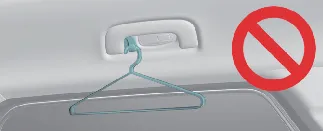
 WARNING
Do not hang hard objects, wire hangers, or items with rigid structures on the hook. Ensure that pockets are free of
heavy, sharp, or breakable items. In the event of a collision or curtain airbag deployment, these objects can become
projectiles, causing significant vehicle damage or serious personal injury.
Side curtain (if equipped)
The integrated side curtains provide additional shade and privacy for rear-seat occupants.
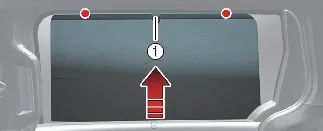
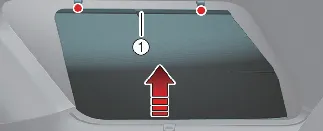
To operate the side curtain:
- Grip the knob (1) and lift the curtain upward.
- Securely hook the top edge onto the designated retainers on both sides of the window frame.
 NOTICE
- Always ensure both sides of the curtain are properly hooked. Hanging only one side can cause uneven tension,
leading to fabric distortion or damage to the retraction mechanism.
- Keep the window track area clear of foreign debris to ensure the side curtain lifts smoothly without obstruction.
Floor mat anchors (if equipped)
To maintain cabin safety and cleanliness, the Kia Carnival is equipped with secure floor mat
anchors. Always ensure your floor mats are properly attached to these anchors to prevent them from sliding forward
and interfering with pedal operation.
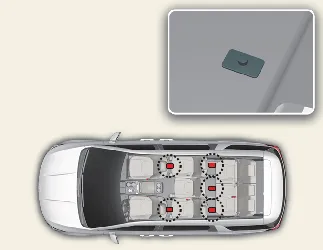
 WARNING
- Aftermarket Mats: Do not install any floor mats that are not specifically designed to lock onto
your Kia Carnival anchor points. Loose mats can move unexpectedly and interfere with braking or
acceleration.
- Proper Installation: Use only appropriately sized, low-profile mats. Before installation, remove
any remaining plastic factory film from the carpeting; leaving this film in place can cause the mat to slip or
damage the anchor rings.
- Driver Safety: An unsecured mat under the driver’s seat is a significant safety hazard. It may
cause unintended acceleration or prevent full braking, potentially leading to a serious accident.
For the safe operation of your Kia Carnival, observe the following rules when installing any floor
mat:
- Always verify that the floor mats are locked into the anchor(s) before driving.
- Never attempt to stack floor mats (e.g., placing rubber mats over carpeted ones). Only install a single, secure
mat in each floor position.
- If a mat cannot be firmly attached to the anchor, do not use it.
Luggage net holder
To ensure your belongings remain secure and organized while traveling, the cargo area of your Kia
Carnival is equipped with four integrated luggage net holders. These allow you to easily attach a luggage
net (sold separately) to prevent items from shifting during transit.
For added versatility, you can also fold the luggage net in half and secure it vertically using the two additional
side-mounted holders. This configuration is ideal for creating a contained barrier for smaller or loosely packed
items.
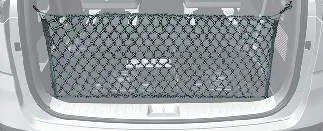
If you wish to purchase an official accessory luggage net or require assistance with its installation, please contact
your authorized Kia Carnival dealer.
 CAUTION
To prevent damage to both your belongings and the vehicle interior, exercise extreme care when transporting fragile,
heavy, or bulky items in the cargo compartment of your Kia Carnival.
 WARNING
To avoid severe facial or bodily injuries, never over-stretch the luggage net. Always keep your face and body clear
of the net's potential recoil path during installation or removal. Regularly inspect the straps and netting for signs
of wear, fraying, or structural damage; do not use the net if any part of it appears compromised.
Passenger view (if equipped)
The Passenger View feature in your Kia Carnival is designed for convenience, allowing the front
passenger to monitor rear-seat occupants without the need to turn their head or body backward, ensuring a safer and
more comfortable driving experience.
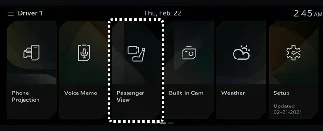
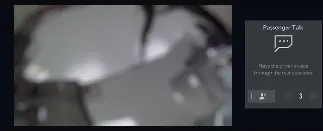
To activate this function, simply select the Passenger View icon on your Kia Carnival
infotainment system screen to display the live feed from the rear cabin camera.
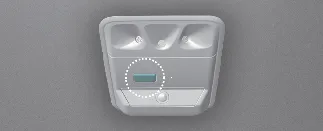
Additionally, you can press the dedicated button located on the overhead console to activate the rear passenger voice
recognition and amplification function, making it easier to communicate clearly with those in the back rows.
