To ensure optimal visibility, it is essential to promptly remove frost and moisture from the windshield of your
Kia Carnival. Clear glass is a fundamental requirement for safe operation in adverse weather
conditions.
 WARNING
Windshield heating caution: Do not use the  or
or  modes while
the air conditioning is operating during extremely humid weather. The temperature disparity between the cooled cabin
air and the exterior glass surface can cause external fogging, which obscures vision. Should this occur, switch the
mode to
modes while
the air conditioning is operating during extremely humid weather. The temperature disparity between the cooled cabin
air and the exterior glass surface can cause external fogging, which obscures vision. Should this occur, switch the
mode to  and reduce the fan speed to minimize the thermal contrast.
- For rapid defrosting, set the temperature to the maximum heat (HI) and the fan speed to the highest setting.
- If floor heating is required while clearing the windshield, use the "Floor-Defrost" mode setting.
- Prior to driving, ensure all snow and ice are cleared from the windshield, rear glass, all side windows, and
exterior mirrors.
- Keep the hood cowl grill and air intake vent free of snow and debris to maximize heater efficiency and prevent
interior humidity buildup.
Defogging inside windshield with manual climate control system
Defrosting outside windshield with manual climate control system
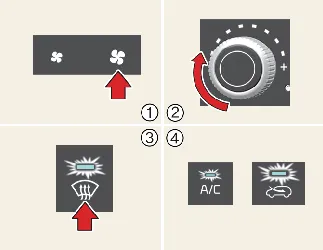
- Set the fan speed to its maximum level.
- Move the temperature control to the extreme "HOT" position.
- Select the
 position to direct maximum heat to the glass.
- The system will automatically enable the A/C and fresh air intake for efficient defrosting of your Kia
Carnival.
Defogging inside windshield with automatic climate control
Defrosting outside windshield with automatic climate control
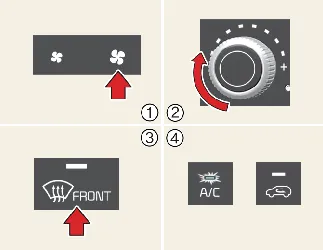
- Set the fan speed to the maximum setting.
- Set the temperature to the extreme "HI" position.
- Press the defroster button (
 ).
).
- The system will automatically toggle to fresh air mode and activate the A/C compressor to clear frost from the
Kia Carnival windshield rapidly.
Auto defogging system (only for automatic climate control system) (if equipped)
The Kia Carnival features an advanced Auto Defogging System designed to enhance safety. By utilizing
internal moisture sensors, the system proactively detects condensation on the inner surface of the windshield and
automatically intervenes to maintain clear visibility.
 When the heater or air conditioning is active, the system continuously monitors cabin humidity. An indicator on your
Kia Carnival climate display confirms when the system is actively working to clear the glass.
When the heater or air conditioning is active, the system continuously monitors cabin humidity. An indicator on your
Kia Carnival climate display confirms when the system is actively working to clear the glass.
When high humidity is detected, the system performs the following actions automatically:
- Activates the A/C compressor to dehumidify the air.
- Switches air intake to 'Fresh' mode to improve air exchange.
- Directs airflow to the windshield (Defrost mode).
- Increases the fan speed to ensure rapid clearance.
To cancel or reset the Auto Defogging System:
With the vehicle in the ON position, press and hold the front windshield defroster button for 3 seconds. The system
will confirm cancellation with 3 blinks of the indicator, or a reset with 6 blinks.
 NOTICE
- If the system engages automatically, you cannot manually disable the A/C until the defogging cycle is complete.
- For maximum efficiency, avoid switching to 'Recirculation' mode while the Auto Defogging System is active.
- During automatic operation, manual adjustments to fan speed and temperature may be temporarily restricted by the
system.
 NOTICE
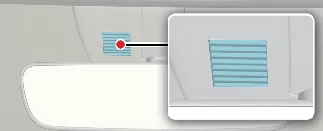
Do not remove or obstruct the sensor cover located on the upper end of the driver-side windshield. Tampering with
this component can lead to system failure, which may not be covered under your Kia Carnival
warranty.
Front glass heater (if equipped)
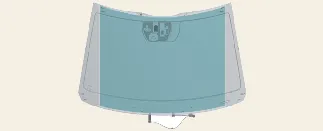
The front glass heater effectively clears frost, fog, and thin ice from the interior and exterior surfaces of the
front windshield in your Kia Carnival.
Type A: 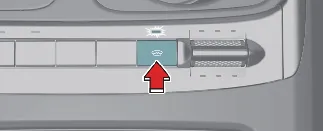
Type B: 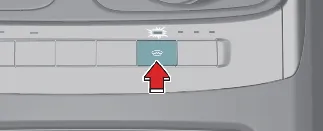
As with the rear system, we recommend brushing off heavy snow accumulations before activating the heater to prevent
excessive load on the system and to ensure rapid clearance.
To activate the front glass heater, press the button; the indicator will glow when the system is ON. The heater will
run for approximately 15 minutes before shutting off automatically. If you restart it manually after this period, it
will operate for an additional 5 minutes to prevent overheating. You can turn it off manually by pressing the button
again during operation.
Scheduled Ventilation (if equipped)
The Kia Carnival offers a sophisticated 'Scheduled Ventilation' feature, designed to lower cabin
temperatures before you enter the vehicle, providing a comfortable environment on hot days.
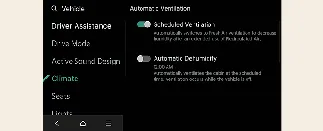
To program this, navigate to Climate → Automatic Ventilation → Scheduled Ventilation Control on your
infotainment screen. You can set specific dates and times, ensuring your Kia Carnival is perfectly
ventilated and ready for your next journey.

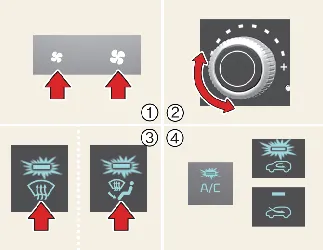
 or
or  position.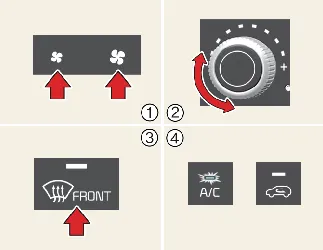
 ).
). position may automatically increase the fan speed to clear the glass more
effectively in your Kia Carnival.
position may automatically increase the fan speed to clear the glass more
effectively in your Kia Carnival.