-
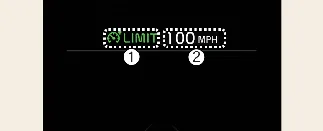
Speed Limit indicator
-
Set speed
The Manual Speed Limit Assist (MSLA) system is a helpful tool for your Kia Carnival, allowing you to set a maximum
speed limit when you wish to avoid driving above a specific velocity. If you exceed this preset limit, the system
activates by flashing the limit indicator and emitting an audible chime until your Kia Carnival speed returns to or
falls below the designated limit.
Manual Speed Limit Assist operation
Setting speed limit
-
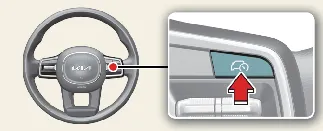
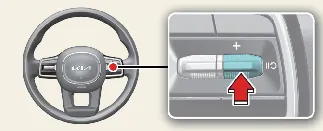
While driving at your desired speed, press and hold the Driving Assist button ( ). The Speed Limit indicator (
 )
will appear on your cluster.
)
will appear on your cluster.
-
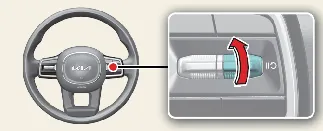
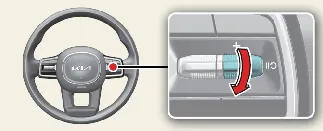
Push the (+) switch up or the (-) switch down to adjust your speed settings. Briefly pushing the switch
increments the speed; holding it will increase or decrease the limit to the nearest multiple of 5 mph (10 km/h)
initially, followed by 5 mph (10 km/h) increments thereafter.
-
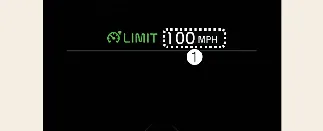
Once set, the speed limit is displayed on your Kia Carnival cluster. If you need to accelerate beyond the
preset limit—such as during an overtaking maneuver—firmly depress the accelerator pedal. The indicator will
blink and a warning chime will sound until the Kia Carnival returns to a speed within the set limit.
 NOTICE
-
As long as the accelerator pedal is not pressed beyond the resistance point, your Kia Carnival will maintain
the set speed.
-
Depending on your specific Kia Carnival trim and regional features, the maximum allowable speed setting may
vary. You cannot increase the limit beyond the factory-defined maximum.
Temporarily pausing Manual Speed Limit Assist
To temporarily pause the Manual Speed Limit Assist, press the designated button ( ).
The active speed limit display will turn off, but the master Speed Limit indicator (
).
The active speed limit display will turn off, but the master Speed Limit indicator ( )
will remain illuminated to show the system is in standby.
)
will remain illuminated to show the system is in standby.
Resuming Manual Speed Limit Assist
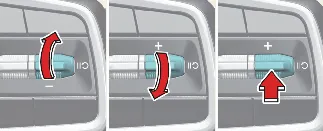
To reactivate the Manual Speed Limit Assist (MSLA) system in your Kia Carnival after it has been temporarily paused,
simply operate the (+), (-), or the resume button ( )
located on the steering wheel.
)
located on the steering wheel.
If you push the (+) switch up or the (-) switch down, the Kia Carnival will adopt your current driving speed as the
new limit, which will be updated and displayed on the instrument cluster.
Alternatively, if you press the resume button ( ), your Kia Carnival will automatically revert to the
previously stored speed limit setting.
), your Kia Carnival will automatically revert to the
previously stored speed limit setting.
Turning off Manual Speed Limit Assist
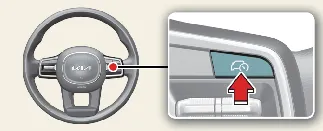
To fully disable the Manual Speed Limit Assist, press the Driving Assist button ( ).
Once deactivated, the Speed Limit indicator (
).
Once deactivated, the Speed Limit indicator ( ) will disappear from your instrument cluster.
 WARNING
To ensure a safe driving experience while using the Manual Speed Limit Assist in your Kia Carnival, please observe
the following precautions:
-
Always calibrate your vehicle's speed limit setting to remain within the legally posted traffic speed limits
for the road you are currently traveling on.
-
Keep the Manual Speed Limit Assist system turned off when it is not actively required to prevent unintentional
speed restrictions. Always verify that the Speed Limit indicator ( ) is extinguished when the system is not in use.
-
Remember that the Manual Speed Limit Assist is a driver-aid, not a substitute for attentive and safe driving.
The driver retains full responsibility for vehicle control, maintaining awareness of sudden changes in traffic
conditions, and strictly monitoring the road ahead at all times.
