Should you prefer total control, the Kia Carnival allows you to bypass the automatic system by using
the manual climate buttons.
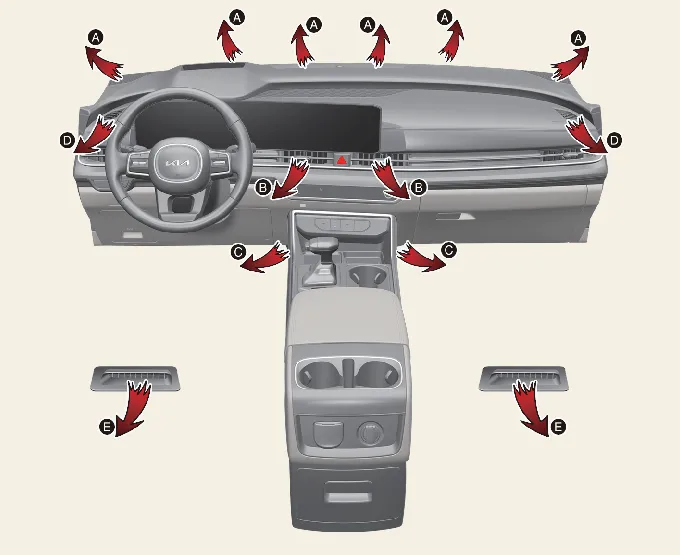
When you select manual functions, the system will execute your commands sequentially based on your input.
- Start the engine.
- Select the desired airflow mode (Heating:
 ,
Cooling:
,
Cooling:  ).
).
- Set the temperature to your preference.
- Select 'Fresh Air' intake for better air quality.
- Adjust the fan speed. If you require rapid cooling, ensure the A/C button is toggled on to activate the
compressor.
Mode selection
The mode selection button allows you to precisely direct airflow within your Kia Carnival. By
cycling through the available settings, you can manage where the air is discharged to ensure maximum comfort for all
passengers.

The airflow distribution patterns follow this sequential cycle:

 Face-Level (B, D): Air is directed toward the upper body and face. Each individual vent can be adjusted for
direction and intensity.
Face-Level (B, D): Air is directed toward the upper body and face. Each individual vent can be adjusted for
direction and intensity. Bi-Level (B, C, D, E): Air is split between the face-level vents and the floor-level outlets.
 Floor-Level (A, C, D, E): Primary airflow is directed to the floor, with minor output to the windshield and
side defrosters to maintain clear visibility.
Floor-Level (A, C, D, E): Primary airflow is directed to the floor, with minor output to the windshield and
side defrosters to maintain clear visibility. Floor/Defrost-Level (A, C, D, E): Balances airflow between the floor and the windshield for optimal
defrosting performance.
Floor/Defrost-Level (A, C, D, E): Balances airflow between the floor and the windshield for optimal
defrosting performance. Defrost-Level (A, D): Concentrates airflow on the windshield and side windows for rapid fog or ice removal.
Instrument panel vents
Adjust the direction of air in your Kia Carnival using the manual control levers located on both the
front and rear vents to suit passenger preferences.
Front: 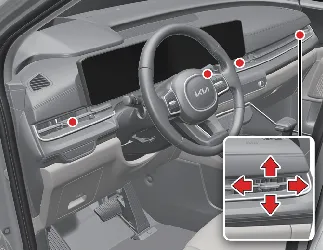
Rear: 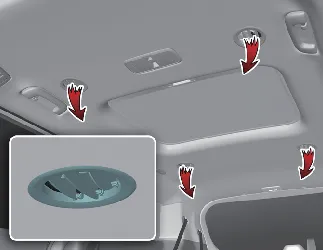
Temperature control
The temperature control interface provides granular adjustment for your Kia Carnival cabin climate.
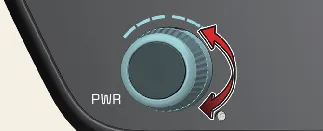
Move the lever upwards to increase the temperature toward the maximum (HI) setting, or downwards to decrease it
toward the minimum (Lo) level. Each movement adjusts the cabin temperature by 1 °F (0.5 °C). When set to the lowest
temperature position, the air conditioning compressor will operate continuously.
 NOTICE
To optimize heating performance during cold starts in your Kia Carnival:
- Reduce blower speed immediately after engine ignition.
- Allow the engine to warm up, ensuring the coolant reaches operating temperature for efficient heater core
performance.
- After a few minutes, increase the fan speed and move the temperature lever to the hot setting.
Adjusting the driver and passenger side temperature equally
To ensure uniform comfort across the front cabin of your Kia Carnival, use the SYNC functionality.

- Press the "SYNC" button; the passenger-side temperature will automatically align with the driver's setting.
- Adjust the driver-side lever; both zones will now move in tandem.
- If you need separate comfort levels, moving the passenger's control lever will automatically disable the SYNC
function, allowing for independent operation.
Adjusting the driver and passenger side temperature individually
To customize the cabin environment for different preferences, press the "SYNC" button again. The indicator light will
extinguish, allowing you to set unique temperature levels for the driver and passenger sides independently within
your Kia Carnival.
Changing temperature scale
You can toggle your temperature display between Celsius and Fahrenheit in your Kia Carnival by
following these steps:
- While holding down the OFF button, press and hold the AUTO button for at least 3 seconds.
The display will switch units accordingly. Please note that if the vehicle battery is disconnected or fully
discharged, the display will automatically revert to the default Celsius setting.
Controlling air intake
The air intake system in your Kia Carnival allows you to toggle between drawing in fresh outside air
or recirculating the interior cabin air. Simply press the designated intake button to switch modes based on external
conditions and traffic.

Recirculated air position

When the recirculated air mode is active, the system stops drawing in outside air and instead cycles the existing air
through the HVAC system. This is highly effective for rapidly cooling or heating the cabin or for preventing outside
pollutants and odors from entering your Kia Carnival.
Outside (fresh) air position

Selecting the 'Fresh' air position allows the climate system to draw in ambient air from outside, which is essential
for maintaining cabin oxygen levels and preventing the air from becoming stale during long journeys.
 NOTICE
Operating your Kia Carnival heater in recirculated air mode for long periods without active A/C can
cause rapid windshield fogging. Additionally, sustained use of recirculated air in combination with the air
conditioner can lead to excessively dry air within the passenger compartment.
 WARNING
- Extended use of recirculation mode increases cabin humidity, which can obscure visibility by causing glass to
fog.
- Never sleep in your vehicle while the climate system is running, as this poses a significant risk of
oxygen depletion and serious health complications.
- Continuous use of recirculated air can contribute to driver drowsiness. For maximum safety and alertness,
prioritize the "Outside (Fresh) Air" position whenever you are driving your Kia Carnival.
Controlling fan speed
You can effortlessly manage the fan speed in your Kia Carnival using the intuitive control buttons
on the climate panel.
To modify the intensity:
- Press the right-hand button to increase airflow or the left-hand button to decrease it.

- To shut down the ventilation blowers immediately, press the OFF button on the control panel.
Air conditioning (A/C)

- Press the A/C button to engage the air conditioning compressor; the indicator light will illuminate to confirm
that the system is active and cooling the air.
- To deactivate the cooling function, press the button again.
Turning off the front air climate control
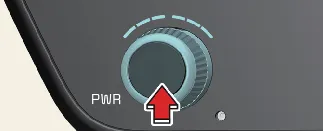
- Press the OFF button to completely shut down the front climate control system of your Kia
Carnival.
- Note that even when the climate system is powered off, you may still operate the air intake and ventilation mode
buttons, provided the ENGINE START/STOP button remains in the ON position.
Rear climate control
The Kia Carnival is equipped with a versatile rear climate system that can be managed by both
front-seat occupants and rear-seat passengers.
 NOTICE
While rear-seat passengers have independent control over airflow direction and fan intensity, the rear temperature is
synchronized with the front cabin settings. For efficient cabin conditioning, we recommend activating both the front
and rear systems simultaneously to achieve your desired temperature faster in your Kia Carnival.
From the front seat
- Press the rear climate selection button to toggle the main control panel interface to rear-cabin settings.
- Adjust the rear airflow mode, temperature, and fan speed to your preference.
From the rear seat
- Press the rear climate selection button to enable the rear-seat control panel interface.
- Ensure the rear climate system has been 'unlocked' via the front climate control panel to allow independent
passenger adjustments.
- Passengers can now configure their own mode, temperature, and fan speed settings directly from the rear console.
Rear mode selection
Rear temperature control
From the front seat:
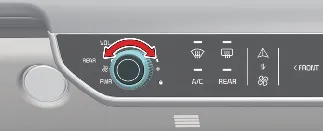
Engage the rear climate selection and rotate the temperature knob on the front panel to adjust the rear cabin
climate.
From the rear seat:
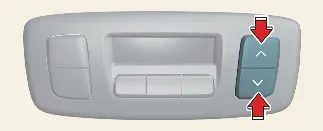
Rear passengers can fine-tune their comfort by pressing the warmer ( ) or cooler (
 ) buttons on
their control console.
) buttons on
their control console.
Rear fan speed control
Passengers in the Kia Carnival can easily manage the rear cabin airflow using dedicated controls
located both at the front console and within the rear passenger area.
From the front seat: 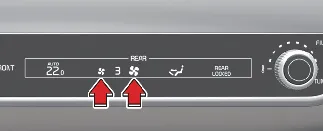
To adjust the rear fan intensity, simply use the designated fan speed buttons on the front climate panel. Press the
left button to decrease the airflow or the right button to increase it to your preferred level.
From the rear seat: 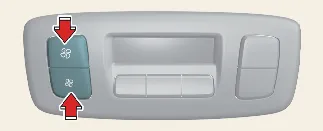
Rear occupants can set their own airflow volume by pressing the fan speed control buttons on the rear-mounted panel.
If you wish to deactivate the rear air conditioning system, press the 'OFF' button located on the same rear climate
control panel.

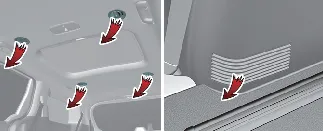

 Air is directed through the upper ceiling vents.
 Air is distributed through both the ceiling and lower side
trim vents.
Air is distributed through both the ceiling and lower side
trim vents.
 Air is directed exclusively through the lower vents on the
right side trim.
Air is directed exclusively through the lower vents on the
right side trim.
 Ceiling vents only.
 Ceiling and lower trim vents combined.
 Lower side trim vents only.