The **Kia Carnival** offers enhanced convenience with the Liftgate Auto Close system. For vehicles equipped with a
smart key, this hands-free feature allows the liftgate to close automatically as you walk away from the vehicle,
streamlining the process of loading and unloading.
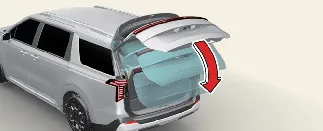
How to use the Liftgate Auto Close
The system triggers a no-touch closing sequence only when all the following conditions are met:
-
The liftgate is currently in the fully open position.
-
You remain within the detection zone (approximately 50~100 cm behind the vehicle) for at least 3 seconds.
-
You then move away from the **Kia Carnival** while carrying the authorized smart key.
-
Setting: To enable this feature, navigate to your **Kia Carnival** infotainment system
settings and select "Smart Liftgate". If you require detailed setup instructions, you can scan the QR code
located in your infotainment quick reference guide for a direct link to the official digital support website.
-
Detect and Alert:
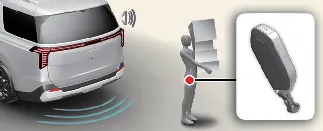
When you are positioned in the detection area (20 ~ 40 inches or 50 ~ 100 cm behind the rear bumper) with the
smart key while the liftgate is open, the **Kia Carnival** hazard lights will flash and a chime will sound to
confirm the key is detected.
-
Automatic closing:
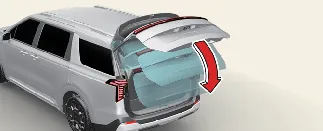
As you walk away from the vehicle with your smart key, the system will emit 3 preparatory chimes. Once you have
moved sufficiently far, the system will sound 2 additional chimes and begin the automatic closing process.
Releasing Liftgate Auto Close
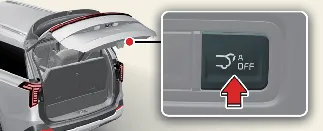
If you prefer to keep the gate open, simply press the Liftgate Auto Close release button while the gate is open. This
will instantly disable the auto-close function for that cycle. The liftgate will remain securely opened until you
manually engage the close button.
