-
Driver Assistance
-
Driving Safety
-
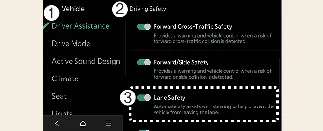
Lane Safety
To configure your preferences, ensure the vehicle is in the "On" state, then navigate to Setup → Vehicle →
Driver Assistance → Driving Safety on the Kia Carnival infotainment system.
-
Lane Safety: When lane departure is detected, the Kia Carnival system assists with steering to
prevent the vehicle from leaving the lane. If a departure occurs, it immediately alerts the driver with an
audible sound and steering wheel vibration. If Lane Safety is deselected, the indicator light ( ) will turn off.
 WARNING
-
The Lane Keeping Assist system does not provide active steering control when the vehicle is already being
driven in the center of the lane.
-
The driver must remain fully aware of the surrounding traffic and maintain control of the steering wheel at all
times, regardless of whether Lane Safety settings are enabled or disabled.
 CAUTION
When a trailer is electrically connected to your Kia Carnival (if equipped with genuine parts), the Lane Keeping
Assist system will automatically deactivate. During this time, the system will not provide steering assistance;
please drive with extra caution while towing.
 NOTICE
By pressing the Lane Driving Assist button ( ), you can quickly turn off the Lane Keeping Assist, which
will also deactivate the active Lane Safety features.
), you can quickly turn off the Lane Keeping Assist, which
will also deactivate the active Lane Safety features.
-
Driver Assistance
-
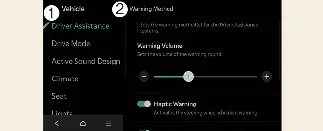
Warning Methods
You can customize how your Kia Carnival alerts you to safety risks while the vehicle is powered on. Navigate to
Setup → Vehicle → Driver Assistance → Warning Methods within your infotainment system to adjust the
following preferences:
-
Warning Volume: Allows you to select the desired intensity for audible safety alerts.
-
Haptic Warning: Toggles the steering wheel vibration feedback feature for tactile alerts.
-
Lane Safety Audible Warning Off: Disables the auditory component of lane safety alerts, even
if both volume and haptic settings are otherwise active.
-
Driving Safety Priority: Automatically lowers the volume of other media or navigation audio
when a driving safety warning is issued by the Kia Carnival.
 NOTICE
-
Configured Warning Methods often apply globally to other driver assistance systems in your Kia Carnival.
-
Your selected warning preferences will be saved and maintained automatically, even after the vehicle is turned
off and restarted.
-
Specific menu options may vary depending on the trim level and technical specifications of your Kia Carnival.
-
For safety reasons, the Warning Volume and Haptic Warning cannot both be turned off simultaneously; if one is
disabled, the other remains active.
-
The Lane Safety Audible Warning Off function can only be activated if both the Warning Volume and Haptic
Warning settings are enabled.
