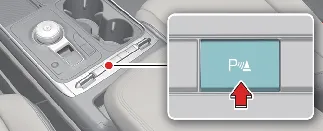
To manually toggle the Reverse Parking Collision-Avoidance Assist system on or off, press and hold the Parking Safety
button ( ) for more than two seconds. This provides the
driver with quick control over the Kia Carnival safety suite depending on current environmental requirements.
) for more than two seconds. This provides the
driver with quick control over the Kia Carnival safety suite depending on current environmental requirements.
When the system detects a potential risk of collision with pedestrians or objects situated behind your Kia Carnival,
it takes immediate action. You will be alerted via an audible warning chime, a haptic steering wheel vibration, and a
visual warning notification on the instrument cluster. Furthermore, if your Kia Carnival is equipped with the
Surround View Monitor, a supplementary alert will be displayed directly on the infotainment screen.
In scenarios where a collision is deemed imminent or urgent, the Reverse Parking Collision-Avoidance Assist (PCA)
system will automatically engage the brakes of the Kia Carnival to help mitigate or prevent the impact.
The Reverse Parking Collision-Avoidance Assist feature in your Kia Carnival is designed to be active and ready to
assist when the following specific operational conditions are met:
-
All vehicle doors and the liftgate are securely closed.
-
The Electronic Parking Brake (EPB) has been fully released.
-
The transmission gear has been shifted into R (Reverse).
-
Your driving speed is below 6 mph (10 km/h) when the system is monitoring for pedestrians.
-
Your driving speed is below 1 mph (4 km/h) when the system is monitoring for stationary objects.
-
The core components of the Kia Carnival PCA system, including the wide-rear-view camera and the rear ultrasonic
sensors, are functioning correctly and free from obstructions.
Please note that any automatic braking assistance will be held for a maximum of 5 minutes. Before the system releases
the brakes, you must immediately depress the brake pedal yourself and carefully inspect your surroundings to ensure
safe operation of your Kia Carnival.
The automatic braking assist function will also be released if:

When the Kia Carnival Parking Collision-Avoidance Assist activates, a distinct line will appear at the bottom of the
vehicle status graphic within the instrument cluster to inform you that the system is engaged.
 NOTICE
-
For safety reasons, the Parking Collision-Avoidance Assist operates only once per gear engagement. To
reactivate the system after it has performed its function, you must shift out of R (Reverse) and then return
the gear to the R (Reverse) position.
-
If the PCA system activates during a reverse maneuver and applies the brakes, the control will be held for 5
minutes, after which the Electronic Parking Brake (EPB) will automatically engage to keep the Kia Carnival
stationary.
