-
Driver Assistance
-
Driving Safety
-
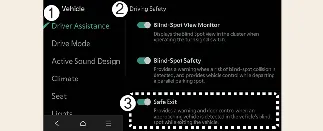
Safe Exit
With the vehicle powered on, you can customize your preferences by navigating to Setup → Vehicle → Driver
Assistance → Driving Safety → Safe Exit on the Kia Carnival infotainment system.
 WARNING
If the Safe Exit function is deselected, the Kia Carnival system will not provide warnings. The driver and passengers
should always remain aware of their surroundings and check for unexpected traffic before opening any doors.
 CAUTION
When a trailer is connected electrically to the Kia Carnival (if equipped with genuine parts), the Safe Exit Warning
will automatically turn off. In this configuration, the system cannot assist you; please exercise extreme care when
exiting.
 NOTICE
Your Kia Carnival is designed to remember your last preferred setting for the Safe Exit Warning, and it will maintain
that selection even after the vehicle is restarted.
-
Driver Assistance
-
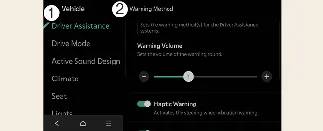
Warning Methods
You can adjust how the Kia Carnival communicates alerts by selecting Setup → Vehicle → Driver Assistance →
Warning Methods on your infotainment screen:
-
Warning Volume: Adjusts the loudness of the alert. If set to "Off," the system may still emit
a low-volume sound for your safety.
-
Driving Safety Priority: Automatically lowers other audio volumes (such as media) when a
safety warning is triggered by your Kia Carnival.
 NOTICE
-
Configured Warning Methods in your Kia Carnival may also apply to other driver assistance systems.
-
These settings are persistent across vehicle restarts.
-
Menu availability may vary based on your Kia Carnival's specific trim level and equipment.
