Forward Safety
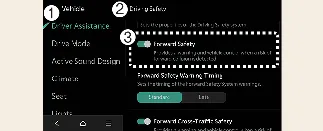
To customize your Kia Carnival safety preferences, ensure the vehicle is powered on. Navigate through your
infotainment system to Setup → Vehicle → Driver Assistance → Driving Safety → Forward Safety. Here,
you can adjust the activation timing for warnings provided by the Forward Collision-Avoidance Assist (FCA) system.
-
Forward safety: When enabled, this feature provides collision warnings and emergency braking
in critical situations. If you choose to deselect this setting, the system will turn off, and the Forward
Safety warning light ( ) will illuminate on the instrument
cluster to remind you that collision-avoidance assistance is inactive.
) will illuminate on the instrument
cluster to remind you that collision-avoidance assistance is inactive.
Forward Cross-Traffic Safety (if equipped)
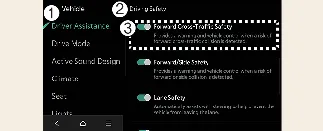
- Driver Assistance
- Driving Safety
- Forward Cross-Traffic Safety
You can manage the Junction Crossing function via your infotainment screen. By navigating to Setup → Vehicle
→ Driver Assistance → Driving Safety → Forward Cross-Traffic Safety, you can toggle this function on or
off according to your driving needs in complex traffic environments.
Forward/Side Safety (if equipped)
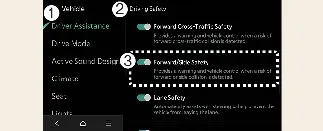
- Driver Assistance
- Driving Safety
- Forward/Side Safety
To access advanced maneuvering protection, go to Setup → Vehicle → Driver Assistance → Driving Safety →
Forward/Side Safety on your Kia Carnival infotainment system.
-
Forward/Side Safety: This feature assists the driver with collision warnings and emergency
steering in imminent danger. If disabled, the system turns off, and the Emergency Steering warning light ( ) will appear.
Drivers can monitor the current operational status of the FCA system directly through the Settings menu. If the
Forward Safety warning light ( ) or the Emergency steering warning light (
 ) persists while the features are selected, please have your Kia
Carnival inspected immediately by an authorized Kia dealer.
) persists while the features are selected, please have your Kia
Carnival inspected immediately by an authorized Kia dealer.
 WARNING
For your protection, the Forward Collision-Avoidance Assist system resets to "On" every time you restart your Kia
Carnival. If you decide to manually deselect these safety features, you must exercise heightened vigilance and drive
with increased caution, as the vehicle will no longer assist in avoiding frontal collisions.
 CAUTION
-
System scope: 'Forward safety' manages the basic, junction turning, and oncoming vehicle
functions. 'Forward Cross-Traffic Safety' handles the junction crossing function, while 'Forward/Side Safety'
covers lane-change assist and Evasive Steering Assist functions.
-
Dependency: If the primary 'Forward safety' is turned off, the 'Junction Crossing function'
will not operate, even if individual sub-settings are enabled.
-
Towing: When a trailer is connected electrically to your Kia Carnival using a genuine Kia
harness, the FCA system will automatically deactivate. In this mode, you will not receive automatic collision
assistance, so always maintain a safe distance and drive with extra care when towing.
Forward Safety Warning Timing
-
Driver Assistance
-
Driving Safety
-
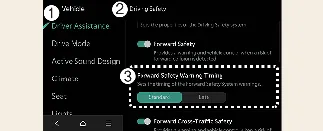
Forward Safety Warning Timing
To customize how early the system alerts you, ensure your Kia Carnival is turned on. Navigate through the
infotainment system by selecting Setup → Vehicle → Driver
Assistance → Driving Safety → Forward Safety Warning Timing.
This menu allows you to adjust the sensitivity and activation timing of the Forward Collision-Avoidance Assist (FCA)
system to suit your personal driving style.
-
Standard: This is the recommended setting for normal driving conditions, providing a balanced
alert time. If you feel that the Kia Carnival issues warnings too frequently or is overly sensitive to traffic,
you may opt to change the setting to Late.
-
Late: When this mode is selected, the Forward Collision-Avoidance Assist system will delay the
initial warning until a closer proximity is detected, allowing for a more relaxed driving experience in
controlled environments.
 CAUTION
-
Please note that even when the Kia Carnival is set to "Standard" warning timing, there may be instances where a
warning appears to be delayed—for example, if the vehicle in front of you comes to an abrupt or emergency stop.
-
It is advised to select "Late" for the Forward Safety Warning Timing specifically when driving in light traffic
conditions or when traveling at slower speeds, where you have more time to react.
 NOTICE
-
Please be aware that the "Forward/Side Safety" function does not provide a customizable warning timing setting.
-
The Kia Carnival is designed to be convenient; the warning timing preferences you have selected will be stored
automatically and maintained even after the vehicle is turned off and restarted.
Warning Methods
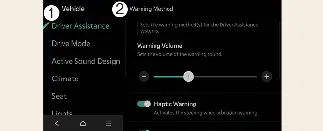
-
Driver Assistance
-
Warning Methods
The Kia Carnival offers advanced customization for how the vehicle communicates potential hazards. To adjust these,
navigate to Setup → Vehicle → Driver Assistance →
Warning Methods within your infotainment system. You can tailor the following feedback settings:
-
Warning Volume: This setting controls the intensity of the audible alert. For your continued
protection, if you choose to set the volume to its lowest level or off, the system may still emit a low-volume
sound during critical situations to ensure you are alerted to potential danger.
-
Haptic Warning: This feature engages the steering wheel’s vibration motor to provide a tactile
physical warning, offering a more immediate physical alert compared to sound alone.
-
Driving Safety Priority: When enabled, this feature automatically lowers the volume of other
media (such as music or podcasts) when the Driving Safety system issues an alert, ensuring you can hear the
warning clearly.
 NOTICE
-
Be mindful that the "Warning Methods" configured for the Kia Carnival often apply globally to other driver
assistance systems in the vehicle, not just the collision avoidance feature.
-
Your chosen Warning Method settings are saved in the vehicle's memory and will remain active the next time you
start your Kia Carnival.
-
Availability of these specific settings may vary depending on the trim level, specific vehicle features, and
regional specifications of your Kia Carnival.
-
To maintain a high level of safety, the "Warning Volume" and "Haptic Warning" cannot both be completely
disabled at the same time; if one is turned off, the system will ensure the other remains active.
