Kia Carnival Reference Library

Kia Carnival: Forward/Reverse Parking Distance Warning (PDW) (if equipped) / Forward/Reverse Parking Distance Warning operation

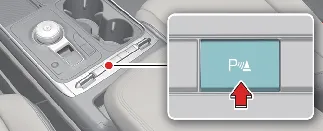
Parking Safety button

Parking Safety physical button location in Kia Carnival cockpit

Press the Parking Safety (Parking Safety button symbol) button to manually toggle the Forward/Reverse Parking Distance Warning system ON or OFF.

  • When the Kia Carnival transmission is shifted into R (Reverse), the Parking Distance Warning system will automatically activate, indicated by the Parking Safety button light turning on.

Forward Parking Distance Warning

The Forward Parking Distance Warning (PDW) system in your Kia Carnival is designed to activate and assist you when any of the following operational conditions are met:

  • The transmission gear is shifted from R (Reverse) to D (Drive) while the Reverse Parking Distance Warning is already active.

  • The transmission is in D (Drive) and the Parking Safety (Parking Safety button icon for Kia Carnival PDW system) button indicator light is illuminated.

  • The Forward Parking Distance Warning automatically alerts the driver while the Kia Carnival is in D (Drive) if the "Parking Distance Warning Auto On" feature has been enabled via the infotainment system (Navigate to: Setup → Vehicle → Driver Assistance → Parking Safety → Parking Distance Warning Auto On).

System notification notice for Kia Carnival forward parking sensors NOTICE

  • The Forward Parking Distance Warning feature in your Kia Carnival will operate effectively when the vehicle speed is maintained below 6 mph (10 km/h).

  • When the gear is in R (Reverse), the front sensors are partially restricted to prevent nuisance alerts; therefore, the system will only issue warnings for objects located within 24 inches (60 cm) directly in front of your Kia Carnival.

  • If the "Parking Distance Warning Auto On" feature is not selected, the Forward Parking Distance Warning will automatically deactivate (and the button indicator will turn off) once your vehicle speed exceeds 18 mph (30 km/h). Please note that even if you subsequently reduce your speed below 6 mph (10 km/h), the function will not re-enable automatically; you must manually toggle it back on if required.

Warning indication and warning sound

Distance from object

Warning indicator

Warning sound

Cluster

Infotainment

24~48 in (60~120 cm)

Visual indicator for objects 60-120cm away from Kia Carnival

Sound level icon for distant objects on Kia Carnival PDW

Buzzer beeps intermittently (Front inner side)

12~24 in (30 ~ 60 cm)

Visual indicator for objects 30-60cm away from Kia Carnival

Sound level icon for close proximity objects on Kia Carnival PDW

Beeps more frequently

within 12 in (30 cm)

Visual indicator for objects within 30cm of Kia Carnival

Continuous alarm icon for immediate proximity on Kia Carnival PDW

Beeps continuously

  • A corresponding visual indicator appears on your Kia Carnival displays whenever the ultrasonic sensors detect an object within the active sensing range, accompanied by an audible alert.

  • If multiple objects are detected simultaneously, the Kia Carnival system intelligently prioritizes the closest object to provide the appropriate audible warning.

  • Objects detected at a distance greater than 24 inches (60 cm) will not be visualized on the instrument cluster to maintain a clean display interface.

  • Please be aware that the indicator shapes shown in illustrations may vary slightly from the actual graphic display in your specific Kia Carnival model.

Reverse Parking Distance Warning

The Reverse Parking Distance Warning system for the Kia Carnival is designed to activate automatically under the following condition:

  • The gear shift lever is placed into the R (Reverse) position.

Warning indication and warning sound

Distance from object

Warning indicator

Warning sound

Cluster

Infotainment

24~48 in (60~120 cm)

Reverse parking visual indicator for Kia Carnival (long distance)

Reverse parking sound indicator for Kia Carnival (intermittent)

Buzzer beeps intermittently

12~24 in (30 ~ 60 cm)

Reverse parking visual indicator for Kia Carnival (medium distance)

Reverse parking sound indicator for Kia Carnival (frequent)

Beeps more frequently

within 12 in (30 cm)

Reverse parking visual indicator for Kia Carnival (close proximity)

Reverse parking sound indicator for Kia Carnival (continuous)

Beeps continuously

  • The Kia Carnival system displays the relevant warning indicator as soon as any ultrasonic sensor detects a person, animal, or object within its operational sensing range, accompanied by an audible signal.

  • If more than two objects are detected simultaneously, the system will prioritize the closest object to warn the driver.

  • Note that the visual representation of indicators in this manual may differ slightly from the actual interface presented in your Kia Carnival.