-
Driver Assistance
-
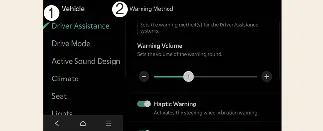
Warning Methods
You can configure the warning settings while your Kia Carnival is powered on. Navigate through the infotainment
system menu by selecting Setup → Vehicle → Driver Assistance → Warning Methods to
adjust your preferences:
 NOTICE
-
Be aware that the Warning Methods configured here may also apply to other driver assistance features integrated
into your Kia Carnival.
-
The system is designed to retain your selected Warning Methods settings even after the vehicle has been turned
off and restarted.
-
Menu availability and specific setting options may vary depending on the particular features and software
specifications of your Kia Carnival trim level.
 CAUTION
When a trailer is electrically connected to your Kia Carnival, the Reverse Parking Distance Warning system will
automatically deactivate. In this configuration, the PDW sensors cannot provide assistance, so always exercise extra
care and vigilance when reversing with a trailer attached (if using a genuine Kia-compatible part).
For added convenience, you can program the system to activate automatically at low vehicle speeds. To enable this,
select Setup → Vehicle → Driver Assistance → Parking Safety → Parking Distance Warning
Auto On within the infotainment settings of your Kia Carnival.
 NOTICE
When the "Parking Distance Warning Auto On" function is actively selected, the indicator light on the Parking Safety
button ( ) will remain illuminated to show the system is ready.
