WARNING
For your safety and to prevent distractions, please only adjust these configuration settings while your Kia Carnival
is parked in a secure, stationary location.
 CAUTION
If your Kia Carnival is electrically connected to a trailer, the Highway Driving Assist (HDA) system will
automatically deactivate. In this mode, the Kia Carnival will not provide steering or speed support; please remain
attentive and drive with increased caution. (Applicable if a genuine Kia towing component is equipped).
 NOTICE
-
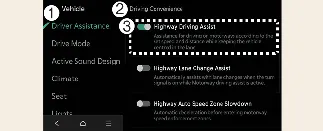
The core "Highway Driving Assist" function must be enabled in the settings menu for "Highway Lane Change
Assist" to be available for use.
-
Should the system detect a functional error, configuration changes will be locked. Please have your Kia
Carnival inspected by an authorized Kia dealer if this occurs.
-
Your Kia Carnival is designed to retain your preferred driver assistance settings, so these functions will
maintain their last state even after the vehicle is turned off and restarted.
-
Driver Assistance
-
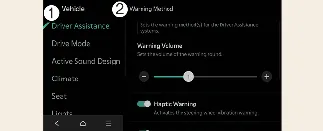
Warning Methods
You can fully customize your Kia Carnival alert preferences while the vehicle is powered on. Navigate through your
infotainment system to Setup → Vehicle → Driver Assistance → Warning Methods to adjust the following:
-
Warning Volume: This controls the intensity of alert sounds. For your continued safety, if you disable
the volume, the Kia Carnival may still emit a low-volume chime during critical safety events.
-
Driving Safety Priority: When active, this feature automatically reduces the volume of your media or
other audio sources whenever a safety warning is triggered by the Kia Carnival.
 NOTICE
-
Please be aware that adjustments made to "Warning Methods" may also apply to other driver assistance systems
throughout your Kia Carnival.
-
The Kia Carnival will automatically save your warning preferences, ensuring they persist across different
driving sessions.
-
Menu availability and specific feature options may vary based on your Kia Carnival trim level and regional
hardware specifications.