Highway Driving Assist
Display and control
You can monitor the operational status of the Highway Driving Assist system via the "Driving Assist" view on your Kia
Carnival instrument cluster. Please refer to your owner's manual for further details.
Operating State

Standby State

The Highway Driving Assist system in your Kia Carnival provides real-time status updates on the cluster display:
-
The system displays the HDA indicator, the presence of a vehicle ahead, and your currently selected distance
setting.
-
HDA Status Indicators:
-
Green HDA icon: System is actively operating.
-
Gray HDA icon: System is in standby mode.
-
White blinking HDA icon: Indicates the accelerator is currently depressed by the driver.
-
No icon: System is powered off.
-
Set speed display.
-
Lane Following Assist (LFA) status indicator.
-
Lead vehicle detection and selected headway distance.
-
Real-time lane detection status.
 NOTICE
-
For comprehensive details on how to interpret cluster displays, please refer to the "More Details" section of
your Kia Carnival documentation.
-
Please note that the specific visual icons, animations, and color palettes on your Kia Carnival cluster may
differ depending on the display theme or software version selected in your settings menu.
Turning on Highway Driving Assist
The Highway Driving Assist (HDA) system in your Kia Carnival is designed to provide automated support on supported
roads. It operates under the following conditions:
-
When you are driving on a road supported by the HDA system, simply press the "Drive Assist" button located on
the steering wheel to activate Highway Driving Assist for your Kia Carnival.
-
If you are merging onto the main road of a highway while Smart Cruise Control is already active, please note
that the Highway Driving Assist function will not automatically engage if the Lane Following Assist (LFA)
feature is currently turned off.
Restarting after stopping
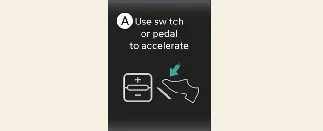
A: Use switch or pedal to accelerate
While Highway Driving Assist is active, your Kia Carnival can automatically bring the vehicle to a complete stop if
the car ahead stops. If the vehicle ahead begins to move again within 30 seconds of your stop, your Kia Carnival will
resume driving automatically. However, if the vehicle remains stopped for longer than 30 seconds, a prompt will
appear on the instrument cluster. To resume travel, you must either depress the accelerator pedal, or briefly operate
the (+) switch, (-) switch, or the ( ) switch on your steering wheel.
Hands-off warning
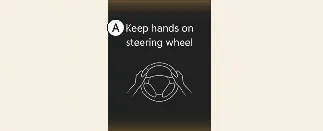
A: Keep hands on steering wheel
To ensure safety, the Kia Carnival monitors your interaction with the steering wheel. If you remove your hands for
several seconds, the system will trigger a multi-stage warning to regain your attention:
-
First stage: A visual warning message appears on the Kia Carnival instrument cluster.
-
Second stage: A visual warning (featuring a red steering wheel icon) is displayed, accompanied by an
audible chime.
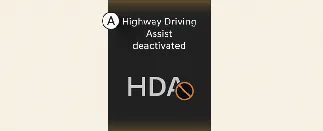
A: Highway Driving Assist deactivated
If the driver fails to place their hands back on the wheel after the aforementioned warnings, the Kia Carnival will
display a final notification, and the Highway Driving Assist system will be automatically canceled for your safety.
Driving speed limit

A: Driver's grasp not detected. Driving speed can be limited
In the event that the Kia Carnival Highway Driving Assist system is canceled due to a persistent hands-off warning,
the vehicle will enter a speed-limiting mode to encourage the driver to take manual control. While this "Driving
Speed Limit" function is active, a persistent warning message will appear on the cluster, and an audible warning will
sound continuously until the driver resumes steering control.
Driving to one side within lane (if equipped)
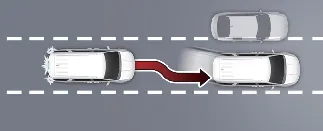
When your Kia Carnival is traveling at speeds above 40 mph (60 km/h), the system monitors surrounding traffic. If a
vehicle in an adjacent lane is driving at a dangerously close distance, your Kia Carnival will gently adjust its
steering in the opposite direction to provide an extra safety buffer. Please note that if there are vehicles driving
closely on both sides of your lane, the system may prioritize stability and might not veer to either side of the
lane.
Highway Driving Assist standby
In the event that the Smart Cruise Control (SCC) is temporarily disengaged while the Highway Driving Assist (HDA) is
actively operating, your Kia Carnival will automatically transition the Highway Driving Assist into a "standby"
state. During this standby period, the Lane Following Assist (LFA) feature will continue to operate as intended to
help maintain your position within the lane.
 NOTICE
-
The "Driving Speed Limit" function may assist in managing vehicle speed when dropping below 40 mph (60 km/h).
If your Kia Carnival decelerates significantly due to the presence of a slower vehicle ahead, the system will
not automatically resume acceleration until you manually intervene.
-
The "Driving Speed Limit" warning will be automatically canceled under the following circumstances:
-
Once you firmly grasp and apply torque to the steering wheel.
-
When you reactivate Lane Following Assist by pressing the Lane Driving Assist button.
-
When you operate the (+), (-), or ( )
switches, or if you press the (
)
switches, or if you press the ( ) button, or manually depress the accelerator or brake pedal.
Highway Lane Change Assist (if equipped)
Display and control
You can effortlessly monitor the operational status of the Highway Lane Change Assist function by checking the
"Driving Assist" view located on your Kia Carnival instrument cluster. For comprehensive details on interpreting
these icons, please refer to the "More Details" section of your owner's manual.
The status of the Highway Lane Change Assist function on your Kia Carnival is indicated by the following visual
displays:
Ready/Operating: 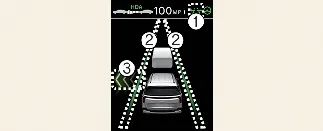
Standby/Canceled: 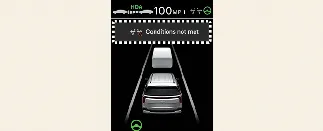
-
Highway Lane Change Assist indicator
-
Green ( ) on: System is in Ready state.
-
Green ( ) blink: System is actively operating.
-
Gray ( ) on: System is in Standby state.
-
White ( ) blink: System is in Canceled state (displayed
temporarily).
) blink: System is in Canceled state (displayed
temporarily).
-
Lane line
The lane line color mimics the Highway Lane Change Assist indicator (1). In Standby state, the cluster will
explicitly show the current lane detection availability.
-
Green arrow and shade
A green arrow appears once the function has successfully initiated the maneuver and remains visible until the
lane change is fully completed by your Kia Carnival.
-
Message
The Highway Lane Change Assist function will activate when the following conditions are met:
Turning on Highway Lane Change Assist
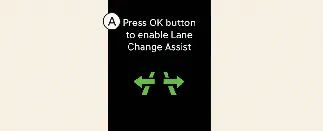
A: Press OK button to enable Lane Change Assist
Once the Highway Lane Change Assist function is enabled in your Kia Carnival, it will enter a "Ready" state to assist
with maneuvers only when all of the following conditions are strictly satisfied:
-
Highway Driving Assist (HDA) is currently active and managing vehicle speed.
-
Lane Following Assist (LFA) is actively providing steering support.
-
The system has successfully detected a vehicle in the adjacent lane at least once since the Kia Carnival was
started.
-
Your current driving speed is above 20 mph (30 km/h).
-
When traveling at lower highway speeds (20–40 mph / 30–60 km/h), the system will only operate if it can clearly
recognize vehicles in the left and right adjacent lanes, and it has confirmed there is no risk of collision
during the lane change.
-
No "Hands-off" warning is currently being displayed on your Kia Carnival instrument cluster.
-
The hazard warning flasher system is completely switched off.
 NOTICE
-
While the Lane Change Assist function is active (indicator illuminated), the Lane Following Assist feature will
not be canceled even if you activate your turn signals or hazard warning flashers.
-
The Lane Change Assist feature in your Kia Carnival will automatically deactivate when it detects the following
road conditions:
-
Roads restricted to a single driving lane.
-
Sections of road that lack a physical center separation barrier, such as guardrails or concrete dividers.
-
If the forward sensors detect a pedestrian or cyclist on the path ahead.
-
If your driving speed drops below 15 mph (25 km/h) while in the "Ready" state, the system will revert to
"Standby."
-
At low speeds (20–40 mph / 30–60 km/h), the system will shift to "Standby" if it can no longer detect vehicles
in the adjacent left or right lanes.
-
The system will immediately transition to "Standby" if any potential risk of collision is identified.
-
Please note that visual icons and color schemes on your Kia Carnival cluster may vary based on your selected
display theme or software specifications.
 WARNING
Should the Highway Lane Change Assist function deactivate unexpectedly while a maneuver is in progress, steering
assistance will be instantly suspended. Always remain fully engaged and maintain a firm grip on the steering wheel of
your Kia Carnival to ensure safe operation at all times.
Highway Lane Change Assist operating
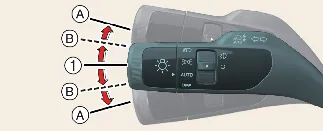
The Highway Lane Change Assist function in your Kia Carnival will initiate when you engage the turn signal lever to
the (A) or (B) position while the system is in the "Ready" state (indicated by the green ( )
icon). For the maneuver to execute, the following conditions must be met:
)
icon). For the maneuver to execute, the following conditions must be met:
-
Your hands are detected on the steering wheel.
-
The system determines there is no risk of collision in the intended direction of the lane change.
-
You are on a two-lane road featuring broken lane markings in the direction of the intended shift.
-
No active warnings are present from the Forward Collision-Avoidance Assist (FCA) or Blind Spot
Collision-Avoidance Assist (BCA) systems.
-
Your Kia Carnival is positioned steadily in the middle of the current lane; driving too close to one side may
prevent activation.
-
The current highway section—and the destination lane—must be within the operational parameters supported by the
system.
 NOTICE
-
If you manually place the turn signal lever in position (A), the Highway Lane Change Assist function will
begin. If you move the lever back to the neutral position before the Kia Carnival has crossed the lane marking,
the function will cancel. Once the maneuver has successfully crossed the lane, the function will complete, and
the turn signal will automatically deactivate.
-
If the turn signal lever is held in the (B) position for a short duration, a green arrow will appear on the
display. Even if you release the lever and it returns to the center position, the Kia Carnival will continue to
assist with the lane change until completion.
-
During an active lane change, the turn signal indicator will continue to blink automatically. The system will
turn off the indicators as soon as the lane change is finalized.
Highway Lane Change Assist standby
The Highway Lane Change Assist function will automatically transition to "Standby" if any of the ready-state
requirements are no longer met, or if your Kia Carnival encounters the following road environments:
-
Areas in close proximity to a highway or motorway tollgate.
-
Road sections that terminate unexpectedly without a clear interchange or junction.
-
Road segments featuring excessively sharp curves that exceed system tracking capabilities.
-
Roads where the lane width is detected as being too narrow for a safe automated maneuver.
Canceling Highway Lane Change Assist
The Highway Lane Change Assist function in your Kia Carnival is designed to be intuitive and safe; however, it will
automatically cancel under the following conditions:
-
If you manually activate the turn signal lever in the direction opposite to the ongoing lane change maneuver.
-
If the system detects a sharp or aggressive steering input from the driver.
-
If the turn signal switch is placed in position (A) to initiate the lane change, but is manually returned to
the neutral (N) position before the Kia Carnival has fully crossed into the target lane.
 WARNING
-
During an active maneuver, the Highway Lane Change Assist function will be immediately interrupted if any of
the following events occur:
-
The primary Highway Driving Assist (HDA) system is switched off.
-
Lane Following Assist or Smart Cruise Control is deactivated or temporarily suspended.
-
A "Hands-off" warning message appears on the Kia Carnival instrument cluster, signaling that you must
take control.
-
The turn signal lever is moved to position (A) while the system is already operating.
-
The hazard warning flashers are activated.
-
A safety alert from the Forward Collision-Avoidance Assist (FCA) or Blind-Spot Collision-Avoidance Assist
(BCA) is triggered.
-
The system detects a potential collision risk in the target lane, even if official FCA or BCA warnings
are not yet displayed.
-
The target lane marking disappears or is no longer identifiable by the camera sensors.
-
There is a detected technical fault with the turn signal lighting system.
-
The Highway Lane Change Assist function is disabled via the settings menu, or if the road environment
changes (e.g., transition to a single-lane road, approaching an intersection/crosswalk, entering a road
without a center median, or detecting pedestrians/cyclists in the path).
-
If the Kia Carnival driving speed drops below 15 mph (25 km/h) while in "Ready" state, reverting the
system to "Standby."
-
At low speeds (20–40 mph), if the system loses detection of vehicles in the adjacent lanes.
-
If any new collision risk is identified during the maneuver.
-
Should the function be canceled during an active lane change, the Kia Carnival may either steer back toward the
center of your original lane or cease steering assistance entirely. Always maintain full situational awareness
and be ready to resume manual steering control immediately.
-
Please note that the system's performance may be compromised in areas with high pedestrian or cyclist activity,
such as near intersections. Even when the Kia Carnival is managing steering, you are responsible for monitoring
the driving environment to ensure safety.
