Before beginning your drive, adjust the interior rearview mirror to ensure a clear, centered view through the rear
window. To maintain maximum safety, never place bulky items in the cargo area or on the rear seats that might
obstruct your line of sight.
 WARNING
Mirror Adjustment: Never adjust your rearview mirror while the Kia Carnival is
moving. Adjustments should always be performed while the vehicle is stationary to avoid distraction and potential
loss of vehicle control.
 NOTICE
Do not modify the factory-installed mirror or install aftermarket wide-angle attachments. Such modifications can
interfere with proper airbag deployment or compromise the structural integrity of the mirror housing during an
accident.
 CAUTION
Cleaning Instructions: When cleaning the mirror, apply glass cleaner to a microfiber cloth or paper
towel, then wipe the surface. Never spray cleaner directly onto the mirror, as liquid may seep into the housing and
damage the internal electronics.
Day/night rear-view mirror (if equipped)
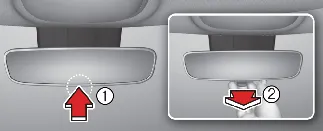
For standard daytime driving, ensure the adjustment lever is in the "Day" position (1). When driving at night, pull
the lever toward you (2) to switch to the "Night" position; this tilts the glass to reduce glare from trailing
vehicles' headlights. Please note that rear-view clarity is slightly reduced in the night mode.
Electric Chromic Mirror (ECM) (if equipped)
The Kia Carnival may be equipped with an Electric Chromic Mirror (ECM), which automatically adjusts
its tint level based on ambient light conditions.
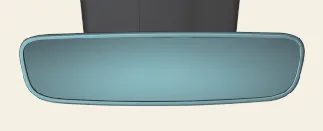
Using a light-sensitive sensor, the ECM detects high-intensity glare from following vehicles and electronically
darkens the mirror glass to protect your vision. This process is fully automated whenever the engine is running.
ECM with HomeLink® system (if equipped)
Some models feature a premium Gentex Automatic-Dimming Mirror with an integrated HomeLink® Wireless Control
System.
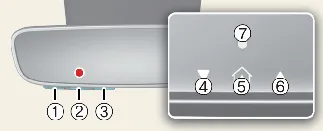
- HomeLink Channel 1
- HomeLink Channel 2
- HomeLink Channel 3
- Garage Door Opener Status Indicator: Closing or Closed
- HomeLink Operation Indicator
- Garage Door Opener Status Indicator: Opening or Opened
- HomeLink User Interface Indicator
In addition to automatic glare reduction, the HomeLink® Universal Transceiver allows you to program and activate
home automation systems, such as garage doors, electric gates, and home lighting directly from your Kia
Carnival interior.
Automatic-Dimming Night Vision Safety™ (NVS®) Mirror (if equipped)
The Kia Carnival may be equipped with an NVS® mirror, designed to enhance driver visibility
during nighttime conditions. This advanced mirror automatically reduces glare by continuously monitoring light levels
in front of and behind the vehicle. Please note that for optimal performance, the light sensors must remain
unobstructed; any objects covering these sensors will interfere with the automatic dimming control feature.
For more detailed information regarding the technology behind these mirrors and other compatible applications, please
visit the official Gentex website at: www.gentex.com.
The Kia Carnival NVS® mirror activates automatically to suppress headlight glare from trailing
vehicles. By default, the mirror resets to the 'ON' position every time you start the engine, ensuring consistent
protection during every drive.
Integrated HomeLink® Wireless Control System
The Integrated HomeLink® Wireless Control System in your Kia Carnival offers a premium,
clutter-free solution for your home connectivity. It allows you to replace up to three separate handheld
radio-frequency (RF) transmitters with a single, elegant interface built directly into your rearview mirror. Use it
to activate compatible devices such as garage door openers, automated security gates, smart entry locks, residential
security systems, and exterior or interior home lighting.
 NOTICE
For enhanced home security when your Kia Carnival is parked outside the garage, the HomeLink system
is designed to operate ONLY when the vehicle's ignition is in the ACC or ON position. This prevents unauthorized
access to your home via the vehicle when it is parked and unattended.
 CAUTION
Programming Safety: Before initiating the programming sequence for a garage door or gate, ensure all
people and obstacles are clear of the door's path to prevent injury or damage. When performing the initial setup,
park your Kia Carnival in the driveway, outside of the garage.
Security Compatibility: Do not use HomeLink with any garage door opener that lacks mandatory safety
"stop-and-reverse" features, as required by current U.S. federal safety standards (specifically, openers manufactured
before April 1, 1982). If your system cannot detect an object and automatically reverse, it does not meet modern
safety benchmarks. For further assistance or compatibility inquiries, visit www.homelink.com or contact HomeLink support at 1-800-355-3515.
Pro Tip: Before beginning the pairing process, replace the battery in your handheld remote. A fresh,
strong signal from your original remote ensures faster training and more reliable radio frequency synchronization
with your Kia Carnival mirror.
1. Programming HomeLink®
The steps below outline the standard procedure for programming HomeLink. Should you encounter difficulties or have
specific questions about your particular device, please contact HomeLink customer support at 1-800-355-3515.
-
Online Support: Visit www.homelink.com. Select your
vehicle make (Kia) from the menu to access model-specific instructional videos and detailed guides for your
Kia Carnival.
-
Mobile Quick Access: For on-the-go assistance, you can access the portal directly using your
smartphone by scanning the QR code below:

1) Programming Preparation
Before beginning the synchronization process for your Kia Carnival, please complete these essential
preparatory steps to ensure a successful setup:
-
For your safety and to ensure clear signal transmission, park your Kia Carnival in the
driveway, outside of the garage.
-
Install a fresh battery in your original handheld garage door transmitter. A strong signal is crucial for quick
and accurate radio-frequency (RF) code transmission.
-
Set your Kia Carnival ENGINE START/STOP button to the ACC (Accessory) position to provide
power to the rearview mirror system.
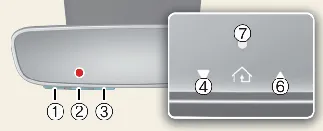
Follow these steps to link your Kia Carnival to your garage door opener or gated community entry
system:
-
Press and release the specific HomeLink button (1, 2, or 3) on the mirror you wish to program. The HomeLink
indicator light should begin to flash orange slowly. If it does not, refer to the "Erasing HomeLink Buttons"
section to reset and try again.
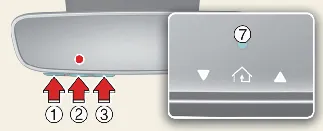
-
Hold your original handheld remote 1–3 inches (2–8 cm) away from the HomeLink buttons on the mirror.
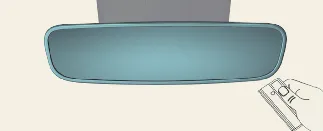
-
While the indicator light is flashing orange, press and hold the button on your handheld remote. Keep it held
until the HomeLink indicator light on the mirror changes from orange to a steady green. The garage door may
trigger during this process; you may now release the remote button.
-
Allow the garage door to come to a complete stop before moving to the next phase.
-
Test the programmed button by pressing it once and observing the mirror's indicator light:
-
Solid Green: Programming is complete and successful.
-
Rapidly Flashing Green: Your opener utilizes a "rolling code" system. Firmly press, hold
for two seconds, and release the HomeLink button on your Kia Carnival mirror up to three
times slowly. If the door operates, you are finished.
-
For Rolling Code Systems: If the device did not operate in step 5, locate the "Learn,"
"Smart," or "Program" button on your garage door motor-head unit (typically found near the antenna wire). Refer
to your opener's manual if needed.
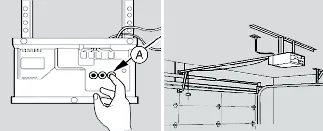
* Note: A ladder and an assistant are highly recommended for this step.
-
Press and release the "Learn" button on the motor unit. You now have a 30-second window to complete the final
synchronization.
-
Return to your Kia Carnival, and firmly press/hold the programmed HomeLink button for two
seconds, then release it. Repeat this process up to three times slowly. Once the garage door begins to move,
stop pressing the button immediately and let the door complete its cycle. Your system is now fully programmed
and ready for daily use.
3) Two-Way Communication Programming (For select garage door openers)
If your garage door opener features the 'myQ' logo, it supports Two-Way Communication. This advanced feature allows
the HomeLink system in your Kia Carnival to receive and display real-time status messages from your
garage door opener. The mirror can indicate whether your door is currently "opening" or "closing," and it can recall
the last recorded status of your garage door at any time.
To verify if your specific opener is compatible with this feature, please consult the official compatibility list at:
www.homelink.com/compatible/Two-way-Communication.
If your opener supports this technology, the Two-Way Communication indicators (4 and 6) on the Kia
Carnival mirror should activate automatically during operation. If these indicators do not appear while
the door is moving, please follow the steps below to manually enable this functionality.
-
Press and hold the already programmed HomeLink button in your Kia Carnival for two seconds,
then release. Ensure the door moves. Once the door stops moving, you have a one-minute window to complete the
following synchronization steps.
* Note: A ladder and an assistant are recommended for the following steps.
-
Locate the "Learn" button on your garage door opener motor-head unit (typically located near the hanging
antenna wire). If you are having trouble identifying the button, please refer to the manufacturer's user
manual.
-
Firmly press and release the "Learn" button on the motor unit.
-
The courtesy light on your garage door opener may flash, and the Two-Way Communication indicators on your
Kia Carnival rearview mirror may blink to confirm that the synchronization process has been
successfully completed.
-
Return to your vehicle and press the programmed HomeLink button to trigger the garage door. The Two-Way
Communication indicators (4 and 6) will flash orange while the door is in motion. Do not press any buttons
until the garage door has come to a complete stop.
-
Your Two-Way Communication programming is now successfully configured.
 NOTICE
If your garage door opener supports Two-Way Communication but the system stops responding after approximately ten
uses, it typically indicates that the Two-Way Communication setup was not finalized correctly. To restore full
functionality, ensure that both the "Programming a New HomeLink Button" and the "Two-Way Communication Programming"
procedures are completed in sequence. Proper calibration ensures that your Kia Carnival maintains a
reliable and secure connection with your home.
4) Canadian Programming
Canadian radio-frequency regulations require certain transmitter remote signals to "time-out" or cease transmission
after a few seconds. This automatic cutoff may be shorter than the duration required for the HomeLink system in your
Kia Carnival to fully capture and learn the signal during the standard programming process.
If you are located in Canada or are experiencing persistent difficulties when attempting to program a gate operator
or garage door opener, please replace Step 3 of the "Programming a New HomeLink Button" procedure with the following
instruction:
While the HomeLink indicator light is flashing orange, press and release ("cycle") your device's handheld remote
button every two seconds until the HomeLink indicator light changes from orange to a steady green. You may then
release the remote button and proceed to Step 4 of the standard programming sequence.
2. Operating HomeLink®
1) Operating HomeLink®
-
To activate your programmed device, simply press and release the desired, pre-configured HomeLink button (1, 2,
or 3) on the rearview mirror of your Kia Carnival.
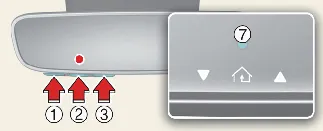
 NOTICE
When the HomeLink indicator light (7) glows solid green or flashes, it confirms that the signal is being transmitted
to your device. If the device does not activate, the programming was likely incomplete, and you will need to repeat
the pairing process.
2) Two-Way Communication Display Behavior
-
Press and release one of the programmed HomeLink buttons on your Kia Carnival.
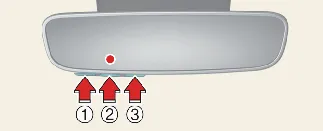
-
If your garage door opener supports Two-Way Communication, the status indicators (4 and 6) will provide
real-time visual feedback:
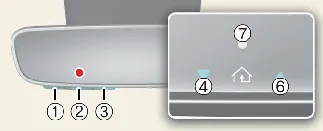
-
Indicator (4) Flashing Orange: The garage door is currently "Closing".
-
Indicator (4) Solid Green: The garage door has successfully closed.
-
Indicator (6) Flashing Orange: The garage door is currently "Opening".
-
Indicator (6) Solid Green: The garage door has fully opened.
-
Status Error: If neither indicator turns solid green after operation, the mirror failed
to receive a confirmation message from the opener. The system will attempt to poll for the last known
status for a few seconds.
3) Recalling Garage Door Status
The HomeLink mirror in your Kia Carnival allows you to check the last stored status of your garage
door at any time. To recall the current state of the last activated device, press buttons "1 and 2" OR "2 and 3"
simultaneously:
If you need to update or change the programming for just one specific button on your Kia Carnival
rearview mirror, you can erase the existing data for that single channel without affecting the other two buttons.
-
Press and hold the specific HomeLink button you intend to re-program. Do not release it during the initial
phase.
-
The HomeLink indicator light (7) will initially appear solid green. Continue holding the button until the
indicator light begins to flash orange, which typically takes about 20 seconds. Once the light transitions to
flashing orange, release the button.
-
Your chosen button is now cleared and ready for new input. Proceed by following the steps outlined in the
"Programming a New HomeLink Button" section to store a new device code.
 NOTICE
If you initiate the reset process but do not complete the programming of a new device, the HomeLink system in your
Kia Carnival will automatically revert to the previously stored code, ensuring you don't
accidentally lose functionality.
2) Erasing ALL HomeLink® Programming
To perform a factory reset and clear all stored data from all three HomeLink buttons simultaneously, follow these
instructions:
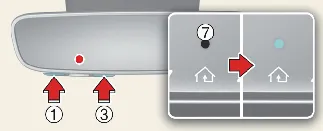
-
Press and hold buttons (1) and (3) simultaneously for the duration of the reset process.
-
The HomeLink indicator light (7) will glow a solid orange for approximately 10 seconds.
-
Release both buttons as soon as the indicator light (7) transitions to a rapidly flashing green light.
-
All three HomeLink channels (1, 2, and 3) are now successfully cleared, and your Kia Carnival
mirror is ready for a fresh configuration.
HomeLink and the HomeLink House logo are registered trademarks of Gentex Corporation. The myQ logo is a registered
trademark of The Chamberlain Group, Inc.
FCC (USA) and ISED (Canada) Regulatory Compliance
This integrated system complies with FCC rules (Part 15) and Innovation, Science, and Economic Development Canada
(RSS-210). Operation is subject to two conditions: (1) This device may not cause harmful interference, and (2) This
device must accept any received interference, including interference that may lead to undesired operation.
WARNING: Unauthorized changes or modifications to the transmitter, not expressly approved by the
compliance party, could void your authority to operate this equipment in your Kia Carnival.
This equipment adheres to FCC and ISED radiation exposure limits established for an uncontrolled environment. To
maintain RF exposure compliance, users must ensure the transmitter remains at a distance of at least 20 cm from the
user and is not co-located with any other antenna or transmitter.
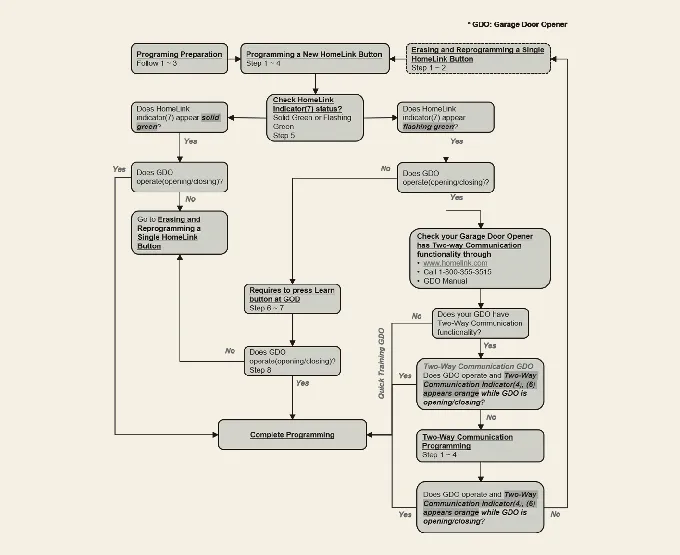
HomeLink 5 Programming Flow Chart
Digital Center Mirror (DCM) (if equipped)
The Digital Center Mirror (DCM) in your Kia Carnival is an advanced visibility system that utilizes
a rear-mounted camera to project a live video feed directly onto the mirror’s integrated display. This feature is
particularly valuable when interior obstructions—such as tall headrests, cargo, or rear passengers—would typically
block your traditional line of sight, ensuring you have a clear, expansive view of the traffic behind you.
 WARNING
-
Safety Usage: The DCM is designed as a convenience aid and does not replace the necessity for
attentive driving. The system may have inherent blind spots; always perform a visual check of your surroundings
before maneuvering your Kia Carnival. The driver retains full responsibility for safe vehicle
operation at all times.
-
Distraction Prevention: To maintain safety, do not adjust the DCM settings while the vehicle
is in motion. Adjustments should be made while parked to avoid loss of focus or vehicle control.
-
Maintenance and Integrity: Never attempt to disassemble or modify the DCM camera, housing, or
electrical wiring. Such actions risk causing fire or electrical failure. Should you detect unusual odors,
smoke, or performance issues, cease using the system immediately and contact an authorized Kia dealer for
inspection.
 NOTICE
-
Pre-Drive Setup: Ensure the mirror is adjusted before you start your journey:
-
Set the system to "Conventional" (optical) mode, seat yourself properly, and adjust the housing to view
through the rear window. Then, toggle to "Digital" mode and refine your display settings. Proper
adjustment is critical; failure to do so may result in glare or reflection issues that hinder your
ability to view the camera feed clearly while driving your Kia Carnival.
-
Malfunction Strategy: If the DCM experiences an electronic fault, manually toggle the lever to
switch to standard optical mirror mode.
-
Glare Management: In scenarios involving intense direct sunlight or high-beam glare that
interferes with the digital screen, utilize the lever to switch back to the conventional mirror mode.
-
Lens Care: Clear imagery depends on a clean lens. If the image appears blurry, gently clean
the exterior camera lens (1) using a soft cloth or swab dampened only with water.
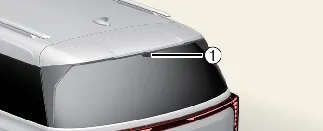
System component
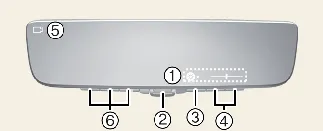
-
Icon display area: Provides visual indicators for adjusting Brightness and Tilt settings.
-
Lever: Toggle to switch between digital camera feed and traditional optical mirror modes.
-
Menu button: Press to activate the icon display area and cycle through adjustable settings.
-
Select/adjust button: Press to modify the parameters of your currently selected setting.
-
Camera indicator: A visual confirmation that the camera system is powered and operating
normally.
-
HomeLink buttons: Integrated controls for the HomeLink® Universal Transceiver system in
your Kia Carnival.
How to change the mode
You can toggle between display modes when the Kia Carnival ignition is in the ON position.
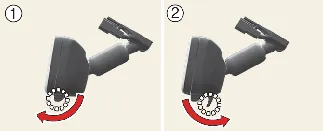
-
Digital Center Mirror Mode: Pull the mode select lever toward you to activate the digital
camera view. This displays a live feed of the area behind the vehicle, indicated by the camera icon on the
screen.
-
Optical Rearview Mirror Mode: Push the mode select lever away from you to deactivate the
screen, allowing the unit to function as a standard optical mirror.
Adjusting the mirror height
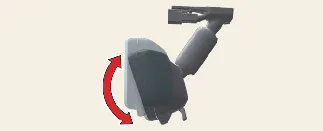
The mirror housing in your Kia Carnival can be adjusted vertically to align with your specific
driving posture. To do this, first switch to optical mirror mode, then manually move the mirror up or down to achieve
the desired angle for optimal rear visibility.
Display settings (Digital mirror mode)
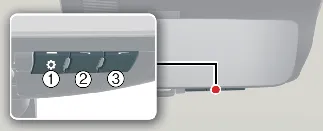
-
Press the menu button (1) to display the adjustment icons on the screen.
| Icons |
Settings |
 |
Select to adjust the brightness of the digital display. |
 |
Select to adjust the camera view angle up or down. |
-
Press the menu button (1) repeatedly to cycle through and select the item you wish to modify.
-
Use button (2) or (3) to change the selected setting. The icon menu will automatically disappear if no input is
detected for approximately 5 seconds.
Pro Tip: Avoid setting the brightness too high, as it may cause eye fatigue during night driving. If your
eyes feel tired, switch the Kia Carnival system to optical mirror mode for a more natural viewing
experience.
To prevent light sensor malfunction
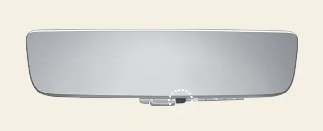
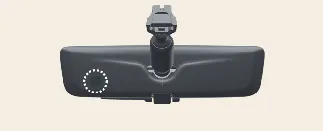
The mirror features sensitive light sensors to adjust display performance. Please ensure these sensors are not
touched or covered by accessories, as this will result in system malfunctions.
Digital mirror mode operating condition
The DCM functions exclusively when the Kia Carnival ENGINE START/STOP button is in the ON position.
If the ignition is switched to OFF or ACC, the digital image will automatically turn off.
When using the DCM in digital mirror mode
-
Liftgate Status: Ensure the liftgate is completely closed before driving, as an open liftgate
may obscure the camera's field of view.
-
Glare Reduction: If reflections on the screen make the image difficult to see, closing the
sunroof sunshade can significantly improve display clarity.
-
Night Driving Characteristics: Driving in low-light conditions may result in the following
normal system behaviors:
-
Colors may appear slightly different from their natural state due to infrared sensor processing.
-
Focusing on a screen can sometimes take longer than focusing on a distant object; if you have difficulty
adjusting, switch to optical mode.
-
To prevent motion sickness, discourage passengers from continuously staring at the digital display while
the Kia Carnival is in motion.
When the system malfunctions
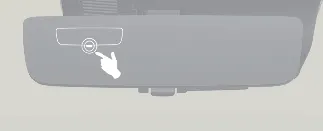
If you observe a specific error symbol on the display while using the Digital Center Mirror mode, it indicates a
potential system fault. In such instances, the symbol will typically disappear after a few seconds. For your safety,
immediately switch the mirror to the conventional optical rearview mode and have your Kia Carnival
inspected by an authorized Kia dealer as soon as possible.
 CAUTION
-
Cleaning Standards: Never use harsh chemicals such as paint thinner, benzene, or alcohol to
clean the mirror surface. These substances can cause permanent discoloration or deterioration of the reflective
and digital coating.
-
Component Integrity: Do not attempt to remove, disassemble, or modify the DCM mirror housing
or the rear camera unit, as this voids your warranty and may cause system failure.
-
Camera Protection: Avoid contact with organic solvents, vehicle wax, or glass coatings. If any
of these substances inadvertently contact the camera lens, wipe them away immediately with a soft, damp cloth.
-
Gentle Maintenance: When cleaning the lens, use a soft, damp cloth. Avoid rubbing the lens
forcefully, as even minor scratches can significantly degrade image clarity.
-
Impact Prevention: Subjecting the camera to physical impact can damage the internal optics. If
an impact occurs, seek a professional inspection at your Kia dealer.
-
Battery Awareness: Note that operating the DCM in the "ON" position while the engine is not
running may lead to battery discharge.
-
Signal Interference: Keep wireless device antennas away from the DCM mirror unit, as
electromagnetic interference may cause distortion in the displayed image.
-
Physical Handling: Use the buttons and adjustment lever with moderate pressure. Aggressive
operation may cause the mirror to lose its secure mounting or trigger a system failure. Never attempt to rotate
the DCM housing by 90° or more.
-
External Glare: If strong external light makes the digital screen difficult to read, toggle
the unit to the conventional rearview mirror mode for a safer, clearer view.
DCM error icon and solution
| Symptom |
Likely cause |
Solution |
|
High temperature icon ( ) displayed on the screen. ) displayed on the screen.
|
The DCM unit is overheating. The display will dim automatically to protect components; if heat persists,
it will power off.
|
Reduce the cabin temperature using the Kia Carnival climate control. The icon will
disappear once the unit cools. If it persists, consult your dealer.
|
|
Error icon transition from  to to  . .
|
A persistent system malfunction has been detected.
|
Immediately switch to conventional optical mirror mode and visit an authorized Kia dealer for diagnostic
testing.
|