-
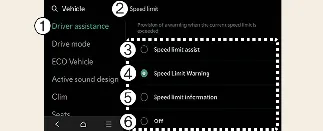
Driver Assistance
-
Speed Limit
-
Speed Limit Assist
-
Speed Limit Warning
-
Speed Limit Information
-
Off
With your Kia Carnival powered on, you can personalize your safety preferences by navigating to Setup →
Vehicle → Driver Assistance → Speed Limit on your infotainment system.
-
Speed Limit Offset: Allows you to define a tolerance value. Your Kia Carnival will provide a
warning or adjust your cruising speed only when your current speed exceeds the recognized limit plus this set
tolerance.
-
Speed Limit Assist: This comprehensive mode keeps you informed of speed limits and auxiliary
road signs. If you exceed the limit, the Kia Carnival will alert you and may suggest adjustments to your Manual
Speed Limit Assist or Smart Cruise Control settings to ensure you remain compliant.
-
Speed Limit Warning: Keeps you informed of current speed limits and road signs, providing an
audible or visual alert if you exceed the posted limit in your Kia Carnival.
-
Speed Limit Information: Strictly provides a display of detected speed limits and relevant
road signs without active warning interventions.
-
Off: Disables all Intelligent Speed Limit Assist (ISLA) features for your Kia Carnival.
 WARNING
To ensure total focus, please park your Kia Carnival in a safe and stationary location before configuring these
advanced settings.
 NOTICE
-
Both the warning and adjustment functions rely on the offset value. Setting this to '0' ensures that your Kia
Carnival reacts precisely to the posted speed limit signs.
-
Please note that the Speed Limit Offset settings are independent and do not affect the behavior of
Navigation-based Smart Cruise Control (NSCC).
