Warning and control
The Intelligent Speed Limit Assist system in the Kia Carnival coordinates with the driver through several operational
channels:
-
Displaying the current speed limit on the cluster.
-
Providing active speeding warnings.
-
Suggesting set speed changes for cruise control systems.
-
Automatic set speed adjustments where supported.
 NOTICE
Displaying speed limit

The system intelligently detects road signs and displays the current speed limit information directly on your Kia
Carnival instrument cluster for easy reference.
 NOTICE
-
If the system cannot confirm a speed limit for the road ahead, a '---' sign will appear. Refer to the "More
Details" section if you encounter roads where signs are frequently difficult for the Kia Carnival to recognize.
-
Beyond speed limits, the system may display additional road signs, though the exact information provided can
vary significantly based on your current region.
-
Visual presentation, including images and icon colors, may vary depending on the cluster theme or display type
selected in your Kia Carnival settings.
Speeding warning

To ensure you remain compliant with local traffic laws, the Kia Carnival system monitors your velocity. When the
vehicle detects that you are driving at a speed higher than the currently displayed speed limit, the speed limit
indicator on the cluster will turn red to provide a clear visual warning.
Changing set speed
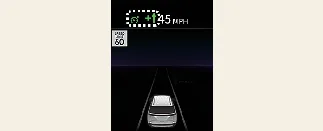
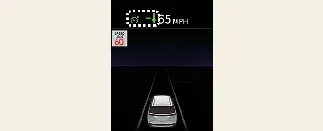
If the posted speed limit changes while your Kia Carnival is operating in Manual Speed Limit Assist (MSLA) or Smart
Cruise Control (SCC) mode, the system displays an upward or downward arrow. This informs you that the preset speed
needs adjustment. You can quickly synchronize your Kia Carnival cruise speed with the new road limit by using the (+)
or (-) switches located on the steering wheel.
Auto set speed change
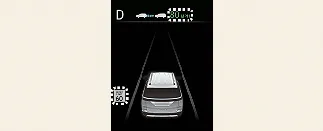
For added convenience, if your current cruise speed is identical to the detected road limit, the Kia Carnival can
automatically adjust your set speed to match future changes in the posted limit. This "Auto set speed change"
function is designed to operate on roads where the limit is 45 mph (70 km/h) or higher. When this feature is active,
the set speed value on your Kia Carnival instrument cluster will be highlighted in green.
 WARNING
-
If you prefer to drive below the posted limit, adjust the speed offset to below '0' or manually press the (-)
switch to decrease your Kia Carnival set speed.
-
Even when the set speed is adjusted automatically, your Kia Carnival can still exceed the speed limit under
certain conditions; always be prepared to depress the brake pedal to manually reduce speed if necessary.
-
The automatic speed adjustment functions are disabled if the detected speed limit is below 20 mph (30 km/h).
-
The Intelligent Speed Limit Assist in your Kia Carnival relies on the speed unit (mph or km/h) selected in the
instrument cluster. Ensure the unit matches the signage of the country you are driving in, or the system may
not operate with expected accuracy.
 NOTICE
-
For in-depth operational guides on Manual Speed Limit Assist, please refer to the relevant section in your Kia
Carnival manual.
-
Detailed instructions regarding the activation and limitations of Smart Cruise Control are also available in
the "More Details" section.
