-
Driver Assistance
-
Parking Safety
-
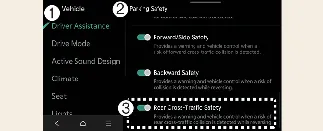
Rear Cross-Traffic Safety
With your Kia Carnival powered on, you can configure this feature by selecting Setup → Vehicle →
Driver Assistance → Parking Safety → Rear Cross-Traffic Safety on the infotainment screen. This
menu allows you to enable or disable the Rear Cross-Traffic Collision-Avoidance Assist (RCCA) system according to
your preference.
 WARNING
For your protection, the Rear Cross-Traffic Collision-Avoidance Assist system will automatically activate every time
you restart the Kia Carnival. If you choose to deactivate Rear Cross-Traffic Safety after a restart, you must remain
hyper-vigilant and always monitor your surroundings manually while reversing.
 CAUTION
-
Within the settings menu, you have the option to enable or disable steering wheel vibration alerts.
-
When a trailer is electrically connected to your Kia Carnival, the Rear Cross-Traffic Collision-Avoidance
Assist system will automatically deactivate to prevent false readings. In this scenario, the system will not
provide collision warnings or braking assistance. Always exercise extra caution while towing.
-
Driver Assistance
-
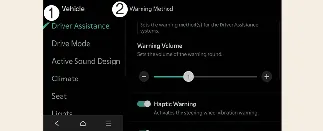
Warning Methods
You can customize how your vehicle alerts you while the Kia Carnival is powered on. Navigate to Setup →
Vehicle → Driver Assistance → Warning Methods in the infotainment settings to adjust the
following:
-
Warning Volume: Allows you to customize the intensity of the audible alert sounds.
-
Haptic Warning: Toggles the physical steering wheel vibration feature, providing a tactile
alert alongside the visual and audible signals.
 NOTICE
-
Please note that the warning preferences selected here may apply globally to other driver assistance systems
within your Kia Carnival.
-
The system will remember your last configured warning preferences, even after the vehicle is turned off and
restarted.
-
Depending on the specific trim level and software version of your Kia Carnival, some menu options may vary or
be unavailable.
-
To ensure you are always alerted, the Warning Volume and Haptic Warning cannot be completely disabled at the
same time; if one is turned off, the other must remain active.
