Warning Methods
-
Driver Assistance
-
Parking Safety Priority
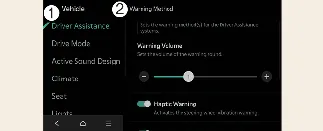
You can customize your Kia Carnival alert preferences while the vehicle is powered on. Navigate to Setup → Vehicle
→ Driver Assistance → Warning Methods on your infotainment screen to adjust the following:
-
Parking Safety Priority: When enabled, this feature intelligently lowers the volume of all other media
or audio sources whenever the Kia Carnival Rear View Monitor is active, ensuring you can clearly hear proximity
alerts.
 NOTICE
-
Be aware that changes made to the "Warning Methods" menu may also impact the behavior of other driver
assistance systems on your Kia Carnival.
-
The Kia Carnival system will automatically save these preferences, so your warning settings will persist even
after the vehicle is turned off and restarted.
-
Menu options may vary depending on the specific trim level and software specifications of your Kia Carnival.
Camera Settings
-
Camera Settings
-
Display Contents
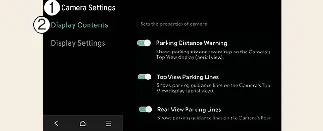
With the vehicle powered on, you can configure your Rear View Monitor settings by tapping the setup icon ( ) on the display, or
by navigating through Setup → Vehicle → Driver Assistance → Parking Safety → Camera Settings within the Kia
Carnival infotainment system.
) on the display, or
by navigating through Setup → Vehicle → Driver Assistance → Parking Safety → Camera Settings within the Kia
Carnival infotainment system.
Extended Rear View Monitor
If the "Extended Rear View Monitor" option is enabled, the rear camera feed will remain active even when you shift
the transmission from R (Reverse) to N (Neutral) or D (Drive), providing continuous visibility during complex parking
maneuvers in your Kia Carnival.
Rear-view Parking Guidance
By selecting "Rear-view Parking Guidance" in the display menu, the system will overlay dynamic guidelines and Top
Rear-view Parking Guidance on your Kia Carnival monitor to assist you in aligning the vehicle perfectly while
reversing.
Display settings
You can fine-tune the image quality of your Kia Carnival camera feed by adjusting the brightness (Day/Night mode) and
contrast directly within the Display Settings menu.
 NOTICE
-
The availability of these settings may vary based on your specific Kia Carnival vehicle configuration.
-
The horizontal guidelines provided for rear-view parking are calibrated for an empty vehicle. These indicate
approximate distances of 20 inches (0.5 m), 40 inches (1 m), and 91 inches (2.3 m) from the rear bumper of your
Kia Carnival.
-
The horizontal guidelines for the top-view parking assist are also based on an empty vehicle, illustrating the
distance required for tailgate opening and a fixed marker at approximately 60 inches (1.5 m) behind the Kia
Carnival.
