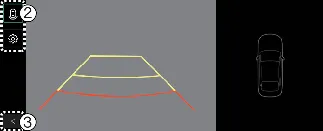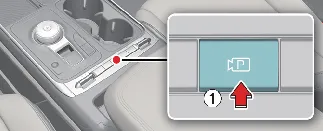
To manually activate the Kia Carnival Rear View Monitor at any time, press the Parking/View button. Press the same
button once more to deactivate the display.
Rear-view
Operating conditions
The Rear View Monitor (RVM) function in your Kia Carnival will automatically activate under the following conditions:
-
Shifting the transmission gear into R (Reverse).
-
Pressing the Parking/View button (1) while the Kia Carnival is in P (Park) or N (Neutral), provided the vehicle
speed is below 6 mph (10 km/h).
Once active, you can press the View switching button (2) on the screen to cycle between the available camera angles,
including rear top view, standard rear-view, or the wide-angle rear view for enhanced coverage.
Off conditions
The Rear View Monitor function in your Kia Carnival will automatically deactivate during parking operations if any of
the following occur:
-
Shifting the gear selector into P (Park).
-
Pressing the Parking/View button (1).
-
Selecting the "back" button (3) on the infotainment monitor interface.
-
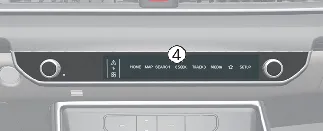
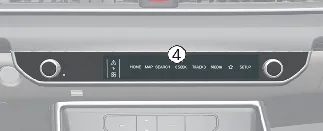
Pressing the primary infotainment system operation button (4).
-
Shifting into N (Neutral) or D (Drive) and accelerating the Kia Carnival to a speed greater than 6 mph (10
km/h).
 NOTICE
For safety reasons, the rear-view feed will not turn off automatically while the vehicle is in R (Reverse).
Extended Rear View Monitor
The Extended Rear View Monitor function is designed to keep the rear camera feed visible even after you shift from R
(Reverse) to N (Neutral) or D (Drive), assisting you in maintaining awareness during multi-point parking maneuvers.
Operating conditions
The Extended Rear View Monitor will remain active in your Kia Carnival as long as the following conditions are
satisfied:
Off conditions
This extended monitoring function will turn off automatically when one of the following conditions is satisfied:
-
Shifting the gear to P (Park).
-
Pressing the Parking/View button (1).
-
Pressing the "back" button (3) on the monitor screen.
-
Pressing the infotainment system operation button (4).
-
The Kia Carnival speed increases beyond 6 mph (10 km/h).
Rear top view
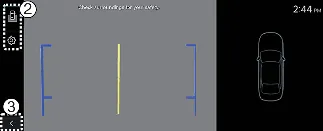
The Rear Top View provides a virtual overhead perspective of your Kia Carnival, allowing you to accurately judge the
distance between your rear bumper and any obstacles or vehicles while parking.
Press the Rear Top View button on the screen interface to activate this specific camera perspective.
 NOTICE
-
Regardless of the selected camera view, the feed will remain active as long as the Kia Carnival is in R
(Reverse) mode.
-
The standard rear-view is the default display whenever R (Reverse) is engaged.
-
Parking guidelines can be toggled on or off for both rear-view and top-view modes. To manage these, navigate to
Setup → Vehicle → Driver Assistance → Parking Safety → Camera Settings → Display Information → Rear Parking
Guidelines on your infotainment system. Note that these specific guidelines may not be displayed in all
versions of the "Rear-view while parking" mode.