To ensure passenger safety, the driver of the Kia Carnival can disable the individual power window
switches on the rear passenger doors, as well as the rear sunroof switch, by engaging the lock button located on the
driver's door panel. When the indicator on the switch is illuminated (pressed), the lock is active.
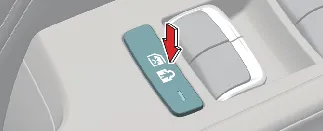
When the Kia Carnival power window and rear sunroof lock switch is engaged, the following controls
apply:
-
The driver’s master control panel retains full authority to operate all windows in the vehicle.
-
The front passenger's individual switch remains fully functional.
-
Rear passenger door switches are disabled, preventing accidental or unauthorized operation.
-
Rear sunroof controls are disabled, though the driver’s master sunroof control can still operate both front and
rear sections (if equipped).
* Note: When the lock indicator is lit, rear passengers cannot operate their respective windows.
 CAUTION
-
To prevent electrical strain on the system and protect the fuse, avoid operating three or more windows
simultaneously.
-
Do not attempt to operate the driver’s master switch and an individual door switch in opposite directions at
the exact same time; this may cause the motor to enter a protection mode, halting window movement.
 WARNING
-
NEVER leave children or pets unattended in the Kia Carnival with the ignition on, as they may
inadvertently operate the power windows.
-
Always verify that all limbs, heads, and objects are completely clear of the window frame before activation.
-
For child safety, always keep the master power window lock button in the LOCK (pressed) position while driving.
-
Strictly prohibit children from playing with power window switches, as unintended operation can lead to serious
injury.
-
Ensure no passengers extend their heads or limbs out of the windows while the Kia Carnival is
in motion.
Remote window opening (if equipped)
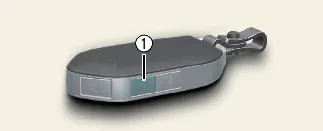
-
Door Unlock button 
You may control the window glass movement remotely even when the engine is switched off. To activate, press and hold
the Door Unlock button (1) for more than 3 seconds. The windows will begin to lower after the doors unlock. Simply
release the button to halt the movement at your desired position.
* Note: The remote window function applies exclusively to windows equipped with the auto up/down feature.
 WARNING
Be mindful that leaving the windows of your Kia Carnival open remotely can expose the interior to
theft or weather-related damage, such as rain entering the cabin.
 CAUTION
-
Stay within close proximity to your Kia Carnival while using remote window functions; moving
out of range may cause the windows to stop abruptly.
-
If one window encounters an obstruction, it may stop while others continue moving; always monitor the process
visually.
-
Use this feature with caution, as it simultaneously unlocks the doors of your Kia Carnival.
