With your Kia Carnival powered on, you can fine-tune your driving experience by selecting Setup → Vehicle →
Driver Assistance → Smart Cruise Control via the infotainment system. This menu allows you to adjust your
preferred vehicle following distance, acceleration responsiveness, and the system's reaction speed to suit your
driving preferences.
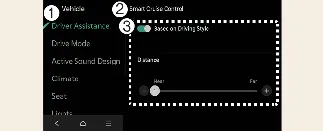
-
Driver Assistance
-
Smart Cruise Control
-
Based on Driving Style
With your Kia Carnival powered on, you can enable a more personalized driving experience. By navigating to
Setup → Vehicle → Driver Assistance → Smart Cruise Control → Based on Driving Style on the
infotainment screen, the system will calibrate the Smart Cruise Control (SCC) behavior to align with your unique
driving habits—specifically regarding inter-vehicle distance, acceleration profiles, and response speeds.
Furthermore, these driving parameters can be fine-tuned manually to better suit your preferences.
 NOTICE
-
If your Kia Carnival is equipped with advanced SCC features, you may choose between "Based on Driving Mode" and
"Based on Driving Style" within the Setup → Vehicle → Driver Assistance → Smart Cruise Control
menu.
-
While the Smart Cruise Control is active in "Based on Driving Style" mode, pressing and holding the Vehicle
Distance button ( ) will disable the mode. To
re-enable "Based on Driving Style," press and hold the same Vehicle Distance button (
) will disable the mode. To
re-enable "Based on Driving Style," press and hold the same Vehicle Distance button ( ) again.
-
The Kia Carnival SCC system dynamically learns and refines your driving style continuously while the vehicle is
in motion.
-
When "Based on Driving Style" is deactivated, the system retains your previously learned driving parameters
(distance, acceleration, response) as the baseline.
-
Please note that the visual indicators for inter-vehicle distance and response speed may shift depending on
whether the "Based on Driving Style" feature is toggled on or off, reflecting the transition between different
control logic modes.
