Operating conditions
Basic function
The Smart Cruise Control system in your Kia Carnival will only engage when the following operational criteria are
met:
-
The transmission gear selector is in the D (Drive) position.
-
Your current driving speed falls within the designated operational range:
-
The Electronic Stability Control (ESC) or Anti-lock Braking System (ABS) must be fully functional and active.
Conversely, the Kia Carnival Smart Cruise Control will not activate or will automatically suspend operation if any of
the following conditions are present:
-
The driver’s door is detected as open.
-
Engine RPM is excessively high.
-
The Electronic Parking Brake (EPB) is currently applied.
-
The ESC or ABS systems are actively intervening to stabilize the vehicle.
-
The Forward Collision-Avoidance Assist (FCA) system is performing emergency braking.
-
The Remote Smart Parking Assist (RSPA) brake control is actively engaged (if equipped).
 NOTICE
When your Kia Carnival is brought to a complete stop behind another vehicle, you are able to activate the Smart
Cruise Control system even while the brake pedal is firmly depressed.
Overtake Acceleration Assist function
The Overtake Acceleration Assist feature in your Kia Carnival is designed to enhance driving confidence during
lane-change maneuvers. This function engages when the turn signal is activated—to the left for left-hand drive models
or to the right for right-hand drive models—while Smart Cruise Control is actively engaged, provided the following
criteria are met:
Please note that Overtaking Acceleration Assist will remain inactive under these conditions:
 WARNING
-
When you engage the turn signal while a vehicle is detected ahead, your Kia Carnival may initiate a temporary
acceleration. Always maintain full situational awareness of the road conditions and surroundings before
committing to a maneuver.
-
Overtaking Acceleration Assist is programmed to function regardless of regional driving side specifications.
When operating your Kia Carnival in countries where driving directions differ from your home region, always
exercise increased caution and verify road safety.
Turning on Smart Cruise Control
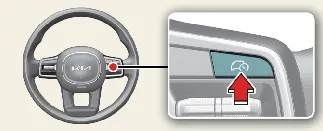
To engage the system, simply press the Driving Assist button located on your steering wheel. The Kia Carnival will
immediately register your current velocity and set it as the cruise speed, which will be prominently displayed on the
instrument cluster.
-
If the path ahead is clear, your Kia Carnival will maintain the set cruising speed.
-
If the system detects a vehicle in front, it will adjust your velocity to maintain a safe, driver-selected
following distance. Should the leading vehicle accelerate, your Kia Carnival will naturally resume its steady
cruising speed once the path is clear and the set speed is reached.
 NOTICE
-
If you engage the Driving Assist button while your Kia Carnival is moving at a speed between 0–20 mph (0–30
km/h), the system will automatically default to a minimum cruise speed of 20 mph (30 km/h).
-
Note that if the driver manually selects a lower gear, the vehicle may be unable to reach or maintain the
programmed set speed.
Setting vehicle distance
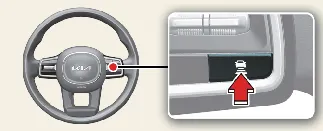
You can customize the gap maintained by the Smart Cruise Control system by pressing the vehicle distance button. Each
press cycles through the available headway settings:
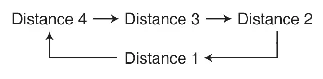
For example, while traveling at 56 mph (90 km/h), the approximate following distances are calibrated as follows:
-
Distance 4: approximately 172 ft (52.5 m)
-
Distance 3: approximately 130 ft (40 m)
-
Distance 2: approximately 106 ft (32.5 m)
-
Distance 1: approximately 82 ft (25 m)
 NOTICE
Your Kia Carnival is designed to remember your preferences; the system will default to the last used distance setting
when the vehicle is restarted or if the Smart Cruise Control is temporarily canceled and subsequently resumed.
Increasing set speed
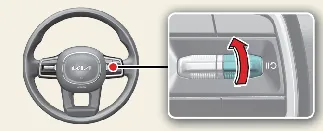
-
Gently push the (+) switch up and release it immediately. Your Kia Carnival will increase the set cruising
speed by 1 mph (1 km/h) per activation.
-
Push and hold the (+) switch upward. The set speed will increment by 5 mph (10 km/h) for each interval the
switch is held.
The system allows you to increase the set cruising speed of your Kia Carnival up to a maximum of 110 mph (180
km/h).
 WARNING
Always evaluate your current driving environment before utilizing the (+) switch. Be aware that the Kia Carnival
vehicle speed may increase rapidly when the (+) switch is held in the upward position.
Decreasing set speed
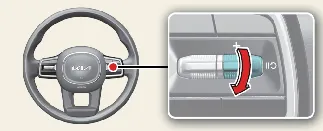
-
Push the (-) switch down and release it immediately. The set cruising speed of your Kia Carnival will decrease
by 1 mph (1 km/h) per activation.
-
Push and hold the (-) switch downward. The set speed will decrease by 5 mph (10 km/h) for each interval the
switch is held.
The minimum set speed you can adjust your Kia Carnival to is 20 mph (30 km/h).
Temporarily canceling Smart Cruise Control
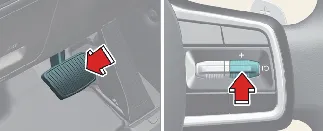
To temporarily pause the Smart Cruise Control system in your Kia Carnival, simply press the cancel button ( ) or
depress the brake pedal.
) or
depress the brake pedal.
Resuming Smart Cruise Control
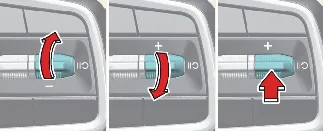
If you wish to resume the Smart Cruise Control function after it has been canceled, use the (+), (-), or resume ( ) switch.
Engaging the (+) or (-) switches will set the cruising speed to your current Kia Carnival speed.
Pressing the resume button ( ) will instruct the Kia Carnival to accelerate or decelerate back to the
previously stored preset speed.
) will instruct the Kia Carnival to accelerate or decelerate back to the
previously stored preset speed.
 WARNING
Prior to pressing the resume button ( ), ensure traffic conditions are safe. Your Kia Carnival may accelerate or
decelerate abruptly when the resume (
), ensure traffic conditions are safe. Your Kia Carnival may accelerate or
decelerate abruptly when the resume ( ) command is activated.
Turning off Smart Cruise Control
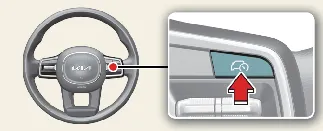
Press the Driving Assist button to fully deactivate the Smart Cruise Control system on your Kia Carnival.
 NOTICE
If your Kia Carnival is configured with Manual Speed Limit Assist (MSLA), pressing and holding the Driving Assist
button will cycle the system off and activate the speed limiter instead.
 WARNING
Avoid pressing multiple switches or buttons simultaneously, as this can lead to unpredictable behavior from the Smart
Cruise Control system in your Kia Carnival.
Smart Cruise Control display and control
You can monitor the active status of your Kia Carnival Smart Cruise Control within the "Driving Assist" view on your
instrument cluster. Detailed status information will appear based on the following configurations:
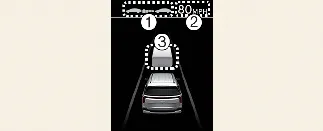
 NOTICE
-
The front vehicle distance shown on your Kia Carnival cluster represents the real-time gap between your vehicle
and the one ahead.
-
The visual representation of target distance may fluctuate depending on current velocity and the selected
distance level. At lower speeds, visual shifts in target distance may be subtle.
-
Specific colors and icon aesthetics may vary slightly based on the selected Kia Carnival instrument cluster
theme or hardware specifications.
Accelerating temporarily
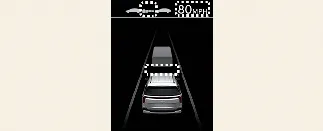
If you require a temporary increase in speed without permanently altering your set cruise velocity while Smart Cruise
Control (SCC) is active, you may simply depress the accelerator pedal. During this manual acceleration, the set
speed, distance level, and target distance icons on the Kia Carnival instrument cluster will blink to indicate that
you have overridden the system's automated speed control.
Please be aware that if the accelerator pedal is pressed too lightly, the Kia Carnival may still attempt to
decelerate to maintain its target parameters.
 WARNING
Exercise caution during temporary acceleration. When you manually override the system, the Kia Carnival will not
automatically control speed or maintain a safe following distance, even if another vehicle is detected in front of
you. You are solely responsible for vehicle control during this time.
Based on Driving Style operating
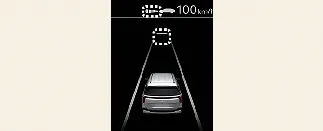
When the "Based on Driving Style" feature is enabled, the Kia Carnival instrument cluster will display the set
vehicle distance level and target vehicle distance in white. The system dynamically adapts these metrics to reflect
your unique driving behavior, providing a customized cruise experience that mirrors your preferred acceleration and
response patterns.
Temporarily canceling Smart Cruise Control
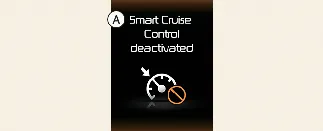
A: Smart Cruise Control deactivated
If the Smart Cruise Control system in your Kia Carnival is canceled automatically, a warning message will appear on
the instrument cluster accompanied by an audible chime to alert you.
Automatic cancellation occurs if:
-
Your driving speed exceeds 120 mph (190 km/h).
-
The vehicle remains at a complete standstill for an extended period.
-
The accelerator pedal is depressed continuously for a prolonged duration.
-
The operational conditions required for the Kia Carnival SCC system are no longer met.
 NOTICE
If the Smart Cruise Control is canceled while the Kia Carnival is at a complete stop, the Electronic Parking Brake
(EPB) may engage automatically for safety.
 WARNING
Upon automatic cancellation of the SCC, the system no longer maintains the distance to the vehicle ahead. Always
remain vigilant and manually depress the brake pedal to reduce your speed and ensure a safe following distance.
Smart Cruise Control conditions not satisfied
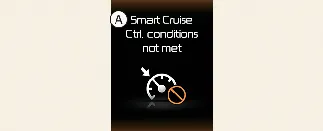
A: Smart Cruise Ctrl. conditions not met
If you attempt to engage the system via the Driving Assist button or speed switches when the necessary operational
criteria are not met, the Kia Carnival will display a warning message on the instrument cluster and trigger an
audible alert.
In traffic situation
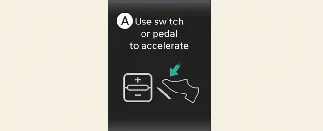
A: Use switch or pedal to accelerate
In heavy traffic, your Kia Carnival will automatically bring the vehicle to a stop if the lead vehicle stops. If the
traffic flow resumes, the Kia Carnival will start moving again automatically.
However, if the vehicle remains stopped for an extended period, the system will prompt you to take action. To resume
driving, either depress the accelerator pedal or operate the (+), (-), or resume ( )
button.
)
button.
Warning road conditions ahead
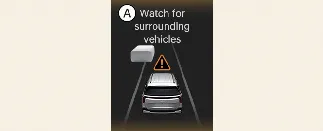
A: Watch for surrounding vehicles
In specific traffic scenarios, your Kia Carnival will trigger a warning message on the instrument cluster accompanied
by an audible chime to alert you to potential hazards or changing road conditions ahead.
 WARNING
Always maintain visual focus on the road. Be prepared for vehicles or obstacles that may appear suddenly; if
necessary, immediately depress the brake pedal to reduce speed and maintain a safe distance from other road users.
Collision Warning
While the Kia Carnival Smart Cruise Control (SCC) is engaged, the vehicle utilizes the Forward Collision-Avoidance
Assist (FCA) system. If the system detects a high risk of collision with a vehicle ahead, it will provide an active
warning to the driver.
Always remain alert and keep your eyes on the road. Should the system alert you to a risk, manually intervene by
braking to ensure the safety of your Kia Carnival and other drivers.
For further details, safety precautions, and system limitations, please refer to the "More Details" section of your
owner's manual.
 WARNING
-
The Kia Carnival Smart Cruise Control is a convenience feature, not a substitute for active, safe driving. You
are responsible for monitoring vehicle speed and traffic distance at all times.
-
The system may not recognize complex or unexpected traffic patterns. Always prioritize manual control if the
SCC behavior is inconsistent with driving conditions.
-
Keep the Smart Cruise Control turned off when not in use to prevent accidental speed activation.
-
Never leave the vehicle or open a door while SCC is operating, even if the Kia Carnival is stationary.
-
Maintain a safe following distance tailored to current road conditions. Traveling too close at high speeds can
lead to severe accidents.
-
If a leading vehicle exits your field of view, the Kia Carnival may accelerate to reach the set speed. Stay
alert for unexpected shifts in traffic.
-
Be prepared for speed fluctuations on inclines and declines, as well as when vehicles merge or cut in abruptly.
-
Performance may be compromised while towing; avoid high-stress driving maneuvers and keep the system off if
your vehicle is being towed.
-
Strong electromagnetic interference may affect system operation.
-
Always operate the Kia Carnival within local posted speed limits.
-
System warnings from other features may take priority and suppress SCC alerts; maintain situational awareness
at all times.
 CAUTION
-
The system requires sufficient driving time to analyze your specific habits (distance, acceleration, and
response).
-
"Based on Driving Style" may not always be optimal for safety; rely on manual control in adverse weather
conditions like snow, heavy rain, fog, or steep mountainous terrain.
 NOTICE
-
SCC may experience a brief operational delay immediately after the Kia Carnival is restarted or the sensors are
initialized.
-
You may hear mechanical or electronic sounds while the system regulates the brakes; this is normal operation.
-
"Based on Driving Style" does not account for unsafe behaviors like rapid, aggressive acceleration and focuses
solely on standard cruise parameters.
