Warning Methods
-
Driver Assistance
-
Warning Methods
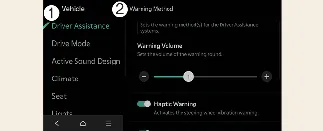
You can customize the alert behavior for your Kia Carnival while the vehicle is powered on. Navigate through Setup
→ Vehicle → Driver Assistance → Warning Methods in your infotainment system to adjust the following
configuration:
 NOTICE
-
Adjustments made to "Warning Methods" may apply globally to other driver assistance systems within your Kia
Carnival.
-
Your chosen settings will be saved automatically and maintained even after the Kia Carnival is turned off and
restarted.
-
Some settings menus may be restricted or unavailable depending on the specific trim and feature set of your Kia
Carnival.
Camera Settings
-
Camera Settings
-
Display Contents
-
Display Settings
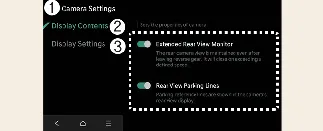
While the vehicle is powered on, you can personalize your Kia Carnival Surround View Monitor experience by selecting
the setup icon ( ) on the display, or by navigating to Setup → Vehicle → Driver Assistance
→ Parking Safety → Camera Settings within the infotainment menu. This allows you to fine-tune how information
is presented to the driver.
) on the display, or by navigating to Setup → Vehicle → Driver Assistance
→ Parking Safety → Camera Settings within the infotainment menu. This allows you to fine-tune how information
is presented to the driver.
Parking Distance Warning
When the "Parking Distance Warning" feature is enabled in your Kia Carnival, proximity alerts will be displayed on
the top-view section to the right of the Surround View Monitor screen, helping you gauge distance to obstacles as you
park.
Rear-view Parking Guidance
When "Rear-view Parking Guidance" is selected, the system overlays helpful directional trajectories on the rear-view
camera feed of your Kia Carnival, assisting you in steering into parking spaces accurately.
Top View Parking Guidance
When "Top View Parking Guidance" is selected, dynamic trajectory lines are displayed within the top-view section (on
the right side of the monitor) whenever the front or rear top-view mode is active on your Kia Carnival.
Display settings
You can adjust the visual clarity of the camera feed in your Kia Carnival by configuring the brightness (Day/Night
modes) and contrast within the Display Settings menu.
 NOTICE
-
Availability of specific menu options may vary depending on the trim level and features equipped on your Kia
Carnival.
-
The horizontal guide lines for rear-view parking are calibrated for an empty vehicle. These indicate
approximate distances of 20 in. (0.5 m), 40 in. (1 m), and 91 in. (2.3 m) from the rear of the Kia Carnival.
-
The horizontal guide lines for rear top-view mode are also based on an empty vehicle. They indicate the
tailgate opening clearance and a reference distance of approximately 79 in. (2 m) from the Kia Carnival.
Surround View Monitor Auto On
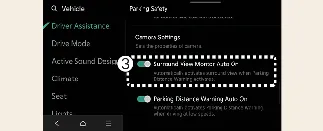
To enable this convenience feature, turn on your vehicle and navigate to Setup → Vehicle → Driver Assistance →
Parking Safety → Surround View Monitor Auto On on your Kia Carnival infotainment screen.
 NOTICE
For more comprehensive details on the operating logic of the Surround View Monitor Auto On feature, please refer to
the "More Details" section of your Kia Carnival owner's manual.
