The advanced smart key system allows you to conveniently lock or unlock your doors and start the engine of your Kia
Carnival without needing to insert a physical key into a lock cylinder.
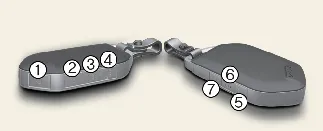
Lock (1)
All vehicle doors will lock securely when the lock button is pressed. If all doors are properly closed, the hazard
warning lights will flash, and the chime will sound once to confirm that your Kia Carnival is locked.
However, if any door remains open, the hazard warning lights will not flash, and the chime will not sound. If all
doors are subsequently closed after the lock button has been pressed, the system will then activate the hazard lights
and sound the chime to confirm that the vehicle is now successfully locked.
Unlock (2)
Press the unlock button once to unlock the driver's door. The hazard warning lights will blink twice, and the chime
will sound twice to indicate that the driver's door is ready to be opened.
To unlock all doors, press the unlock button a second time within 4 seconds of the first press. The hazard warning
lights will blink and the chime will sound twice again to signal that all doors are unlocked. Note that after you
unlock the doors using the smart key, they will automatically re-lock if you do not open any door within 30 seconds.
Please note that the door lock/unlock buttons will not function in the following scenarios:
Depending on your specific Kia Carnival configuration, you may have the option to enable or disable the 2-press
unlock feature through the vehicle's user settings menu.
 NOTICE
-
If your smart key becomes inoperative due to immersion in water or exposure to other liquids, repair or
replacement costs will not be covered by your Kia Carnival manufacturer's vehicle warranty.
-
Please be aware that aftermarket window tinting, especially when using metalized films, may interfere with the
radio frequency signals transmitted by the smart key. This can significantly reduce the effective operating
range of your key fob.
Liftgate unlock, power liftgate open/close (3) (if equipped)
If you press and hold this button for longer than one second, the Kia Carnival liftgate system will respond according
to your vehicle's customized settings—either by releasing the latch, unlocking the gate, or initiating the power
open/close sequence. This convenient feature allows for hands-free access to the cargo area.
Once the liftgate has been opened and subsequently closed, the system will automatically engage the lock to ensure
your vehicle's contents remain secure.
Panic alarm
(4)
To activate the panic alarm, press and hold this button for more than one second. The Kia Carnival horn will sound
and the hazard warning lights will flash for approximately 30 seconds as a deterrent. To deactivate the alarm at any
time, simply press any button on the smart key transmitter.
Remote start (5)
You can pre-condition your Kia Carnival cabin by starting the engine remotely using the dedicated button (5) on your
smart key.
To start your Kia Carnival remotely, follow these steps:
-
Ensure you are within a 32 ft (10 m) range of the vehicle and press the door lock button (1).
-
Within 4 seconds of locking the doors, press and hold the remote start button for over 2 seconds.
To turn off the engine, simply press the remote start button once. For safety, if no further action is taken to
operate or drive the vehicle, the engine will automatically shut down 10 minutes after the remote start sequence was
initiated.
During the remote starting process, the hazard warning lights will blink 3 times to signal activation. If you need to
stop the engine manually, press the remote start button (5) again.
Left or right power sliding door opening/closing (6, 7)
(if equipped)
This functionality is available when the power door master ON/OFF button, located inside the vehicle, is set to the
ON (not depressed) position.
Using the power sliding door handle
-
Ensure you are carrying the smart key in your pocket or bag.
-
Pull the exterior power sliding door handle once.
-
The Kia Carnival power sliding door will open or close automatically. During this operation, the hazard warning
lights will blink, and an audible chime will sound twice to alert nearby individuals.
Using the button on the smart key
-
Press and hold the corresponding power sliding door button (6 or 7) for more than one second to initiate the
movement.
For more granular control settings, please refer to the "More Details" section of your owner’s manual.
Start-up
The Kia Carnival is equipped with a push-button start system, allowing you to ignite the engine without the need to
insert a traditional key into an ignition switch.
* For detailed instructions regarding engine start-up procedures, refer to the "More Details" section of your manual.
Mechanical key
In the event that the smart key battery is depleted or the electronic system does not operate normally, you can
manually access your Kia Carnival by using the integrated mechanical key.
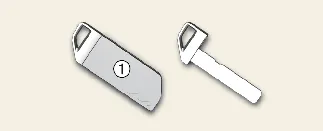
To access the blade, release the locking mechanism and pull the mechanical key from the protective smart key cover
(1).
Smart key precautions
To ensure consistent and reliable performance, please be aware that the smart key system for your Kia Carnival may
experience temporary operational interference under the following conditions:
-
The smart key is in close proximity to a strong radio transmitter, such as those found at radio broadcast
stations or airports, which can disrupt the signal communication.
-
The smart key is positioned near a mobile two-way radio system or an active cellular phone.
-
Another vehicle’s smart key is being actively operated within the immediate vicinity of your Kia Carnival.
If your smart key fails to function correctly, please use the integrated mechanical key to manually lock or unlock
the door. Once you have secured the vehicle, we recommend contacting an authorized Kia dealer for a diagnostic check
to ensure the system is operating within factory specifications.
Be advised that if the smart key is kept near your smartphone, the signal may be intermittently blocked due to the
electromagnetic interference generated by the phone. This is particularly frequent when the device is actively
transmitting data, such as during phone calls, text messaging, or while sending and receiving emails. To prevent
potential issues, we recommend avoiding storing your Kia Carnival smart key and your smartphone in the same pocket or
bag, and always maintain an adequate distance between the two devices.
 CAUTION
Transmitter care
The internal electronics of the transmitter are sensitive. Please keep the device away from water, moisture, or any
other liquids; exposure can lead to severe corrosion or internal circuit failure, rendering the smart key completely
non-functional.
 NOTICE
Loss of the smart key
For security and system management, a maximum of 2 smart keys can be registered to a single Kia Carnival vehicle at
any given time. Should you lose a key, please consult an authorized Kia dealer to have your remaining keys
reprogrammed for your vehicle's security system.
In the event that you lose your smart key, you will lose the ability to start your Kia Carnival. Should this occur,
you must immediately take the vehicle and all remaining keys to an authorized Kia dealer. If the vehicle cannot be
started, you will need to have it towed to the dealership to ensure the security of your Kia Carnival and to protect
it from potential unauthorized use or theft.
Please note that if the smart key becomes inoperative due to exposure to water, salt spray, or other liquids, the
resulting damage is not covered under your manufacturer's vehicle warranty. It is essential to keep the key dry at
all times to maintain proper function.
To prevent the delicate electronic components within your Kia Carnival key from being damaged by magnetic fields or
electromagnetic interference, do not leave the device in close proximity to the following electrical appliances:
-
Televisions (TVs)
-
Personal computers and laptops
-
Cellular phones, cordless telephones, and high-output battery chargers
-
Table lamps with magnetic ballasts
-
Induction cookers or electromagnetic heating surfaces
If you are required to leave your vehicle with a parking attendant or valet service, please remove the integrated
mechanical key for your own personal safekeeping and provide the attendant only with the electronic smart key fob.
When traveling by air, ensure you carry your smart key in a secure manner. Make sure that no buttons are pressed
while you are inside the aircraft cabin. If the key is stored in your bag or luggage, verify that the buttons cannot
be pressed accidentally. If a button is activated, the key may emit radio waves that could potentially interfere with
the sensitive communication equipment on the aircraft.
The Kia Carnival smart key features an energy-saving mode: if the key is not moved for a significant period, the
motion-detection function will pause. Simply pick up or move the smart key to re-activate the detection sensors and
restore full operational functionality.
Additional Recommendation: We suggest periodically checking your smart key for any physical signs of
wear or battery depletion. Keeping a spare battery (CR2450) and your key code information in a secure place away from
your Kia Carnival will ensure you are prepared for any unforeseen circumstances.
