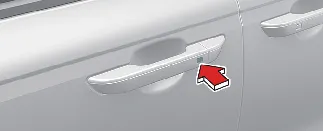
By carrying the smart key, you gain the convenience of locking and unlocking the Kia Carnival doors and liftgate, as
well as starting the engine without removing the key from your pocket or bag. Refer to the following sections for
detailed operational guidelines.
To lock all doors, press the button on either front door handle while all doors are closed and at least one door is
unlocked. If all doors and the engine hood are properly closed, the hazard warning lights will blink once, and the
chime will sound once to confirm that your Kia Carnival is fully locked.
This button will only function when the smart key is within a range of approximately 28 to 40 inches (0.7 to 1 m)
from the front door handle. As a best practice, always verify that a door has locked correctly by pulling the handle
before walking away from your Kia Carnival.
The doors will not lock and the system will emit a warning chime for 3 seconds if any of the following conditions are
met:
-
The smart key remains inside the Kia Carnival cabin.
-
The ENGINE START/STOP button is currently in the ACC or ON position.
-
Any door, other than the power liftgate, is currently open.
To unlock your Kia Carnival, simply press the button on either front door handle while all doors are locked. Upon
successful recognition of your smart key, the hazard warning lights will flash twice, and the chime will sound twice,
clearly indicating that all doors are unlocked and ready for access.
Please note that this button will only function when the smart key is detected within a range of approximately 28 to
40 inches (0.7 to 1 m) from the front door handle.
For your awareness: once the smart key is recognized within this range, the doors can be opened by anyone, even if
they are not in possession of the smart key. For added security, after pressing the unlock button, the Kia Carnival
doors will automatically re-lock if you do not open any door within 30 seconds.
When the 2-press unlock function is activated, the unlocking sequence operates as follows for
enhanced security:
-
If you press the Door Unlock button (2) on the smart key fob once, only the driver's door will unlock.
-
If you press the Door Unlock button (2) on the smart key again within four seconds, all doors will unlock.
-
If you press the driver's outside door handle button, only the driver's door will unlock.
-
If you press the driver's outside door handle button a second time within four seconds, all doors of the Kia
Carnival will unlock.
 NOTICE
You can easily activate or deactivate the 2-press unlock function directly through the infotainment system screen
settings in your Kia Carnival.
 NOTICE
The interface and menus of your infotainment system may be updated or modified following official software releases.
For the most accurate and up-to-date instructions on configuring your security settings, always refer to the digital
user's manual integrated into the Kia Carnival infotainment system and the provided quick reference guide.