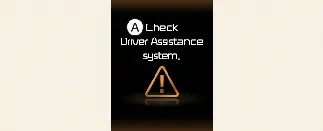
A: Check Driver Assistance system.
If the Driver Attention Warning (DAW) system is not operating correctly, a warning message will appear on your Kia
Carnival instrument cluster for several seconds. Additionally, the Master warning light ( ) and the inattentive warning light (
 ) will illuminate on the cluster. Should these indicators appear,
we recommend having your Kia Carnival inspected by an authorized Kia dealer as soon as possible.
) will illuminate on the cluster. Should these indicators appear,
we recommend having your Kia Carnival inspected by an authorized Kia dealer as soon as possible.
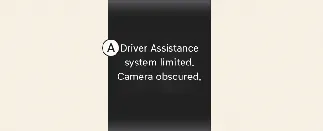
A: Driver Assistance system limited. Camera obscured.
When the windshield area—where the front-view camera is housed—or the bumper/radar sensors are obstructed by foreign
materials such as thick snow, heavy rain, or road debris, the Kia Carnival system's detection performance may be
reduced. This can lead to a temporary limitation or full deactivation of the Driver Attention Warning function. In
this event, a warning message, the inattentive warning light ( ), and the Master warning light (
 ) will trigger on the cluster.
The system is generally expected to resume normal operation once the obstructions are cleared. If the Kia Carnival
Driver Attention Warning does not return to functional status after the windshield and sensors are cleaned, please
consult an authorized Kia dealer for a professional inspection.
 WARNING
-
Even if an explicit warning message or indicator is not currently active, the Driver Attention Warning system
may not function correctly if sensors are partially compromised.
-
The system may experience operational difficulties in expansive, open environments with few detectable
landmarks, or if sensors are obstructed by debris immediately upon starting the Kia Carnival.
 NOTICE
You can review detailed status updates and system messages regarding the Kia Carnival safety features within the
utility information view of the instrument cluster display.
The Driver Attention Warning (DAW) system in your Kia Carnival is designed to assist you, but it may not function as
expected under certain driving conditions, including:
-
Aggressive or erratic driving patterns.
-
Intentional and frequent lane changing or weaving.
-
When primary vehicle control is being managed by other Driver Assistance systems, such as Lane Keeping Assist
(LKA).
-
When a vehicle cuts in front of you:
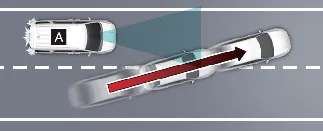
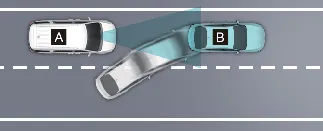
[A]: Your vehicle, [B]: Front vehicle
If another vehicle aggressively maneuvers directly in front of your Kia Carnival, the Leading Vehicle Departure
Alert may not be able to process the sudden change effectively.
-
When the vehicle ahead sharply steers:
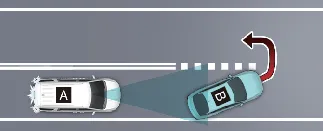
[A]: Your vehicle, [B]: Front vehicle
If the vehicle ahead performs a sharp turn—such as a sudden left/right turn or a U-turn—the Kia Carnival alert
system may not detect the departure accurately.
-
When the vehicle ahead abruptly departs:
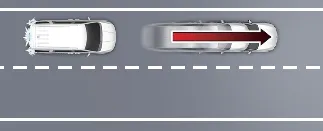
If the vehicle in front moves away with sudden acceleration, the Leading Vehicle Departure Alert might not
register the event in time.
-
When a pedestrian or bicycle is between you and the vehicle ahead:
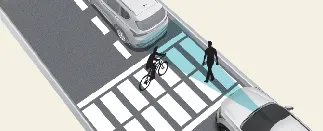
The presence of pedestrians or cyclists between your Kia Carnival and the leading vehicle can obstruct the
sensor's clear line of sight, potentially disabling the alert.
-
When in a parking lot:
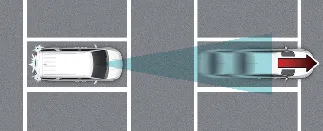
In parking environments, the system may occasionally alert you to the movement of a previously parked vehicle
that is simply pulling away.
-
When driving at a tollgate or intersection:
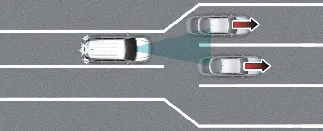
In highly complex traffic environments like tollgates or areas with frequent lane merging/splitting, the Kia
Carnival system's ability to isolate the specific lead vehicle may be temporarily reduced.
 WARNING
Note that the Driver Attention Warning may remain inactive for approximately 15 seconds after starting your Kia
Carnival or during the initial calibration period of the front-view camera.
 NOTICE
For essential information on cleaning and maintaining the front-view camera, please refer to the "More Details"
section in your Kia Carnival owner's manual.
