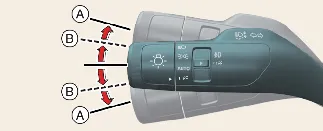
If an indicator light remains steady or flashes at an abnormally high speed, check the exterior bulbs of your
Kia Carnival; one may be burnt out and require professional replacement.
To activate the convenient One-Touch Lane Change function, move the turn signal lever slightly (B) and release it.
The turn signals on your Kia Carnival will automatically blink 3, 5, or 7 times, depending on your
preferred setting, ensuring other drivers are alerted without you needing to hold the lever.
You can customize the number of flashes (3, 5, or 7) or disable this feature entirely by navigating to: Setup
→ Vehicle → Lights → One Touch Turn Signal on your infotainment screen.
 NOTICE
If the turn signal indicator flashes at an abnormally high or low frequency, it usually indicates a burnt-out bulb or
a poor electrical connection. We recommend checking the signal bulbs of your Kia Carnival and
replacing any faulty units promptly.
 NOTICE
Infotainment system menu layouts may change after software updates. Always refer to the digital manual embedded in
your infotainment system or the quick reference guide for the latest navigation steps.