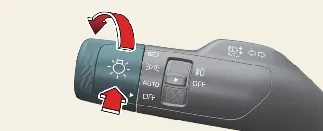
High Beam Assist (HBA) is an intelligent feature that automatically switches between high and low beams based on the
detection of oncoming vehicles or preceding tail lights, as well as ambient lighting conditions.
Detecting sensor
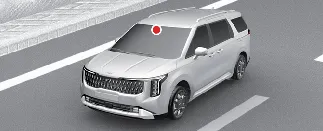
The front-view camera acts as the primary sensor for detecting ambient light and brightness while the Kia
Carnival is in motion. Please refer to the image above for the specific location of this sensor.
 NOTICE
- To maintain the high accuracy of the HBA system, keep the windshield area in front of the camera clean and free
of obstructions.
- For comprehensive safety precautions regarding the front-view camera, please consult your main owner's manual.
Function settings
With the engine running, you can easily toggle HBA status by selecting: Lights → High Beam Assist (HBA)
within the infotainment settings menu.
 WARNING
For your safety and the safety of others, please ensure the vehicle is parked in a safe location before adjusting any
driver assistance settings on your Kia Carnival.
Display and control
Once High Beam Assist (HBA) has been enabled in your Kia Carnival settings, the system will operate
according to the following conditions:
- Activation: To initialize HBA, ensure the headlight switch is set to the AUTO position and push the
headlamp lever away from you towards the instrument cluster. The HBA indicator (
 ) will illuminate on the cluster,
confirming the system is active.
) will illuminate on the cluster,
confirming the system is active.
- Operational Speed: The system will automatically engage high beams once your Kia Carnival
exceeds a speed of 20 mph (30 km/h). Conversely, if the vehicle speed drops below 12 mph (20 km/h), the high beams
will automatically deactivate.
- Status: The High Beam indicator (
 ) will appear on the instrument cluster whenever the
high beams are actively projecting.
) will appear on the instrument cluster whenever the
high beams are actively projecting.
Manual Override: While HBA is active, using the headlight controls will adjust the system's behavior as
follows:
- If you pull the lever towards you while high beams are off, the high beams will activate momentarily
(Flash-to-Pass) without canceling the HBA function.
- If you pull the lever towards you while the HBA system has engaged the high beams, the system will switch to low
beams and the HBA function will be turned off.
- Turning the headlight switch away from AUTO to any other position (e.g., Headlamp/Position/OFF) will immediately
deactivate HBA.
Automatic Switching: Your Kia Carnival will intelligently revert from high beams to low beams
in the following scenarios:
- Detection of an oncoming vehicle’s headlights.
- Detection of the taillights of a vehicle ahead of you.
- Detection of the lights of a motorcycle or bicycle.
- When ambient road lighting is sufficient to make high beams unnecessary.
- Detection of bright streetlights or other sources of illumination.
Malfunction and limitations
Malfunction
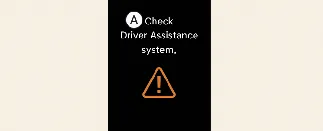
A: Check Driver Assistance system
If the system detects an internal error, a "Check High Beam Assist" warning message will appear, accompanied by the
Master Warning icon ( ). If this occurs, please visit an authorized Kia
dealer to have the Kia Carnival HBA system inspected and repaired.
). If this occurs, please visit an authorized Kia
dealer to have the Kia Carnival HBA system inspected and repaired.
Limitations
While High Beam Assist (HBA) in your Kia Carnival is designed to enhance night-time visibility, its
performance relies on sensor input which can be compromised in specific environmental or traffic conditions. HBA may
not operate as expected in the following scenarios:
- Oncoming or preceding vehicle lights are not detected due to lamp damage, blockage, or obstruction.
- Vehicle headlights are obscured by dust, snow, mud, or heavy water spray.
- A vehicle is using fog lights, but its primary headlights are switched off.
- Static lights (such as street signs or billboards) are shaped similarly to vehicle headlights.
- Headlights are misaligned, damaged, or poorly repaired, leading to irregular beam patterns.
- Driving on roads with sharp curves, steep inclines, or sudden descents.
- A vehicle ahead is only partially visible due to crossroads or tight turns.
- Dense presence of reflective signage, flashing construction lights, or mirrors.
- Driving through road sections with heavy ice, snow, or reflective puddles.
- Vehicles appearing abruptly from behind a curve or in a tilted orientation.
- Environmental interference, including heavy fog, exhaust smoke, or blizzard conditions, which obscures light
detection.
For more comprehensive details on the operational parameters of the front-view camera, please refer to the advanced
safety section in your main owner's manual.
 WARNING
- HBA is a convenience system, not a replacement for attentive driving. The driver is ultimately responsible for
monitoring road conditions and ensuring safe operation.
- If HBA does not function as intended, immediately override the system by manually switching between high and low
beams using the steering column lever.
