If you prefer using the NFC card key for your Kia Carnival, please follow these registration steps carefully.
-
Enter your Kia Carnival with both of your physical smart keys present inside the vehicle.
-
Ensure the NFC card function is enabled: Navigate to Setup → Vehicle → Digital Keys → NFC Card
key → Use on the infotainment system.
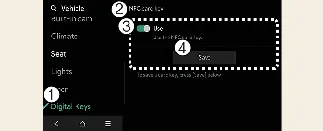
- Digital Keys
- NFC Card key
- Use
- Save
-
While the vehicle is ON, place the card key on the wireless charging pad and select the "Save" menu on the
screen to begin the automatic registration process.
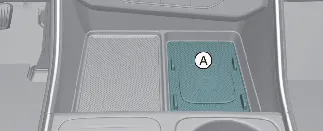
A: Wireless charging pad
-
A confirmation message will appear on your Kia Carnival infotainment screen once the card key is successfully
registered.
 NOTICE
- If a card key is already stored, the "Save" menu will be disabled. You must delete the existing key first to add
a new one.
- Registration requires both physical smart keys to be detected inside the Kia Carnival cabin.
- For security reasons, a card key registered to one Kia Carnival cannot be used to operate a different vehicle.
Card key touch control
As a driver of the Kia Carnival, you can conveniently lock and unlock your vehicle doors by simply tapping your
registered NFC card key against the exterior door handle. Furthermore, you can ignite the engine by placing the card
key onto the designated wireless charging pad within the cabin.
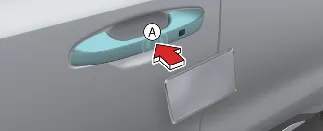
A: Door handle authentication pad
B: Card key NFC antenna location
Locking/Unlocking the doors
-
To lock or unlock your Kia Carnival, hold the center of your registered NFC card key against the authentication
pad (1) on the driver's or passenger's door handle for at least 2 seconds.
-
Always verify that the doors are locked after exiting the vehicle. If you unlock the doors but do not open one
within 30 seconds, the Kia Carnival will automatically re-lock for your security.
-
For the system to register the signal, ensure the center of the NFC card key makes direct, steady contact with
the door handle's NFC authentication zone.
 NOTICE
The doors will not lock and the system will not emit a confirmation beep if any of the following conditions are met:
-
A physical Smart Key is still detected inside the Kia Carnival cabin.
-
The vehicle's ignition is set to the ACC or ON position.
-
Any of the doors, the hood, or the liftgate are not fully closed.
Starting the vehicle
After entering the Kia Carnival, place your registered card key directly onto the wireless charging pad. Depress the
brake pedal and press the ENGINE START/STOP button to successfully start the vehicle.
For additional details, please consult your vehicle's owner's manual.
 WARNING
Because the Kia Carnival engine can be started whenever a registered card key is detected on the charging pad, never
leave unsupervised children or unauthorized individuals inside the vehicle, as this may lead to serious injury or
death. Always keep your card key with you when leaving the vehicle to prevent accidental startup or potential theft.
 CAUTION
-
The digital card key may fail to operate if:
-
The card is not positioned precisely at the center of the door handle authentication pad or the wireless
charging pad.
-
The card key is held against other NFC-enabled items, such as credit cards or smartphones, which can
cause signal interference.
-
If the key does not respond, move it roughly 4 inches (10 cm) away from the sensor, wait a second, and
attempt the touch sequence again.
-
The card key is a sensitive electronic device and can be permanently damaged by physical impact; damaged keys
must be replaced and re-registered at the owner's expense.
-
Avoid leaving your Kia Carnival card key in direct sunlight or high-temperature environments, as extreme heat
can cause internal component failure.
-
Do not leave the card key on the charging pad while driving; once the Kia Carnival is started, remove the card
to prevent potential malfunctions.
-
Do not store the card key between your smartphone and the charging pad during wireless charging, as the
electromagnetic field may cause the card to malfunction.
-
To safely remove the NFC card key from your Kia Carnival, turn the vehicle ON using your physical smart key.
Ensure that the smart key remains inside the cabin throughout the entire deletion process.
-
With the vehicle powered ON, navigate the infotainment screen to: Setup → Vehicle → Digital key
→ NFC card key → Delete.
If no card key is currently registered, the "Delete" menu option will remain disabled.
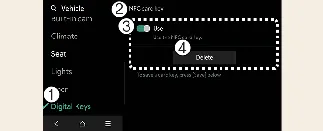
- Digital key
- NFC card Key
- Use
- Delete
-
Once the card key is successfully deleted, a confirmation message will appear on your Kia Carnival infotainment
screen or the instrument cluster.
 NOTICE
As infotainment software may be updated periodically, menu names and paths might evolve. For the most accurate
guidance, please refer to the digital user's manual pre-installed in your Kia Carnival infotainment system.
