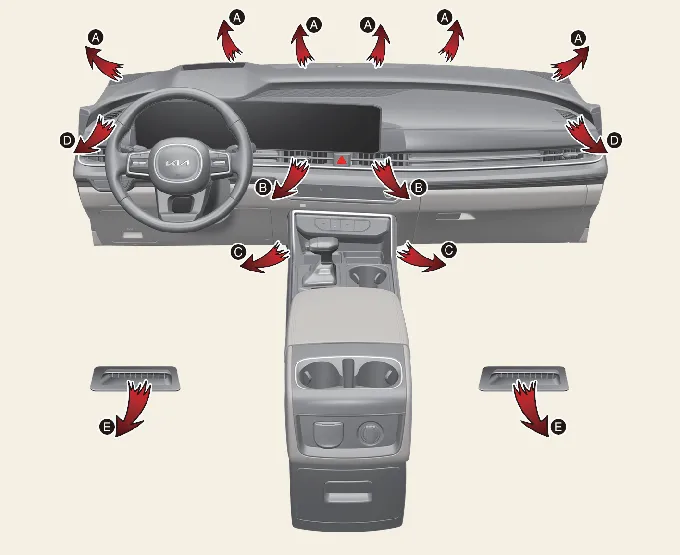
Achieving optimal comfort in your Kia Carnival is simple by following these steps:
- Start the engine to ensure full electrical and HVAC system power.
- Select your desired airflow mode. For maximum efficiency, use the dedicated
 symbol
for heating or the
symbol
for heating or the  symbol for cooling.
- Adjust the temperature dial to your comfort level.
- Set the air intake to 'Fresh Air' to maintain cabin oxygen levels.
- Choose your preferred fan speed and engage the A/C button if dehumidification or active cooling is required.
Mode selection
Instrument panel vents
You can easily customize the airflow in your Kia Carnival by adjusting the direction of the air
delivered from the instrument panel vents. Use the integrated vent control lever to aim the air precisely where you
need it.
Front vents: 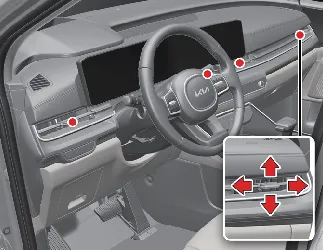
Rear vents: 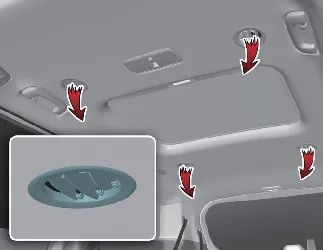
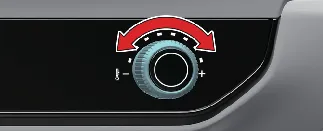
Temperature control
The temperature control knob provides tactile and precise adjustment of the cabin air temperature. Simply rotate the
knob to the right (clockwise) to increase the warmth, or to the left (counter-clockwise) to select cooler air for
your Kia Carnival.
 NOTICE
To maximize heating efficiency during cold weather starts in your Kia Carnival:
- Turn off or minimize the blower speed immediately after starting the engine.
- Allow the engine a few minutes to reach operating temperature, as the heater core requires warm engine coolant to
deliver heat.
- Once the engine has warmed up, increase the fan speed and set your desired high-temperature level to quickly warm
the cabin.
Controlling air intake
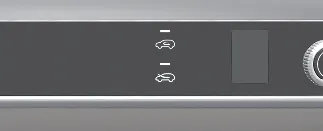
The air intake control allows you to toggle between drawing fresh air from outside or recirculating the air already
inside the cabin. Press the designated control button to switch between these modes.
Recirculated air position

When the recirculated air position is active, the indicator light illuminates. In this mode, the Kia
Carnival climate system draws air exclusively from the passenger compartment, which is then heated or
cooled to reach your set temperature faster.
Outside (fresh) air position

When this position is selected, the system draws in fresh air from outside the vehicle. Depending on your specific
Kia Carnival trim level, the indicator light will either illuminate (Type A) or turn off (Type B) to
signal this mode.
 NOTICE
Avoid running the heater in recirculation mode for extended periods without the air conditioning system enabled, as
this will lead to windshield fogging and stale air. Prolonged use of air conditioning with recirculation may also dry
out the cabin air to an uncomfortable degree.
 WARNING
- Continuous use of the recirculated air position increases cabin humidity, which significantly reduces visibility
due to glass fogging.
- Never sleep in your vehicle with the heating or air conditioning system running. This can lead to fatal
carbon monoxide poisoning or oxygen depletion.
- Extended use of recirculation mode can cause drowsiness. For your safety, always prioritize the "Outside (Fresh)
Air" position while driving your Kia Carnival to maintain alertness and oxygen levels.
Controlling fan speed
The fan speed control knob in your Kia Carnival allows for precise adjustment of the airflow volume.
Ensure the vehicle's ENGINE START/STOP button is in the ON position before attempting to adjust these settings.
To modify the airflow intensity:
- Rotate the knob clockwise to increase fan speed or counter-clockwise to reduce it.
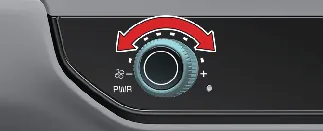
- To fully deactivate the ventilation blowers, simply turn the knob to the "0" position.
Air conditioning (A/C)

Engage the A/C system by pressing the designated button; the indicator light will illuminate to confirm that the
compressor is active. Press the button once more to deactivate the system and return to standard ventilation.
Rear climate control
The Kia Carnival offers a sophisticated rear climate control system, which can be managed either
from the front cabin or by passengers in the rear seats.
 NOTICE
While the rear seat passengers maintain independent control over airflow direction and volume, the rear cabin
temperature is synchronized with the front climate settings. For rapid heating or cooling, we recommend operating
both the front and rear systems in tandem to reach your target temperature quickly.
From the front seat
- Engage the REAR climate selection button located on the front panel to enable the system.
- Configure the rear mode, desired temperature, and fan speed directly from the primary control panel.
From the rear seat
- To grant rear passengers control, press and hold the REAR climate selection button on the front console until the
system is unlocked.
- Rear passengers can now adjust their own mode, temperature, and fan intensity via the rear-mounted control panel.
Rear mode selection
Depending on the current front mode selection, the air delivery path in the rear of the Kia Carnival
will adjust automatically:
- MAX A/C:
 – Air flows from the overhead ceiling vents.
- Bi-Level:
 – Air is distributed between the ceiling vents
and the side trim vents.
– Air is distributed between the ceiling vents
and the side trim vents.
- Floor Mode:
 – Air is directed primarily from the side lower trim
vents.
– Air is directed primarily from the side lower trim
vents.
From the rear seat: Once unlocked, use the mode button to cycle between overhead, combined, and lower-trim
airflow options to suit passenger preference.
Rear temperature control
Front-seat operators can manage rear temperatures by enabling the REAR button and rotating the primary temperature
knob. Rear passengers can fine-tune their environment by pressing the warmer ( ) or cooler (
 ) buttons located on their dedicated console.
Rear fan speed control
Occupants of the Kia Carnival can adjust rear airflow through two primary methods:
From the front seat: 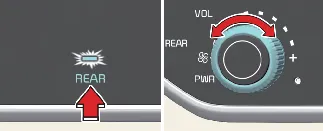
Engage the REAR climate selection button on the main console to the ON position. You can then rotate the primary fan
speed knob to set the desired airflow intensity for the rear cabin.
From the rear seat: 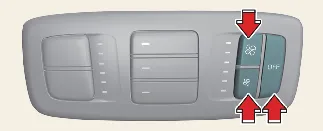
Passengers can manually select their preferred airflow volume using the fan speed control buttons on the dedicated
rear panel. To deactivate the rear cooling system entirely, simply press the OFF button on that same rear console.

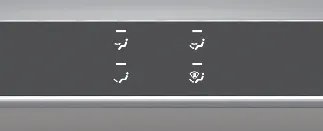
 Face-Level: Directs air toward the upper body and face.
 Bi-Level: Distributes air simultaneously to the face area and the floor.
 Floor-Level: Focuses air toward the floor, with minor output to the windshield and side defrosters to
prevent fogging.
Floor-Level: Focuses air toward the floor, with minor output to the windshield and side defrosters to
prevent fogging. Floor/Defrost-Level: Balances flow between the floor and the windshield for maximum visibility and comfort.
 Defrost-Level: Concentrates airflow onto the windshield and side window defrosters for rapid clearing of
ice or fog.
Defrost-Level: Concentrates airflow onto the windshield and side window defrosters for rapid clearing of
ice or fog.